• Home
  • News
  • Software
  • Knowledge
  • MMO
  • Tips
  • Security
  • Network
  • Office
AnonyViet - English Version
  • Home
  • News
  • Software
  • Knowledge
  • MMO
  • Tips
  • Security
  • Network
  • Office
No Result
View All Result
  • Home
  • News
  • Software
  • Knowledge
  • MMO
  • Tips
  • Security
  • Network
  • Office
No Result
View All Result
AnonyViet - English Version
No Result
View All Result

How to use Facetime on Android phones, no need to download the app

AnonyViet by AnonyViet
September 7, 2025
in Knowledge
0

How to use Facetime on Android phones It is an interesting trick that not everyone knows. As an exclusive Apple application with many attractive features, Facetime has now expanded the door for Android users to participate in calls. This article Anonyviet will guide you step by step to participate in Facetime calls easily with just one web link.

Join the channel Telegram belong to Anonyviet 👉 Link 👈

What is Facetime?

Facetime It has long been a “specialty” of the Apple ecosystem, famous for its superior video call and audio call quality, which is integrated into devices such as iPhone running iOS 18 or MacBook running MacOS 15. Not only stop at 1-1 call, Facetime also owns a powerful feature warehouse such as:

  • Assemble: Connect with many people at the same time.
  • Absolute security: The terminal encryption helps protect the content of the conversation.
  • SharePlay: Watch movies together, listen to music or share the screen while calling.
  • Diverse custom: Using virtual wallpapers, feedback effects with vivid emoticons.

Because of these advantages, being able to participate in a Facetime call has become the desire of many users Android In order not to miss important conversations with friends and relatives in “Apple system”.

What is Facetime?
What is Facetime?

Conditions needed to be able to use Facetime on Android

An important point to clarify from the beginning: Android users Unable to initiate a Facetime call. Currently, Apple has not released the official Facetime app on Google Play Store.

However, you absolutely can join In an existing call. The only condition is that you need to receive an invitation link from a person using iPhone, iPad or Mac.

Instructions on how to use Facetime on Android phones

The participation process is extremely simple and does not require complex techniques. The process is divided into two sides: the linker (using Apple) and participants (using Android).

For Apple users: how to create and send invitations

  • First, the Apple device owners need to open the Facetime application and click on the option Create link (Create Link).

Click the link option to create links
  • They can name the link for easy management by choosing Add name (Add name).

How to use Facetime on Android phones
  • Finally, they just need to copy this link and send it to you via any messaging applications such as Zalo, Messenger, SMS, …

For Android users: How to participate from links

When you receive the link, just click to open it by the web browser on your phone. Apple encourages the use of Google Chrome or Microsoft Edge For the best experience.

  • The website will ask you Enter the name To display in the call. You don’t need to have an Apple ID or provide your phone number.

Enter the name to display in the call
  • After entering the name and press Continue (Continue), you will be taken to the waiting screen. Here, you can customize on/off microphones, the camera before officially participating.
  • The browser will show a notice requesting access to camera and microphone, choose Allow (Allow). Then press the button Join (Join).
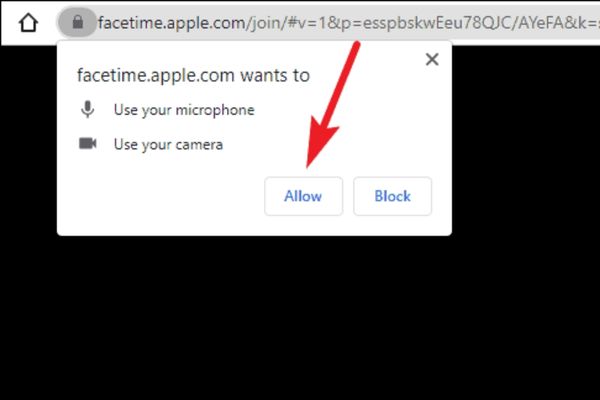
Please select allows
  • Your participation requirements will be sent to the call host. You just need to wait for them to approve to be able to start talking.

Click the joining button

Some important notes when participating in group calls

So what will happen if the person has created the link for you to leave the call?

  • In call 1-1: If only you (Android) and the invitation (Apple), the call will end as soon as Apple users leave.
  • In group calls: If the host leaves but there are still others in the room, the call will continue to take place normally.

A particularly interesting point: If there is at least one other Apple user in the group (other than the host), this person can approve new members who want to participate after 30 seconds.

Conclusion

So, How to use Facetime on Android phones Not as complicated as many people think. Although you can not make your own calls, you can completely participate in high quality video conversations with friends and family using Apple devices. Hopefully, with the above guide, you will no longer miss any important connection moments just because of the operating system difference anymore!


Tags: AndroidAppDownloadFaceTimephones
Previous Post

Microsoft’s latest Office 365

Next Post

Instructions on how to turn on the edge search bar on the desktop

AnonyViet

AnonyViet

Related Posts

Tips for pinning the step counter to the iPhone screen to monitor your health
Knowledge

Tips for pinning the step counter to the iPhone screen to monitor your health

April 28, 2026
How to turn off password suggestions on iPhone: Prevent Safari from auto-filling passwords
Knowledge

How to turn off password suggestions on iPhone: Prevent Safari from auto-filling passwords

April 27, 2026
Tips to completely turn off CAPTCHA codes on iPhone and Mac are super simple
Knowledge

Tips to completely turn off CAPTCHA codes on iPhone and Mac are super simple

April 25, 2026
How to compress online videos for free without losing quality
Knowledge

How to compress online videos for free without losing quality

April 24, 2026
Common errors when using Bosch products and how to fix them
Knowledge

Common errors when using Bosch products and how to fix them

April 22, 2026
How to avoid Adblock detection on Youtube with 4 good tips
Knowledge

How to avoid Adblock detection on Youtube with 4 good tips

April 17, 2026
Next Post
Instructions on how to turn on the edge search bar on the desktop

Instructions on how to turn on the edge search bar on the desktop

0 0 votes
Article Rating
Subscribe
Login
Notify of
guest

guest

0 Comments
Oldest
Newest Most Voted
Inline Feedbacks
View all comments

Recent News

Create an avatar to celebrate April 30 with a beautiful red flag shirt with yellow stars

Create an avatar to celebrate April 30 with a beautiful red flag shirt with yellow stars

April 30, 2026
How to get 2 months of Super Duolingo for free worth 300k

How to get 2 months of Super Duolingo for free worth 300k

April 30, 2026
How to create a Face Sticker Collection using ChatGPT

How to create a Face Sticker Collection using ChatGPT

April 29, 2026
How to install the cute Bongo Cat mouse pointer for Windows

How to install the cute Bongo Cat mouse pointer for Windows

April 29, 2026
Create an avatar to celebrate April 30 with a beautiful red flag shirt with yellow stars

Create an avatar to celebrate April 30 with a beautiful red flag shirt with yellow stars

April 30, 2026
How to get 2 months of Super Duolingo for free worth 300k

How to get 2 months of Super Duolingo for free worth 300k

April 30, 2026
How to create a Face Sticker Collection using ChatGPT

How to create a Face Sticker Collection using ChatGPT

April 29, 2026
AnonyViet - English Version

AnonyViet

AnonyViet is a website share knowledge that you have never learned in school!

We are ready to welcome your comments, as well as your articles sent to AnonyViet.

Follow Us

Contact:

Email: anonyviet.com[@]gmail.com

Main Website: https://anonyviet.com

Recent News

Create an avatar to celebrate April 30 with a beautiful red flag shirt with yellow stars

Create an avatar to celebrate April 30 with a beautiful red flag shirt with yellow stars

April 30, 2026
How to get 2 months of Super Duolingo for free worth 300k

How to get 2 months of Super Duolingo for free worth 300k

April 30, 2026
No Result
View All Result
  • Home
  • News
  • Software
  • Knowledge
  • MMO
  • Tips
  • Security
  • Network
  • Office

wpDiscuz
0
0
Would love your thoughts, please comment.x
()
x
| Reply