How to create Safari extension has now become extremely simple with the help of Apple Intelligence. You don’t need to be a professional programmer to make your own widget. Instead, just a few lines of description are needed. Let’s go together AnonyViet Explore the details.
📢 Join the channel Telegram belong to AnonyViet
Update new articles, cool tools and IT tips fastest
Safari’s makeover with Apple Intelligence
Apple’s default web browser on the device Mac actually supported the installation of extensions as far back as 2010. It wasn’t until 2021 that users iPhone and the iPad has just experienced this feature through the iOS 15 update. But it must be said again, Apple’s utility application store is really quite poor when compared to rival Chrome.
To completely solve this problem, Apple has launched an extremely powerful feature. Now they allow you to personally create utilities that serve your personal needs without worrying about revealing your private data. You just sit down and type a few lines describing what you want. Apple Intelligence will then automatically write code and produce a smoothly functioning utility in just a few minutes.

However, it must be noted that sometimes AI will get confused and report errors if you ask for tasks that are too complicated. For example, it once failed when asked to download all images on a website as a ZIP archive.
Another huge plus is that the utilities you make yourself will work well on Mac, iPhone and iPad. Thanks to that, you only need to do it once and the system will automatically synchronize via iCloud to all devices that share the same Apple account.
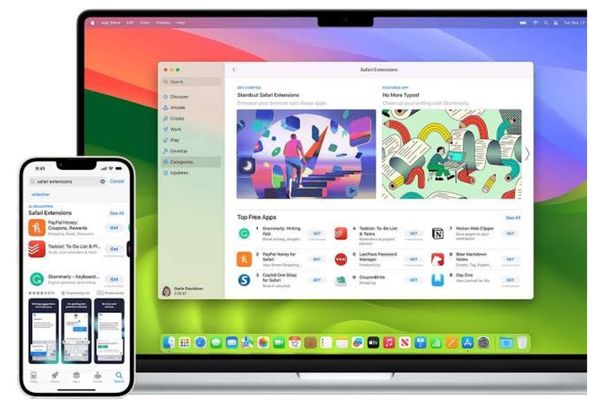
Instructions on how to create Safari extension on macOS 27
Step 1: Update your Mac to version macOS 27 Golden Gate latest or install it on a separate hard drive partition.
Step 2: Open a web browser and visit any website.
Step 3: Look to the left of the address bar and you’ll see a pictured menu icon three dashes. Click on it and select the item Describe Extension.
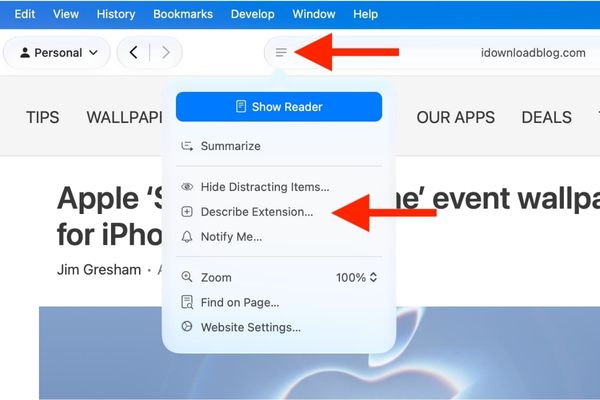
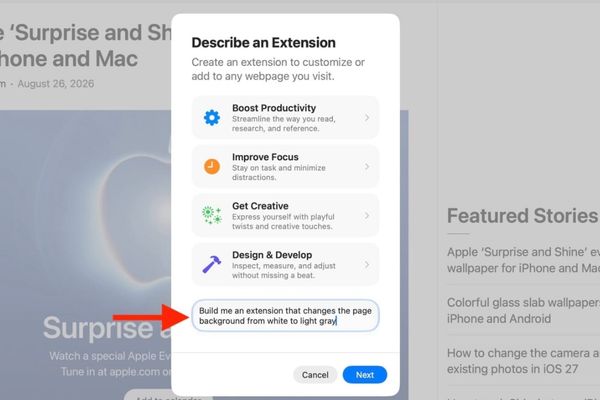
Step 4: Now you need to rack your brain and think about what task you want this utility to do. You can type your own ideas or quickly choose from available suggestions.
For example, here I want to change the background color of the website from white to gray for a nostalgic look. I just need to type that request in the simplest words into the blank box and then click Next.
Step 5: The system will automatically search the App Store to see if there is anything similar to what you want. Usually there is none. Then the screen will display a message that no results were found and suggest you create your own. Just boldly click the button Create okay.
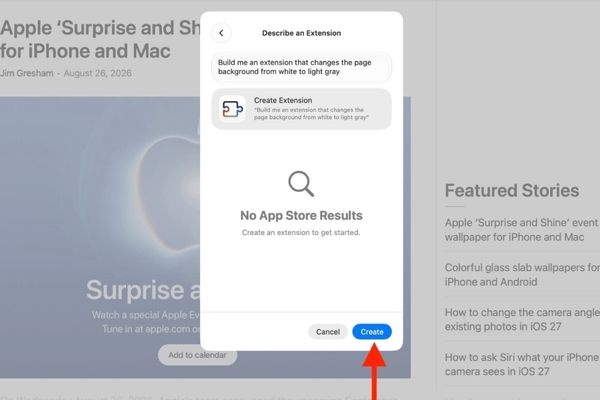
Step 6: When the process is complete, click the button Try to try it out to see if it works properly.
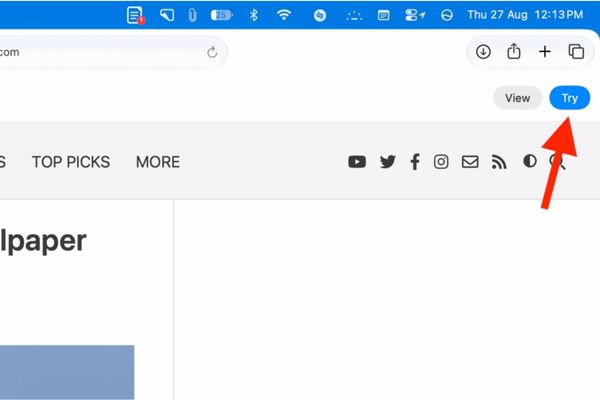
If you are curious to see the access settings, you can click the button View.
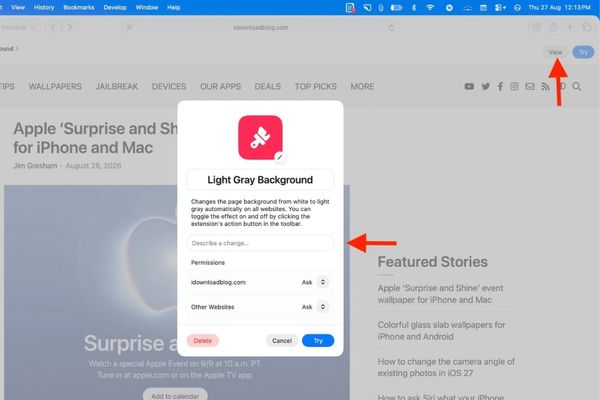
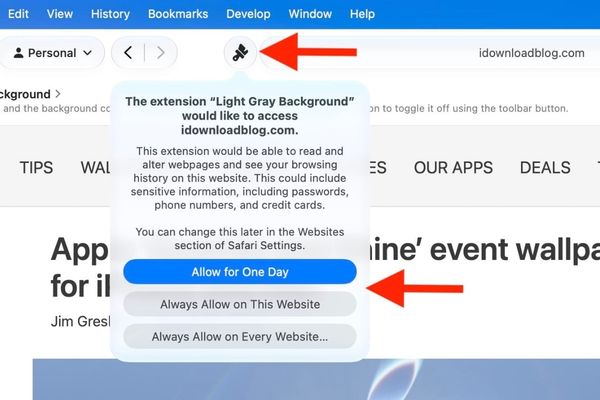
Step 7: Usually, after clicking trial, you will have to click one more time on the utility icon in the upper corner and grant permissions let it run on that website.
Step 8: If everything goes smoothly then congratulations. But what if it works a little wrong? Don’t worry because you can completely fix it. You just need to click Edit or View Then describe the part that needs to be changed. Finally, just click Save to save and you’re done.
How to create Safari extension on iPhone and iPad
As mentioned above, if you have already done it on Mac, you don’t need to do it again on your phone because it syncs automatically. But if you’re going to a coffee shop without your laptop and want to do some sketching right on your phone, use the following extremely quick way to create a Safari extension.
Step 1: Make sure your iPhone or iPad has been upgraded to iOS 27 or iPadOS 27.
Step 2: Open your browser and go to any website.
Step 3: Touch the menu icon three dashes and select item Describe Extension.
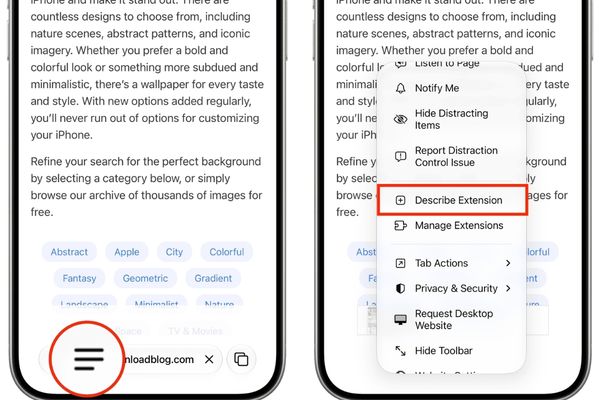
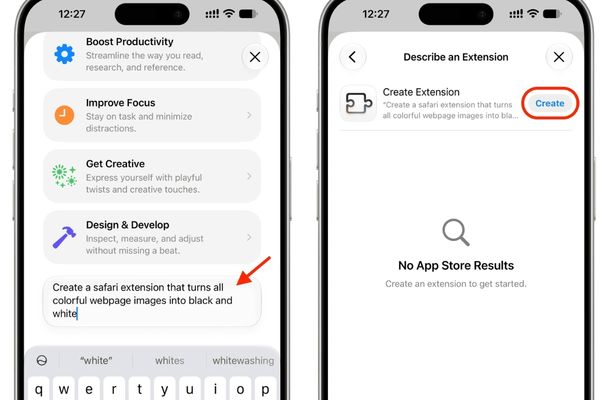
Step 4: Choose an available suggestion or type your own request. This time, let’s try asking it to make a utility that turns all color photos on the web into black and white photos.
Step 5: Once the system confirms that no such widget is available, tap the button Create to make one for myself.
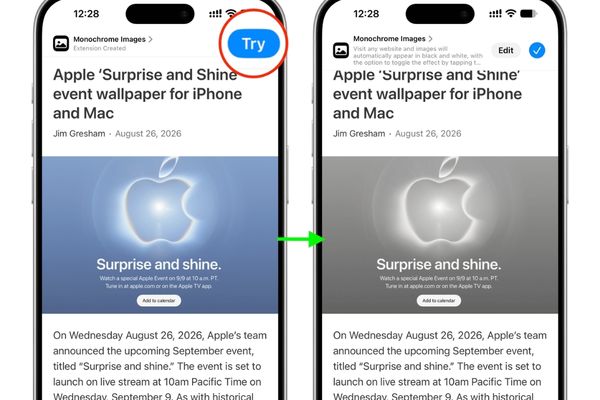
Step 6: Wait a moment for the system to finish processing. Then you touch the button Try at the top for a test run. If you are not satisfied, just click Edit and ask it to be fixed.
Conclusion
Hopefully through this article you have understood clearly How to create Safari extension on Apple devices. This feature not only saves time but is also extremely fun to tinker with. Don’t forget to share your results for everyone to know.
Frequently Asked Questions (Q&A)
1. Are self-created utilities synchronized across devices?
Yes. Any extensions you create automatically sync via iCloud across all the Macs and iPhones that share the same account.
2. Can Apple’s AI do all kinds of gadgets?
Actually, not really. With requests that are too complex, AI may still fail or fail to create them.
3. Do I need to know programming to follow this tutorial?
Absolutely not. You just need to describe it in normal text and Apple Intelligence will automatically write the code for you.