How to get $250 Docker credits This has a deadline until 2027, so just calm down and do it. Although the registration period is long, once accepted, you only have 6 months to use it. Thanks to that, these days I can freely plug in bots running in the background without having to worry about electricity bills. Let’s go together AnonyViet Take a look at the important notes to clean this money most effectively.
📢 Join the channel Telegram belong to AnonyViet
Update new articles, cool tools and IT tips fastest
Fragrant odds from Docker for AI players
Recently, the movement to create autonomous agents is emerging. Anyone who has ever tried running these agents on a personal computer surely understands the pain. The radiator fan roars like a tractor, RAM consumes everything, coding is bad and the computer freezes, which is indescribably frustrating.
Grasping this pain, Docker Just launched an extremely popular promotion. They gave us a decent amount of money to try out their Agentic Platform. The main purpose is to give you a place to throw some AI into the cloud so it can run on its own. Thanks to that, your laptop is completely liberated. If you close your phone and go to sleep, they will still be working normally in the cloud.
Each agent you create will be placed in a separate sandbox. It’s like a mini virtual machine with an independent kernel. You can install any library you like, mess around with it however you like. Don’t be afraid of touching other agents’ files or trashing the system.

Details on how to receive $250 Docker credit are extremely simple
Many of you are afraid that foreign money donation programs are complicated to register. But actually the operation is extremely quick. I tried it myself and it took less than 5 minutes for the money to be in my account.
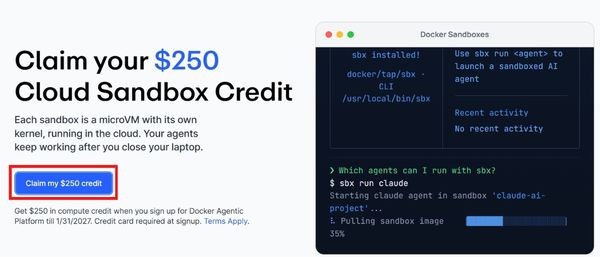
Step 1: Open your browser and go straight to the program’s home page Docker SBX Promo.
At a glance, you’ll immediately see the button Claim my $250 credit huge. Don’t hesitate to click directly on it.
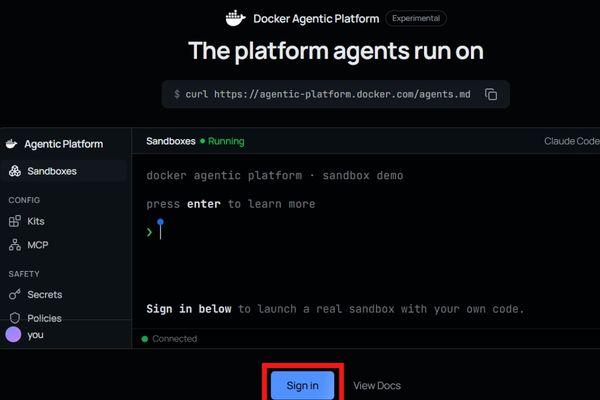
Step 2: The system will ask you to create a brand new account on the Docker Agentic Platform platform. Just choose Sign in with Google for quick.
Step 3: Add a payment card to your account. Usually, using Visa or Mastercard is the most standard card. Don’t worry, they haven’t deducted your money yet.
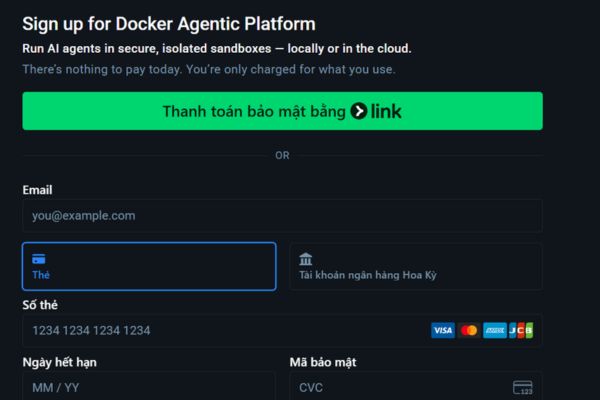
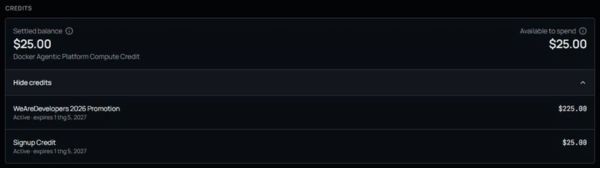
Step 4: After successfully adding the card, you return to the management page. Remember to check carefully to see if the $250 balance has appeared. You must see the money before starting to create the sandbox, otherwise you will be unfairly charged.
How long can this money be used and how are the fees charged?
Once you have money, you must know how to spend it properly. They charge based on the actual time you use the sandbox server. Count from the moment you press the button Start until you click Stop. Even when the machine is starting up, when it’s lying still doing nothing, or when it’s retrying the error, the money is still deducted evenly.
Let me give an example to make it easier to imagine. If you choose the lowest configuration Micro package has 1 vCPU and 2GB RAM. Its price is only about $0.07 per hour. With an initial capital of $250, you can run the machine continuously for about 3570 hours. It turns out that it took several months to run out of money. Too fierce!
If your project is heavier and needs to process large data, you can use it Medium package. This plan gives you 4 vCPUs and 8GB RAM for $0.28 per hour. The amount donated is enough to carry this configuration for nearly 890 hours. Instead, if you rent a VPS with equivalent configuration, it will be much more expensive.

A few notes to avoid having your money deducted unfairly
When playing for free, you also have to understand the rules of the game. There are a few extremely important points I learned from the company’s documents that you must keep in mind.
- This program has a validity period starting from today September 22, 2026 and lasts until the end of the day January 31, 2027. However, each account can only slurp once.
- This money cannot be left there forever. From the date you successfully receive it, you have exactly 6 months to use it. After 6 months, if there is still money left over, the system will automatically recover it. So please take your time and plan it all.
- This credit number is only used to pay for sandbox server rental. It does not include the cost of calling APIs of AIs like OpenAI or Claude. Those amounts are calculated separately by the model supplier. If you spend more than $250 in server money, Docker will automatically tap the bank card you added in Step 3. Remember to monitor your dashboard regularly to see where you are spending.
Conclusion
In short How to get $250 Docker credits This is too good for devs. You not only have a good environment to test your code but also don’t have to worry about damaging your personal computer. Take advantage of registering early because who knows, the company may change its mind. I hope you have fun tinkering with AI.
Frequently Asked Questions (Q&A)
- When is the deadline to participate in this offer?
The program applies to those who register an account from September 22, 2026 and lasts until January 31, 2027.
- Will the $250 gift expire?
Have. Credit will automatically expire and be revoked 6 months from the date you receive it into your account.
- What if I use more than the donated amount?
The system will deduct 250 USD first. Any costs incurred in excess of this number will be charged directly to the payment card you linked.