
• Home
  • News
  • Software
  • Knowledge
  • MMO
  • Tips
  • Security
  • Network
  • Office
AnonyViet - English Version
  • Home
  • News
  • Software
  • Knowledge
  • MMO
  • Tips
  • Security
  • Network
  • Office
No Result
View All Result
  • Home
  • News
  • Software
  • Knowledge
  • MMO
  • Tips
  • Security
  • Network
  • Office
No Result
View All Result
AnonyViet - English Version
No Result
View All Result

How to create a UFO Game that calls students to return their homework

AnonyViet by AnonyViet
October 26, 2026
in Knowledge
0

UFO calls and returns the card brings a completely new experience. The feeling of waiting for the flying saucer light to shine on your name is incredibly thrilling. This application has all kinds of scenes from school to Halloween night. Let’s go together AnonyViet Let’s explore its features now.

📢 Join the channel Telegram belong to AnonyViet


👉 Go to Telegram AnonyViet

Update new articles, cool tools and IT tips fastest

Steps to use UFO to call students back

To get started, you need to create a list first.

Step 1: Access the link HERE. Click the button Create class in the upper corner of the screen.

How to create a UFO Game that calls students to return their homework
Click the Create Layer button

Step 2: Give your class a name, for example Class 7A5 or Disruptive Group or whatever you like.
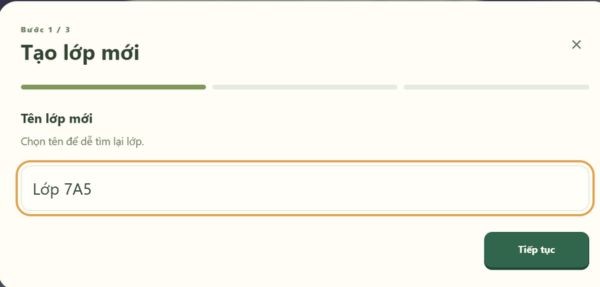
Name the class
Name the class

Step 3: Choose context. This is fun. The system lets you choose where people will meet the flying saucer. There are Halloween Night scenes that look spooky with pumpkins, Small Street scenes, Schoolyard or Park scenes. I like the Halloween setting the most because it has a creepy atmosphere that suits this game of catching people.
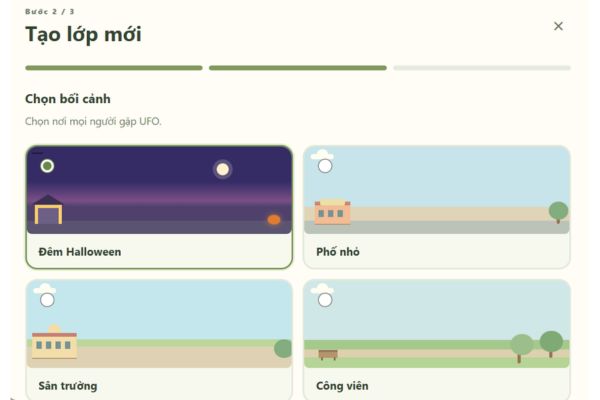
Choose context
Choose context

Step 4: Enter class list. Just type each person’s name into the empty box. Each line is one person. If you want the system to correctly display a male or female character, you swipe once and write the gender on the back. Typing example Minh Anh, female. When finished, click Completed.

Next to it is a code QR loudly with class code. You can give this code to your friends to scan so they can join the class quickly, without having to bother entering it individually.
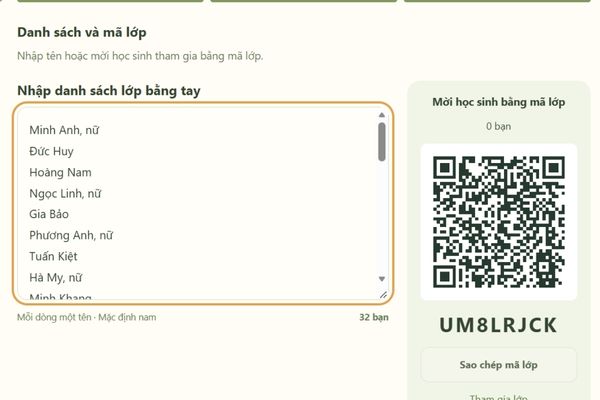
Enter class list
Enter class list

After creating the list, you will see how many characters will drop into the background you choose. Some people stood waiting for the bus, some people bought bread, some people drove around on motorbikes. Looks extremely lively.

Step 5: Look down at the bottom corner of the screen, you will see a box Your number is called. If you want to call someone, type in the number there. If you call one person to the board, type number 1. If you draw 3 people, type number 3.

Step 6: Press the button Begin blue, or if you’re lazy, hit the key Space on the keyboard also.
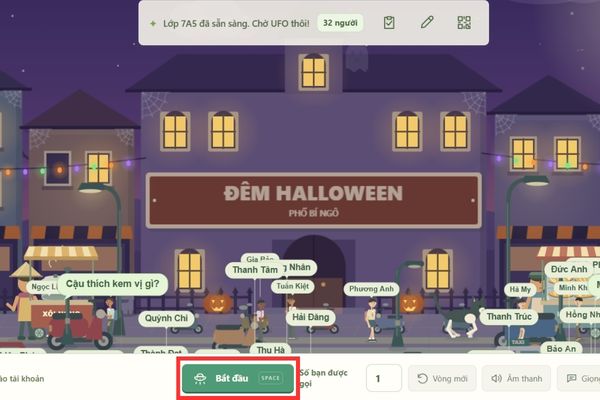
Press the Start button or the Space key

At this time, a large flying saucer will slowly descend, shining a light to scan the crowd below. Whoever is unlucky will be hit by that light and then slowly float and be sucked into the ship’s cabin.
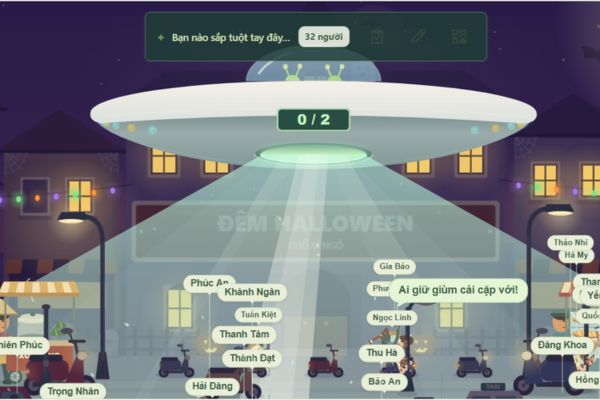
Instructions for using the UFO website to call names and answer extremely hot articles

Step 7: Results table Passenger compartment will appear in the middle of the screen, closing orders for golden faces in the lucky village.
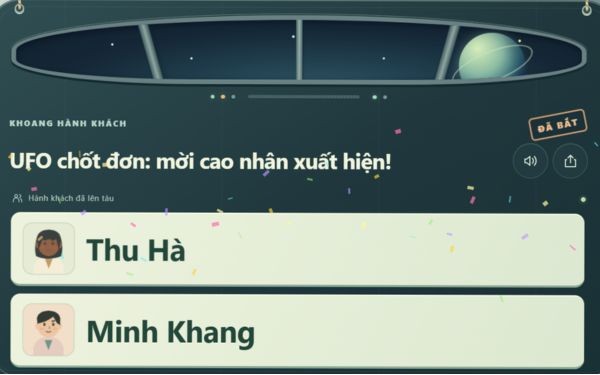
Selected student results table

Instructions for customizing parameters for UFO

Using UFOs to call names and answer questions without sound effects is boring. Remember to click the gear-shaped Settings button in the lower right corner for further adjustments.

Step 1: Edit Thrill. This allows you to choose the number of rounds that the flying saucer passes back and forth before pinning down the first person. The more rounds you go through, the faster your heart beats.

Step 2: Edit Time calls each of you. If you like flying saucers to catch people quickly or slowly, choose here. Default is 12 seconds for one person.

Step 3: Turn sound on and off. There are all kinds of sounds, from scary background music, characters whispering to the loud sirens when the discs fly. I advise you to turn it on all the way to listen to it.

Step 4: If you’re lazy to read the name, check the box Automatically read result names. The system will use Google’s voice to clearly read the name of the arrested person.
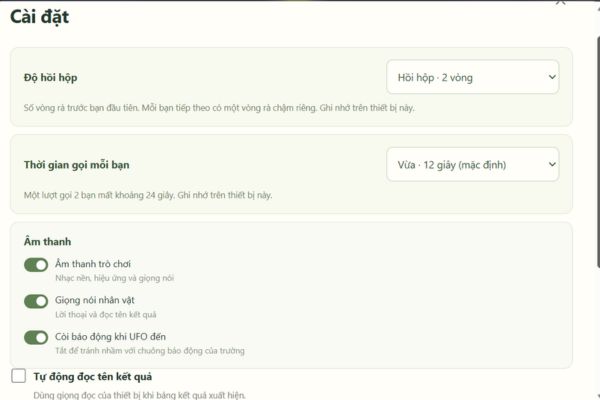
Instructions for customizing parameters for UFO

At the end of the Settings section is the section that manages the list of created classes. Here you can click Edit class to change the name, add or remove people or change the context to make it less boring. If the class has a break from playing, press the delete button and it’s done.

Conclusion

In general, it’s the one UFO calls and returns the card This bag is always fun to use. It makes dry tasks like drawing lots or calling up the board much easier. Anyone who is a teacher should try creating a list and then try it out to see how it goes. I’m sure all the students will be fascinated.

Frequently Asked Questions (Q&A)

1. How to add gender to a character?

When entering the list, just type the name, then swipe once and write the word male or female and the system will automatically understand and display the image correctly.

2. Can I call more than one person at a time?

Okay. In the number input box you are called, just type in the desired number, for example, type 2 and the flying saucer will attract 2 people onto the train.

3. What if I want to turn off the siren sound?

Click on the settings gear icon in the bottom corner, scroll down to the sound section and turn off the siren button when the flying saucer arrives and you’re done.


Tags: callscreateGamehomeworkreturnstudentsUFO
Previous Post

Instructions for registering for OxionAI Pro for 1 year with many powerful AI models

Next Post

Postpaid for new employees: Should you start using it?

AnonyViet

AnonyViet

Related Posts

Postpaid for new employees: Should you start using it?
Knowledge

Postpaid for new employees: Should you start using it?

October 26, 2026
Instructions on how to exit iOS 27 Beta and update to the official version
Knowledge

Instructions on how to exit iOS 27 Beta and update to the official version

October 22, 2026
Instructions for turning off automatic subtitles on iPhone and Macbook
Knowledge

Instructions for turning off automatic subtitles on iPhone and Macbook

October 20, 2026
MBTI, Big Five, DISC or Holland: which personality test should you choose?
Knowledge

MBTI, Big Five, DISC or Holland: which personality test should you choose?

October 15, 2026
Super virtual way to change the photography angle using AI on iPhone
Knowledge

Super virtual way to change the photography angle using AI on iPhone

October 9, 2026
How to create Safari extension on iOS 27 and macOS 27
Knowledge

How to create Safari extension on iOS 27 and macOS 27

October 3, 2026
Next Post
Postpaid for new employees: Should you start using it?

Postpaid for new employees: Should you start using it?

0 0 votes
Article Rating
Subscribe
Login
Notify of
guest

guest

0 Comments
Oldest
Newest Most Voted

Recent News

Postpaid for new employees: Should you start using it?

Postpaid for new employees: Should you start using it?

October 26, 2026
How to create a UFO Game that calls students to return their homework

How to create a UFO Game that calls students to return their homework

October 26, 2026
Instructions for registering for OxionAI Pro for 1 year with many powerful AI models

Instructions for registering for OxionAI Pro for 1 year with many powerful AI models

October 24, 2026
How are Windows 11 Pro and Windows 10 Pro different?

How are Windows 11 Pro and Windows 10 Pro different?

October 23, 2026
Postpaid for new employees: Should you start using it?

Postpaid for new employees: Should you start using it?

October 26, 2026
How to create a UFO Game that calls students to return their homework

How to create a UFO Game that calls students to return their homework

October 26, 2026
Instructions for registering for OxionAI Pro for 1 year with many powerful AI models

Instructions for registering for OxionAI Pro for 1 year with many powerful AI models

October 24, 2026
AnonyViet - English Version

AnonyViet

AnonyViet is a website share knowledge that you have never learned in school!

We are ready to welcome your comments, as well as your articles sent to AnonyViet.

Follow Us

Contact:

Email: anonyviet.com[@]gmail.com

Main Website: https://anonyviet.com

Recent News

Postpaid for new employees: Should you start using it?

Postpaid for new employees: Should you start using it?

October 26, 2026
How to create a UFO Game that calls students to return their homework

How to create a UFO Game that calls students to return their homework

October 26, 2026
  • Home
  • Home 2
  • Home 3
  • Home 4
  • Home 5
  • Home 6
  • Next Dest Page
  • Sample Page

say88 tỷ lệ kèo nhà cái kèo nhà cái 5 febet

No Result
View All Result
  • Home
  • News
  • Software
  • Knowledge
  • MMO
  • Tips
  • Security
  • Network
  • Office

say88 tỷ lệ kèo nhà cái kèo nhà cái 5 febet

wpDiscuz
0
0
Would love your thoughts, please comment.x
()
x
| Reply





