
• Home
  • News
  • Software
  • Knowledge
  • MMO
  • Tips
  • Security
  • Network
  • Office
AnonyViet - English Version
  • Home
  • News
  • Software
  • Knowledge
  • MMO
  • Tips
  • Security
  • Network
  • Office
No Result
View All Result
  • Home
  • News
  • Software
  • Knowledge
  • MMO
  • Tips
  • Security
  • Network
  • Office
No Result
View All Result
AnonyViet - English Version
No Result
View All Result

Instructions on how to exit iOS 27 Beta and update to the official version

AnonyViet by AnonyViet
October 22, 2026
in Knowledge
0

Way Exit iOS 27 Beta and update to the official version is what many of you are looking for when your device starts lagging. Actually, using the trial version is sometimes quite tiring because errors keep appearing. Let’s go together AnonyViet Let’s explore the steps in detail.

📢 Join the channel Telegram belong to AnonyViet


👉 Go to Telegram AnonyViet

Update new articles, cool tools and IT tips fastest

Why should you abandon the Beta?

Probably when I first heard the news Apple released a beta version for developers or users, you eagerly clicked download right away. I used to be the same way. The feeling of being able to use a new feature before the world is nothing. But then the device started to heat up like a coal, and the battery dropped without stopping. When I fully charged in the morning, it showed red at noon. Even the banking apps commonly used to transfer money were scattered. Really annoyed.

Hence, finding a way out iOS 27 Beta and updating to the official version becomes the top priority to save your beloved phone. Instead of trying to get away with using the buggy version, we should return to the more stable version.

Instructions on how to exit iOS 27 Beta and update to the official version
Why should you abandon the Beta?

Instructions on how to exit iOS 27 Beta and update to the official version

Just pick up your phone and follow this order and you’re done.

Step 1: Open the application Settings on the iPhone’s home screen.

Step 2: Scroll down a little and select the item General.

Step 3: Next, click on the section Software Update.
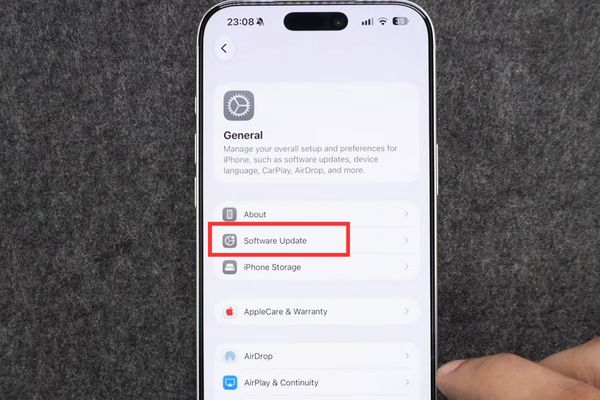
Go to Software Update

Step 4: Looking closely on the screen, you will see a line that says Beta Updates. Click right there.
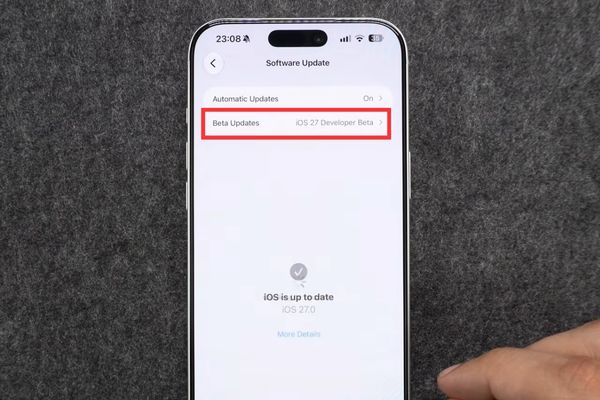
Go to Beta Updates
Go to Beta Updates

Step 5: On the new screen that appears, just select the option Off.

Step 6: That’s it. Your phone is officially unsubscribed from future trials.
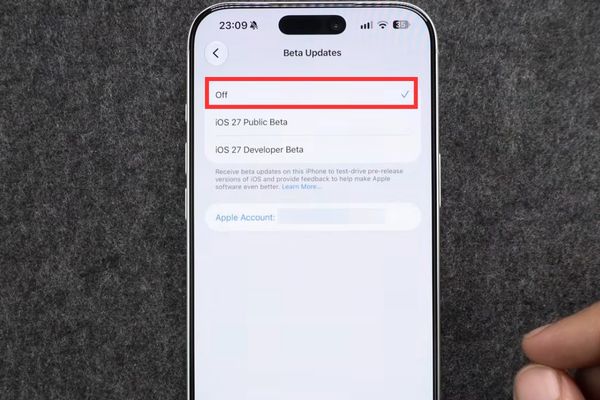
Instructions on how to exit iOS 27 Beta and update to the official version

The harsh truth after choosing Off

At this point, many of you probably think it’s over, the device will automatically switch back to the normal version immediately. But life is not like a dream. There is a truth you must accept. Choosing Off in the above step does not delete the beta version currently on your computer. It only prevents further downloads of error versions. Therefore, you still have to live with the flood for a little longer.

So how to completely stop? You are required to wait for Apple to release the official release. Usually they launch after a few weeks of testing. When that day comes, you just need to enter again Settingsselect Generalthen enter Software Update. At this point, the official version will be there waiting for you to download. Click install and you’re done.

Thanks to that, your iPhone will officially say goodbye to the turbulent beta version and put on a smooth, stable new coat. Applying the correct way to exit iOS 27 Beta and update to this official version, you will never regret having foolishly upgraded early.
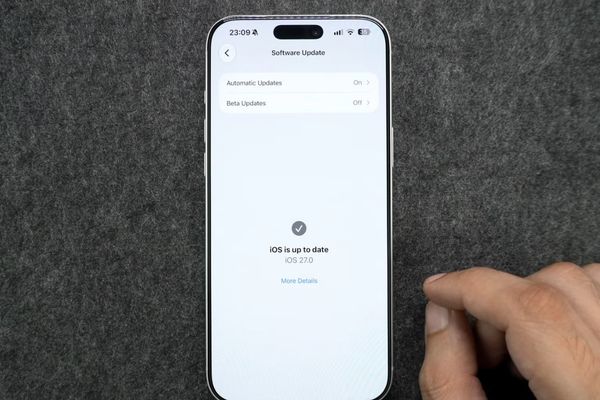
You can download the official Pulish version for more stability

Conclusion

The application way Exit iOS 27 Beta and update to the official version It’s really necessary if your computer is too laggy. Wait patiently for Apple to release the complete version and then go to Software Update and overwrite it and everything will be fine again. Wishing you a successful operation and no more frustration.

Frequently Asked Questions (Q&A)

1. After selecting Off, will the device immediately return to the old version?

No, my friend. After selecting Off, the beta version is still on the device. You have to wait for the official release to download and install before your device is out of beta.

2. How do I know when the official version is available?

Occasionally go to the Software Update section in Settings to check. When Apple releases it, it will be there for you to download.

3. If I’m using the beta, will I lose data if I install the official version?

If you update directly from your device’s Settings when the official version is released, the data will still be intact. However, don’t worry, just back up a copy just to be sure.


Tags: BetaexitInstructionsiOSOfficialUpdateversion
Previous Post

Instructions for updating PHP to avoid PHP2Shell

AnonyViet

AnonyViet

Related Posts

Instructions for turning off automatic subtitles on iPhone and Macbook
Knowledge

Instructions for turning off automatic subtitles on iPhone and Macbook

October 20, 2026
MBTI, Big Five, DISC or Holland: which personality test should you choose?
Knowledge

MBTI, Big Five, DISC or Holland: which personality test should you choose?

October 15, 2026
Super virtual way to change the photography angle using AI on iPhone
Knowledge

Super virtual way to change the photography angle using AI on iPhone

October 9, 2026
How to create Safari extension on iOS 27 and macOS 27
Knowledge

How to create Safari extension on iOS 27 and macOS 27

October 3, 2026
How to write the word Hoa Ki on Casio calculator
Knowledge

How to write the word Hoa Ki on Casio calculator

October 3, 2026
Instructions on how to increase the font size on Apple TV are extremely easy
Knowledge

Instructions on how to increase the font size on Apple TV are extremely easy

October 1, 2026
0 0 votes
Article Rating
Subscribe
Login
Notify of
guest

guest

0 Comments
Oldest
Newest Most Voted

Recent News

Instructions on how to exit iOS 27 Beta and update to the official version

Instructions on how to exit iOS 27 Beta and update to the official version

October 22, 2026
Instructions for updating PHP to avoid PHP2Shell

Instructions for updating PHP to avoid PHP2Shell

October 22, 2026
The website helps you draw beautifully like TikToker Viet My

The website helps you draw beautifully like TikToker Viet My

October 21, 2026
Instructions on how to hard reset iPhone 18 Pro / iPhone 18 Pro Max

Instructions on how to hard reset iPhone 18 Pro / iPhone 18 Pro Max

October 21, 2026
Instructions on how to exit iOS 27 Beta and update to the official version

Instructions on how to exit iOS 27 Beta and update to the official version

October 22, 2026
Instructions for updating PHP to avoid PHP2Shell

Instructions for updating PHP to avoid PHP2Shell

October 22, 2026
The website helps you draw beautifully like TikToker Viet My

The website helps you draw beautifully like TikToker Viet My

October 21, 2026
AnonyViet - English Version

AnonyViet

AnonyViet is a website share knowledge that you have never learned in school!

We are ready to welcome your comments, as well as your articles sent to AnonyViet.

Follow Us

Contact:

Email: anonyviet.com[@]gmail.com

Main Website: https://anonyviet.com

Recent News

Instructions on how to exit iOS 27 Beta and update to the official version

Instructions on how to exit iOS 27 Beta and update to the official version

October 22, 2026
Instructions for updating PHP to avoid PHP2Shell

Instructions for updating PHP to avoid PHP2Shell

October 22, 2026
  • Home
  • Home 2
  • Home 3
  • Home 4
  • Home 5
  • Home 6
  • Next Dest Page
  • Sample Page

say88 tỷ lệ kèo nhà cái kèo nhà cái 5 febet

No Result
View All Result
  • Home
  • News
  • Software
  • Knowledge
  • MMO
  • Tips
  • Security
  • Network
  • Office

say88 tỷ lệ kèo nhà cái kèo nhà cái 5 febet

wpDiscuz
0
0
Would love your thoughts, please comment.x
()
x
| Reply






