• Home
  • News
  • Software
  • Knowledge
  • MMO
  • Tips
  • Security
  • Network
  • Office
AnonyViet - English Version
  • Home
  • News
  • Software
  • Knowledge
  • MMO
  • Tips
  • Security
  • Network
  • Office
No Result
View All Result
  • Home
  • News
  • Software
  • Knowledge
  • MMO
  • Tips
  • Security
  • Network
  • Office
No Result
View All Result
AnonyViet - English Version
No Result
View All Result

Instructions on how to enter promotional codes on the App Store most accurately

AnonyViet by AnonyViet
October 18, 2026
in Tips
0

How to enter promotional codes on the App Store This is something that everyone who uses an iPhone should know so as not to waste gifts. I once threw away some application registration codes just because I was lazy to figure out where to enter them. Let’s go together AnonyViet Find out the extremely quick steps right below.

📢 Join the channel Telegram belong to AnonyViet


👉 Go to Telegram AnonyViet

Update new articles, cool tools and IT tips fastest

Instructions on how to enter promotional codes on the App Store

I remember the first time I got a good code to download the game, I struggled all day. Actually, everything is already available on the device, I just haven’t paid attention to it. If you’re holding a Promo Code for an app, game or subscription, this is the time to use it. Operation above iPhone nice iPad are all exactly the same.

Step 1: Open the application App Store.

Step 2: Look at the top right corner of the screen, click on your profile picture.
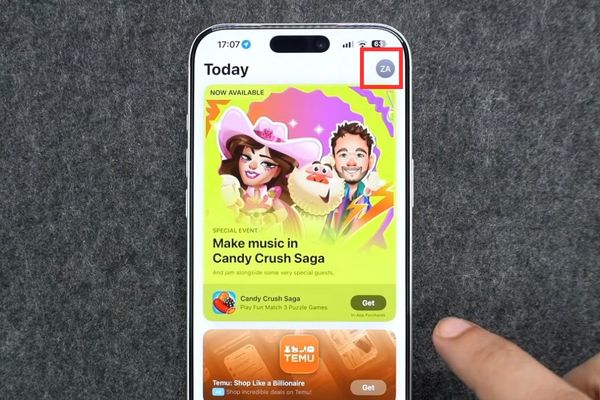
Instructions on how to enter promotional codes on the App Store most accurately
Click to select profile picture

Step 3: In the interface that appears, find and click the button Redeem Code.
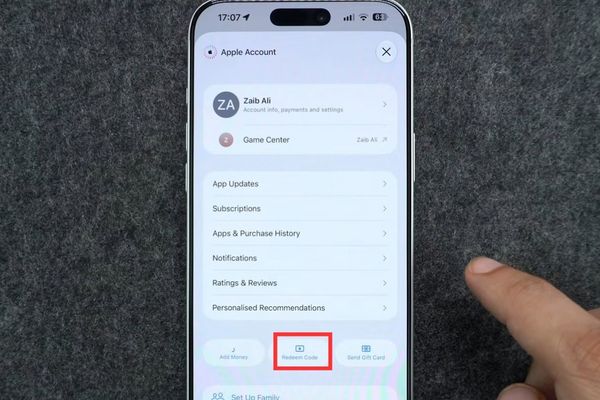
Click on the Redeem Code button

Step 4: Move to the next page, the system will give you two options. You can click Enter Code Manually or choose Use Camera. Depending on whether you are holding a physical card or copying a code online, choose accordingly.
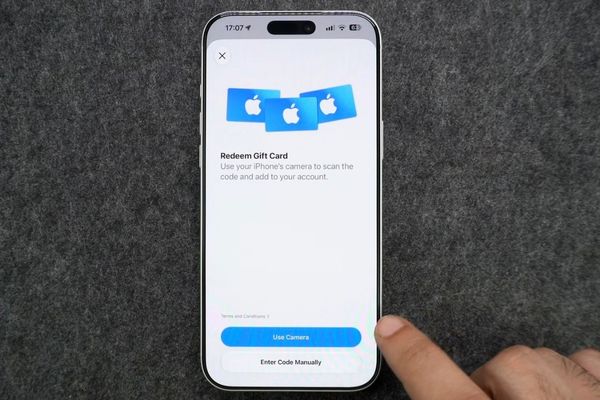
Select Enter Code Manually or select Use Camera

Step 5: Assuming you want to manually enter the code, just type or paste the promotion code into the blank box. Once completed, confirm that it is complete.

After you complete the above steps, Apple’s system will start working. If your code is valid and eligible to apply to the account you are using, Apple will automatically add the corresponding content or balance directly to the account. Thanks to that, you can download games or use apps immediately without having to wait another moment.
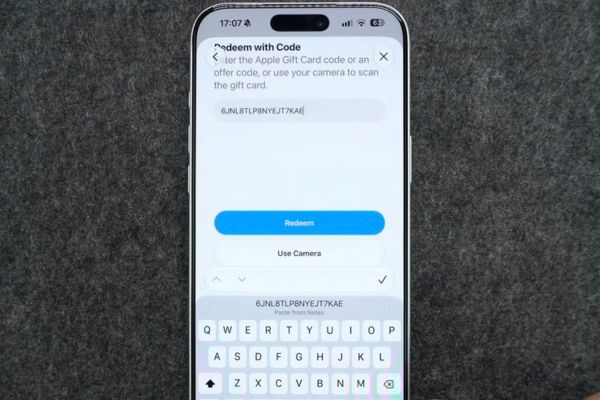
Instructions on how to enter promotional codes on the App Store most accurately

Reasons why you get an error when entering the code

Sometimes you try to enter the promotion code correctly on the App Store but the device shows a red error message. Don’t be so quick to get angry. Instead, calmly check a few basic things below.

  • Make sure that code has never been used by anyone. Many times, friends send me a code that they forget they already used, so when I enter it into the computer it keeps giving me an error.
  • Please review the code’s expiration date. Any promotion has an expiration date. If the code is expired, it is considered abandoned, there is no way to save it.
  • Check that you’re signed in to the correct Apple Account. There are people who use two or three different accounts on the same device. Applying promotional codes on the App Store to the wrong account is a common occurrence.
  • National and regional issues. This is extremely important. The promotional code must be valid in the country or region where your account is registered. For example, if the code is for the US market, importing it into a Vietnamese account will not work.
  • Make sure you are entering each character correctly. Letters that are easily confused like the letter O with the number 0 or the short letter I with the tall letter l often make people cry. It’s best to just copy and paste to be sure.
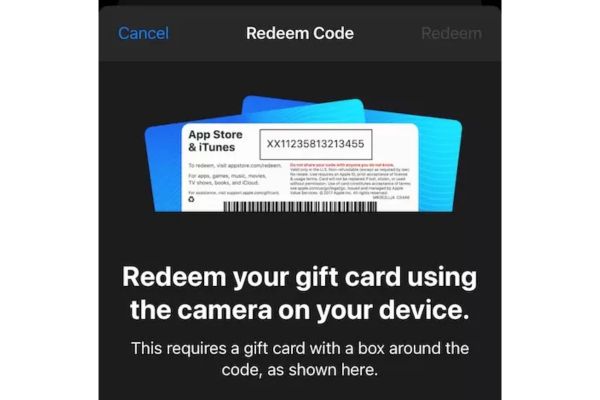
Reasons why you get an error when entering the code

Conclusion

In general, entering promotional codes on the App Store is really easy and anyone can do it themselves. You just need to be a little careful when entering characters and everything will fall into place. Wishing you successful code change!

Frequently Asked Questions (Q&A)

1. Can I use the camera to scan the code instead of typing?

Absolutely. In the step of choosing the method, you just need to choose Use Camera instead of Enter Code Manully and the machine will automatically scan the code for you.

2. Why have I entered all the correct codes but the device still reports an error?

It’s possible your code has expired, has been used before, or isn’t valid in the country where your Apple account is registered.

3. What do I receive when I enter the code successfully?

If the code is valid, Apple will automatically apply the corresponding content such as apps, games, subscriptions, or credit to your account.


Tags: AccuratelyAppcodesenterInstructionspromotionalStore
Previous Post

How to open “This PC” instead of “Quick Access” in File Explorer by default

Next Post

Instructions for registering a .tech domain name for free for 1 year

AnonyViet

AnonyViet

Related Posts

Cách Đăng ký Nhận Code ChatGPT Business
Tips

Cách Đăng ký Nhận Code ChatGPT Business

November 2, 2026
Instructions for cleaning LG TV with Antigravity to help it run faster
Tips

Instructions for cleaning LG TV with Antigravity to help it run faster

October 30, 2026
Quét lỗ hổng bảo mật cho Vide Coding bằng Security Audit Skill
Tips

Quét lỗ hổng bảo mật cho Vide Coding bằng Security Audit Skill

October 27, 2026
Instructions for registering for OxionAI Pro for 1 year with many powerful AI models
Tips

Instructions for registering for OxionAI Pro for 1 year with many powerful AI models

October 24, 2026
How are Windows 11 Pro and Windows 10 Pro different?
Tips

How are Windows 11 Pro and Windows 10 Pro different?

October 23, 2026
Instructions for using CleanYourTV: Remove ads on Android TV, Google TV
Tips

Instructions for using CleanYourTV: Remove ads on Android TV, Google TV

October 23, 2026
Next Post
Instructions for registering a .tech domain name for free for 1 year

Instructions for registering a .tech domain name for free for 1 year

0 0 votes
Article Rating
Subscribe
Login
Notify of
guest

guest

0 Comments
Oldest
Newest Most Voted

Recent News

Tool to get transcript of entire YouTube channel extremely fast and free

Tool to get transcript of entire YouTube channel extremely fast and free

November 10, 2026
Keysoff 11.11 discount: Office 2024 Pro only .58, Windows 11 Pro from .58

Keysoff 11.11 discount: Office 2024 Pro only $26.58, Windows 11 Pro from $15.58

November 9, 2026
How to create an Android App using Google AI Studio without code

How to create an Android App using Google AI Studio without code

November 9, 2026
Holding OPPO Find X10 to watch movies all night: Real experience

Holding OPPO Find X10 to watch movies all night: Real experience

November 9, 2026
Tool to get transcript of entire YouTube channel extremely fast and free

Tool to get transcript of entire YouTube channel extremely fast and free

November 10, 2026
Keysoff 11.11 discount: Office 2024 Pro only .58, Windows 11 Pro from .58

Keysoff 11.11 discount: Office 2024 Pro only $26.58, Windows 11 Pro from $15.58

November 9, 2026
How to create an Android App using Google AI Studio without code

How to create an Android App using Google AI Studio without code

November 9, 2026
AnonyViet - English Version

AnonyViet

AnonyViet is a website share knowledge that you have never learned in school!

We are ready to welcome your comments, as well as your articles sent to AnonyViet.

Follow Us

Contact:

Email: anonyviet.com[@]gmail.com

Main Website: https://anonyviet.com

Recent News

Tool to get transcript of entire YouTube channel extremely fast and free

Tool to get transcript of entire YouTube channel extremely fast and free

November 10, 2026
Keysoff 11.11 discount: Office 2024 Pro only .58, Windows 11 Pro from .58

Keysoff 11.11 discount: Office 2024 Pro only $26.58, Windows 11 Pro from $15.58

November 9, 2026
  • Home
  • Home 2
  • Home 3
  • Home 4
  • Home 5
  • Home 6
  • Next Dest Page
  • Sample Page

say88 tỷ lệ kèo nhà cái kèo nhà cái 5 febet

No Result
View All Result
  • Home
  • News
  • Software
  • Knowledge
  • MMO
  • Tips
  • Security
  • Network
  • Office

say88 tỷ lệ kèo nhà cái kèo nhà cái 5 febet

wpDiscuz
0
0
Would love your thoughts, please comment.x
()
x
| Reply