How to cancel Facebook Plus package Quickly is the best solution when you no longer need to use it. Don’t wait until close to the fee collection date to rush to find a place to cancel because it’s easy to encounter network errors or incorrect operations. It’s best to handle it early to ease your mind. Let’s go together AnonyViet Find out the steps below.
📢 Join the channel Telegram belong to AnonyViet
Update new articles, cool tools and IT tips fastest
What service is Facebook Plus anyway?
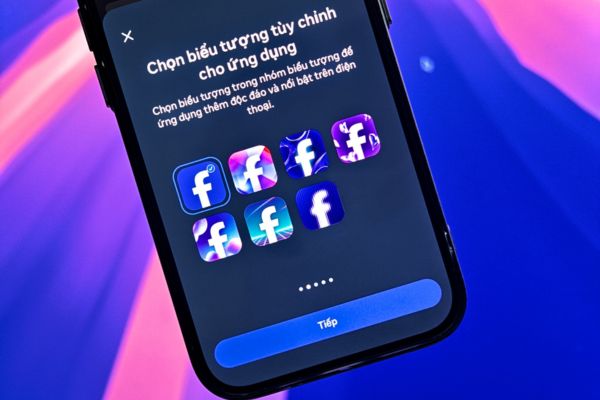
Recently, suddenly I saw a package appear Facebook Plus This confuses many people. In fact, this is a paid service created by Meta to add a few minor features to Facebook and Facebook Messenger like seeing who often reviews your Story, searching for viewer names more easily, previewing Stories, extending news display time or changing the application icon on your phone.
In Vietnam, many people surfing the message board naturally see a notice inviting them to try Facebook Plus for a price 27,990 VND per month. Usually they will let you use it for free for the first 7 days. Thanks to that, many people just click register to let you know and then forget about it. Therefore, you must be extremely careful about the trial expiration date, because the system will automatically deduct money if you do not actively try to cancel the Facebook Plus package before the deadline.
Another point I see many people often confuse is that this package is not the same Meta Verified Where are you? Buying this does not mean you will have genuine green credit. It just focuses on fun add-ons. So if you just surf social networks normally, just using the free version is more than enough, there’s no need to spend money to register.

Instructions on how to cancel Facebook Plus package
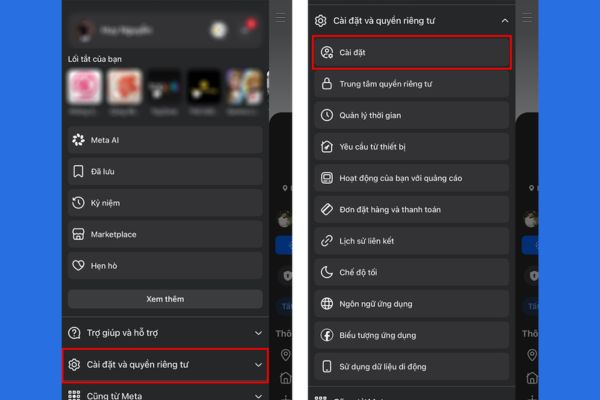
Step 1: Open the application, find the section Menuthen select Setting and privacy then click again Setting.
Step 2: Scroll down to find the Subscription package section, click on it Facebook Plus and choose Manage your subscriptions.
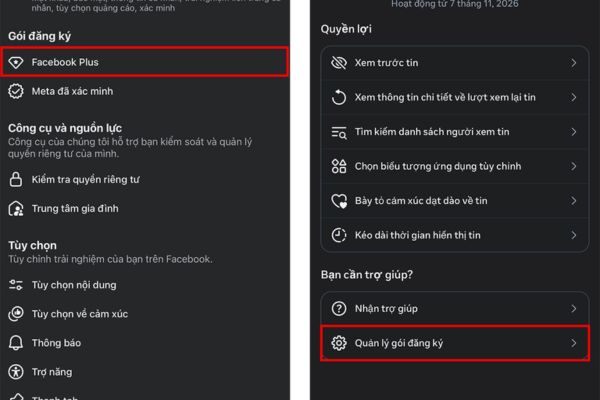
Step 3: Finally, you press Cancel your subscriptionselect Continue canceling and just follow the instructions that appear on the screen and you’re done.
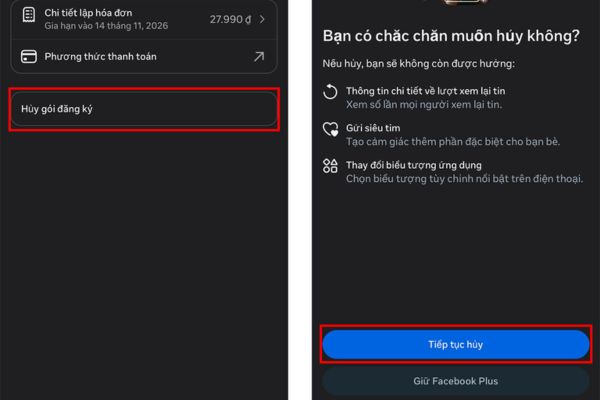
What should I do if I can’t find the Facebook Plus cancellation item?
If you follow the instructions but don’t see Facebook Plus or the cancel button, check to see if you are logged in to the correct account that registered for the package.
Next, you can try closing and reopening the app, check network connection and updates Facebook to the latest version. Actual appearance may differ from illustration, so please look for related items Subscription package, Facebook Plus or Manage your subscriptions.
If you still can’t handle it, you can come in Menu > Help and support > Report a problem to reflect the problem. Please describe the step that is causing the error and attach a screenshot, and mask out personal payment information before submitting.
Conclusion
In short, How to cancel Facebook Plus package It’s really easy if you know the right place to click. Don’t let laziness cause you to lose unnecessary amounts of money every month. Just follow the steps I just shared to ensure success.
Frequently Asked Questions (Q&A)
1. Will deleting the Facebook app automatically cancel the package?
Absolutely not. Removing the app from your device does not terminate your subscription contract, especially with Google Play. You must go to the subscription management section to cancel properly.
2. After canceling, will I immediately lose my benefits?
Usually you can still use it until the end of the period for which you missed payment. However, with some trial packages, you should carefully read the notification line when clicking confirm to know the exact date your benefits will be cut off.
3. If money is deducted, can I get my money back if I cancel the package?
Canceling a renewal and asking for money are two completely different things. If you want a refund, you must submit a request directly to Apple or Google Play depending on where you paid, and whether or not you can get a refund depends on their policy.