How to face unlock iPhone Duo is the most notable highlight in this update. Apple seems to be putting effort into perfecting the experience for their folding phone, along with new AI limitations that you need to keep in mind. Let’s go together AnonyViet Find out in detail in this article.
📢 Join the channel Telegram belong to AnonyViet
Update new articles, cool tools and IT tips fastest
Notable changes in iOS 27.3 Beta 2
The latest update focuses heavily on Siri AI artificial intelligence on the Safari browser.
- When you surf the web, you can make requests Siri summarize or retrieve information from that entire web page.
- Siri AI also connects deeply with the application Health. If you give it permission, it will clearly answer questions about heart rate or sleep in natural language. Comes with visual charts that are very easy to understand.
- Interface Calendar application It’s also been made more neat.
- The new Search and Create Event buttons have been moved to the bottom, making it easy to operate with one hand when walking on the street without fear of falling.
- The Today button clearly displays the day and date, not as general as before.
- Application Apple TV There is also a short vertical video section, and it also syncs podcasts for convenient viewing.
- 10 new weather icons and Apple Music have removed the rather useless horizontal rotation mode in the previous version.
Instructions on how to face unlock iPhone Duo
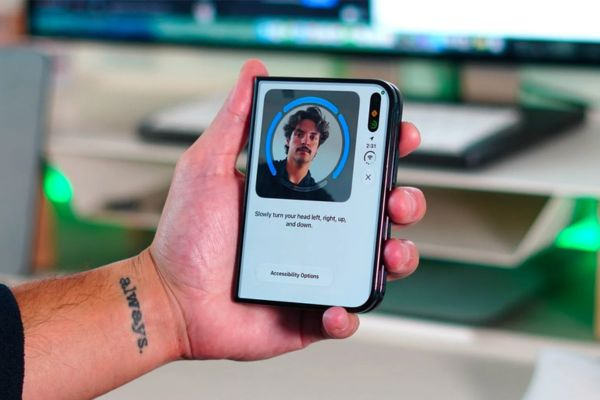
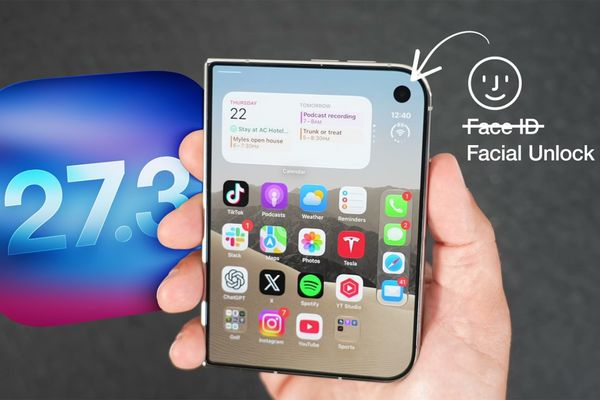
Face Unlock feature via front camera is finally available. To perform iPhone Duo face unlock, you just need to go to the section Settingselect Touch ID & Passcode then turn it on. However, I must clearly say that its security is not as good as traditional Face ID. It also freezes when you open the internal screen. Therefore, when paying with Apple Pay or accessing banking apps, you still have to use your fingerprint or password for safety.
Another plus is optionality Locks the device when folded. Previously, when I folded the phone, the content kept jumping to the external screen, which was quite annoying and wasting battery power. Now go to Settings, select Screen & Brightness and you can set the device to automatically lock and turn off the screen as soon as it is folded. The experience of holding and using is much more seamless.
Should I upgrade to iOS 27.3 Beta 2?
Actually updating or not depends on your dose. If you’re holding an expensive folding device in your hand and want to immediately try out how to unlock the iPhone Duo’s face, then go ahead. Or if you are a technology addict and like to explore Siri AI’s ability to read and understand websites, this version is made for you.
On the contrary, if this is the only phone you use to make calls for work every day, I sincerely advise you to stop. Developer Beta versions are often full of bugs. The device can overheat for no reason, the battery drains quickly, or worse, it can’t access banking applications. It’s best to wait a few more days to wait for the Public Beta or official version.
Detailed steps to update iOS 27.3 Beta 2
If you are determined to experience iPhone Duo face unlock with a series of new features, then just follow the instructions below.
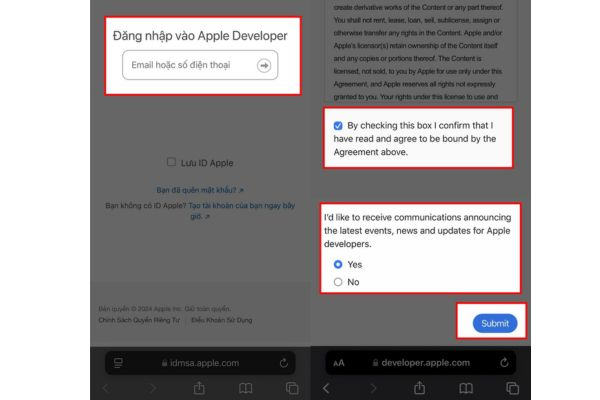
Step 1: Open your browser and access it Apple’s developer site. Then log in with your personal Apple ID account. Just read the terms and conditions, click agree and select Submit the registration is complete.
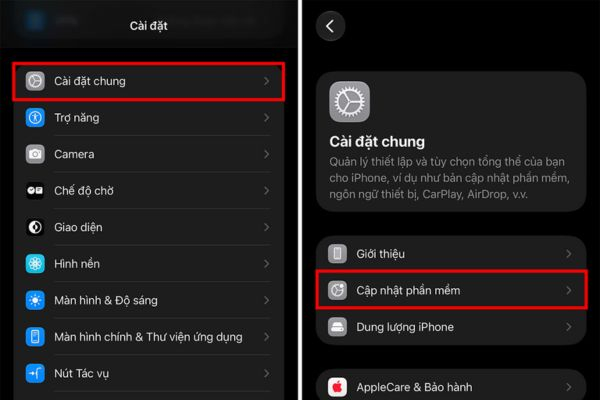
Step 2: You return to the main screen, open the application Setting go up. Next, you choose the item General settings then click Software updates.
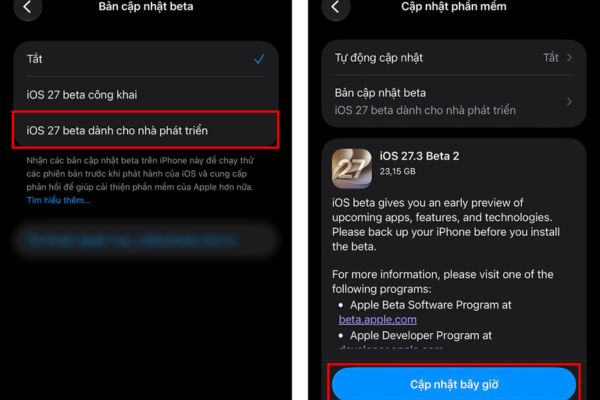
Step 3: On this screen, you look at the item Beta update and choose the correct version iOS 27 beta for developers. When finished, return to the previous page and click Update now Then make a cup of coffee and wait for the device to download and install.
Conclusion
The equipment How to face unlock iPhone Duo shows that Apple is listening more to users. Combined with the intelligence of Siri AI, your folding phone will become extremely powerful.
Frequently Asked Questions (Q&A)
1. Can the facial recognition feature on folding machines be used for payment?
Nope. Apple has made it clear that this feature is not highly secure, so you still have to use your fingerprint or password to use Apple Pay.
2. What’s special about Siri AI in this update?
It can read and summarize entire web pages in Safari, including the parts you haven’t scrolled to yet. In addition, it also answers your health indicators.
3. Does this trial version cause overheating?
Capable. Because this is a developer version, the system is not stable, the device may warm up a bit and the battery drains faster than usual.