
How to buy a free .com domain name sometimes it just takes a little luck and knowing where to look. This time, Checkdomain site is having a deep discount program. If you apply the tips correctly, you won’t lose any money at all. Let’s go together AnonyViet Practice this delicious bet right away.
📢 Join the channel Telegram belong to AnonyViet
Update new articles, cool tools and IT tips fastest
Giveaway from Checkdomain.de on Black Friday
Recently, when I was surfing the internet, I saw brothers talking about the purchase domain cheap price. I was curious to take a look and discovered that the checkdomain.de site was running the Black Friday program. Normally the price is very high, but this time they had a huge sale .com and .de only 0.07 euros one month for the first year. It costs a whole year 0.84 eurosless than a glass of iced tea. This program only lasts until the end of the day November 30 So you have to be quick.

Actually, the price of 0.84 euro is already too cheap. But I will show you how to buy a .com domain name free of charge always if you’re lucky. The story is that there is a discount code called affiliatechecker. This code inherently reduces 5 euros for orders of 5 euros or more and expires until the end of the month September 2027.
However, their system sometimes crashes. Therefore, even though your order is only 0.84 euros, when you enter this code it will still be deducted directly from your order. 0 VND. Thanks to that, it doesn’t cost you anything.
Let me give you detailed step-by-step instructions so you can easily visualize.
Step 1: First you access the link HERE to go to their home page.
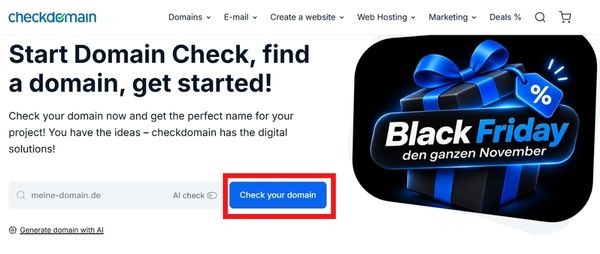
Step 2: Right in the middle of the screen there is an empty box. You type in the domain name you want to buy and click the button Check your domain.
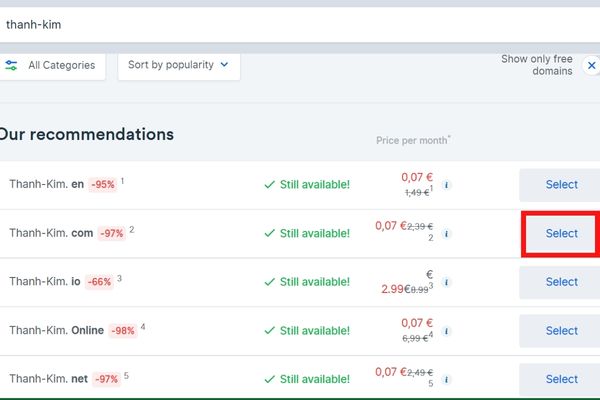
Step 3: Wait a moment and the system will list a series of results. You find the correct .com extension and see that it says Still available in green. Click the button Select next and then select next Add to cart.
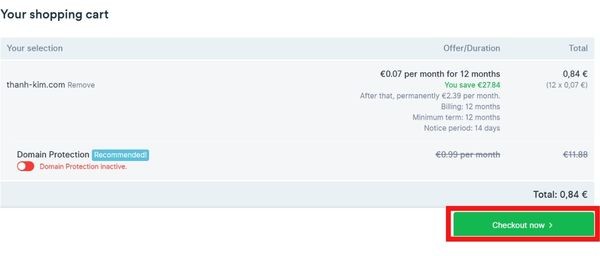
Step 4: Now look at the right corner of the screen and you will see the shopping cart. Remember to check to see if Domain Protection is turned on. If so, turn it off to save money. When finished, click Checkout now.
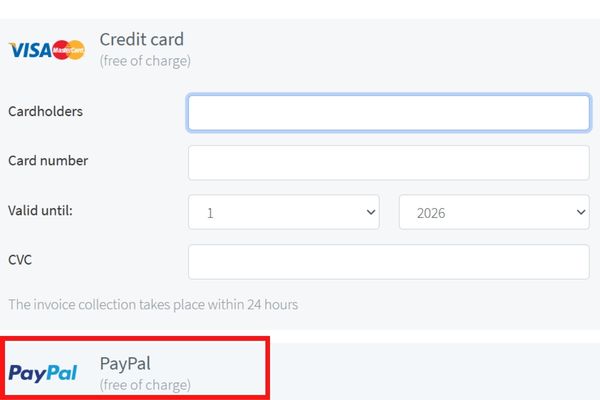
Step 5: The website will ask you to create a new account. Just fill in your personal information normally. Be sure to fill in your phone number early 09 It’s okay. When it comes to payment, you can choose to use a Visa Mastercard credit card or use PayPal.
When I tried it, I used the card and it reported an error, but I still use it PayPal Then payment is ok.
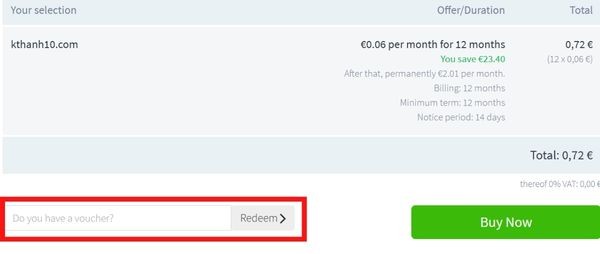
Step 6: In the final step Order overview, scroll down to the bottom left corner and you will see the Do you have a voucher box. Paste the code affiliatechecker Go there and click Redeem.
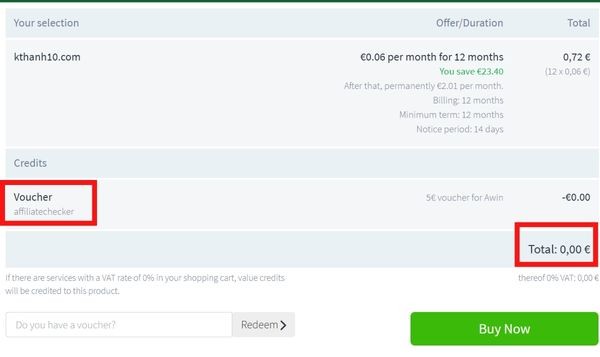
If the system fails as I said above, the total amount will jump to 0.00 euro. If they fix the error, you still only have to pay 0.84 euros, which in Vietnamese currency is probably around twenty thousand, still a great deal. Finally click Buy Now and you’re done.
Things to remember after registering
Many people just buy it when it’s cheap and forget about the consequences later. I’ve been hit once before so I have to remind you guys right away. That cheap price only applies to the first year. In the second year, its renewal fee goes up to 2.39 euros/month. Mental calculation is close 29 euros/yeara rather harsh number compared to the general level.
Therefore, after registering and getting bored, you must remember to go to your account settings to immediately turn off the automatic renewal feature. Or more carefully, near the end of the first year, you transfer that domain name to another cheaper provider like Cloudflare or Namecheap, for example. Don’t wait until it automatically deducts money from your card and then get angry, it’s too late.
Conclusion
In general, How to buy a free .com domain name This is very suitable for those who want to make a satellite website, personal blog or simply buy to test code. Just follow the steps exactly and you will get good products no matter what.
Frequently Asked Questions (Q&A)
1. How long does this discount program last?
Checkdomain’s Black Weeks program for 0.84 euros per year only applies until November 30.
2. Why did I enter the discount code and still not get 0 VND?
Because this code stipulates a minimum order of 5 euros. The fact that it deducts 0 VND for an order of 0.84 euro is a system error, sometimes it works, sometimes it doesn’t depending on when you buy.
3. How much do I have to pay in the second year?
The second year renewal fee is 2.39 euros a month, or about 28.68 euros a year. You should turn off auto-renew if you do not want to continue using it.