

I think there must be many people who have encountered this situation, right? Every time I see my crush post a new Facebook story, I don’t dare check it out because I’m afraid people will know. So that whole night, we couldn’t sleep because we were always restless and curious about what story our crush posted. Every time I close my eyes and prepare to go to sleep, my brain keeps thinking about that story. Understanding your psychology, today I will guide you how to view Facebook stories without others knowing.
📢 Join the channel Telegram belong to AnonyViet
Update new articles, cool tools and IT tips fastest

How to view Facebook stories without others knowing
First, you access j2team Security and click the “Add to Chrome” button.
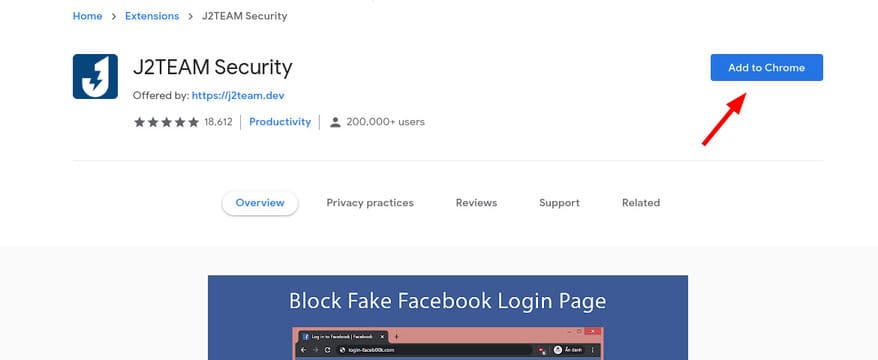
Next, the Chrome browser will ask if you want to add the J2team Security extension? You just need to click “Add extension”.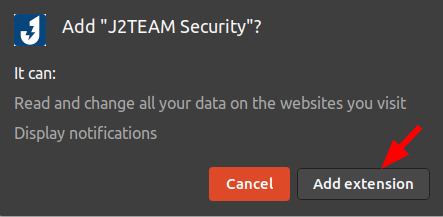
After that, you will be taken to the interface of j2team Security. Click on OPTIONS in the menu on the left. Then select the line “Block The “Seen” Feature Of The Story On Facebook”. You can also turn off the Story viewing feature on Instagram and turn off “viewed” messages on Facebook Messenger by selecting the next 2 lines below.
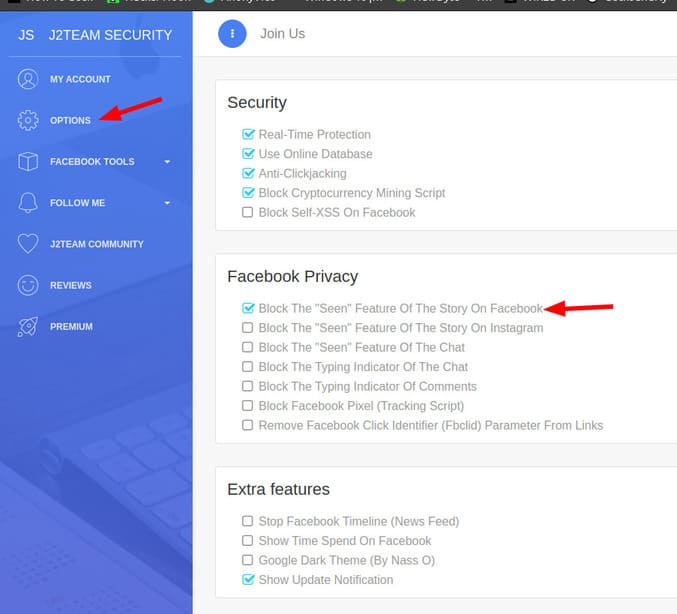
So you can freely view other people’s Stories without being detected. In addition, j2team extension also has many cool features waiting for you to discover such as blocking Facebook Pixel.
Facebook Pixel is a feature that links other websites to Facebook. You can understand it simply like this, all your Facebook activities are tracked by third websites. From there, these websites can suggest items that you are interested in.
Also, you can read the article How to use Messenger without a Facebook account.
Frequently asked questions
Can I view other people’s Facebook stories without them knowing?
Yes, you can use the J2team Security extension for Chrome browser to prevent Facebook from recording your story viewing history.
Is J2team Security safe?
Using this extension depends on how much you trust the developer. Please consider the risks before installing any extension.
Besides viewing Facebook stories, what other functions does J2team Security have?
J2team Security also has other features such as blocking Facebook Pixel and preventing the display of “seen” on Messenger.





