

How to prevent acquaintances from seeing your Tiktok Brings you absolute comfort when surfing social networks every day. You will no longer worry about your account suddenly appearing on the phone screen of your colleagues or relatives. Let’s immediately explore these extremely useful setup operations with AnonyViet.
📢 Join the channel Telegram belong to AnonyViet
Update new articles, cool tools and IT tips fastest
Why is it necessary to hide personal social media accounts?
In the age of rapidly developing digital technology, the boundary between real life and cyberspace is becoming increasingly fragile. The algorithms of today’s short video platforms are extremely smart, constantly scanning geographic location data, phone contacts and other social network links to suggest friends. Finding a way to hide from acquaintances Tiktok comes from the need to protect each person’s personal space.
Many users just want to create an account to store funny videos, follow idols or comfortably leave personal comments. If colleagues, relatives or real-life acquaintances discover this account, it will sometimes lead to unnecessary embarrassing situations. Proactively setting up layers of security will help you freely express your personality without having to be afraid of anyone’s judgmental eyes.
Instructions on how to prevent acquaintances from seeing your Tiktok
To make your account invisible to those around you, you need to synchronize the 3 important groups of settings below.
1. Convert to a private account
This is the first and strongest protective shield to help you prevent prying eyes from unwanted people. When you enable this feature, all of your video content and watchlist will be locked.
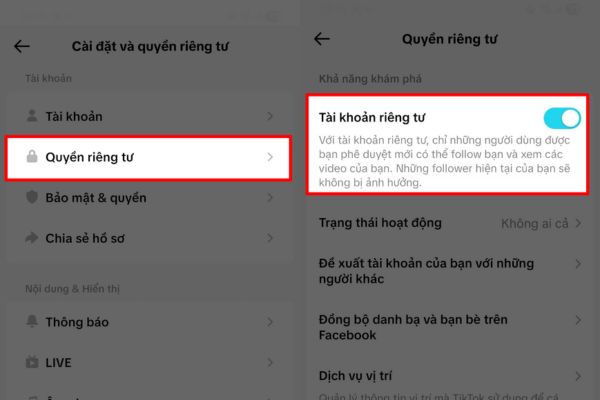
Step 1: Go to your personal profile page and click three dashes icon in the right corner of the screen to open the menu panel.
Step 2: You continue to search for the item Settings and privacy then select the section Privacy to start setup.
Step 3: At the new interface that appears, you just need to flip the switch on the line Private account Turns green to complete.
This action ensures that anyone who wants to watch your video has to submit a request and wait for you to personally approve it. Strangers or acquaintances who accidentally find your username cannot arbitrarily scrutinize your activities on the platform.
2. Disable the friend suggestion feature
Apply a method so that acquaintances cannot see it Tiktok By turning off recommendations is an extremely important step to sever all algorithmic ties. This platform often “snitches” on your account to people who share the same phone number.
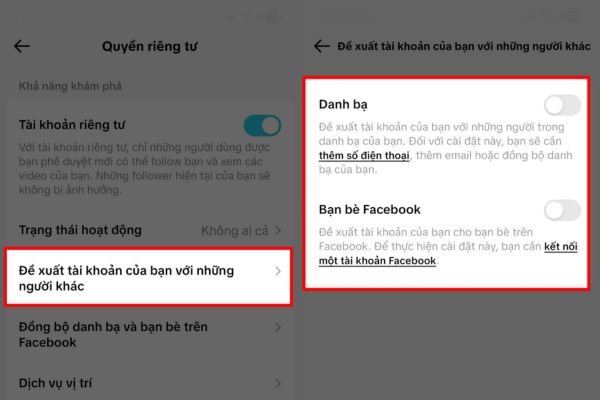
Step 1: In the privacy interface that you just opened in the step above, scroll down the screen and select the item Recommend your account to others.
Step 2: Proceed to turn off all options displayed on the screen including contacts, Facebook friends and people with common connections.
Once you’ve done this, the system will stop including your profile in other people’s lists of people you may know. This helps you freely surf videos according to your personal preferences without fear of algorithms cross-distributing data based on location or real-life relationships.
3. Delete sync data
To perfect the way to prevent acquaintances from seeing your Tiktok, you must clean up the remaining data that the application has accidentally collected in the past. Even though you have locked your account, if you do not delete old data, the system will still leak information from time to time.
Step 1: Still in section Privacy settingsplease click on the item Sync contacts and friends on Facebook.
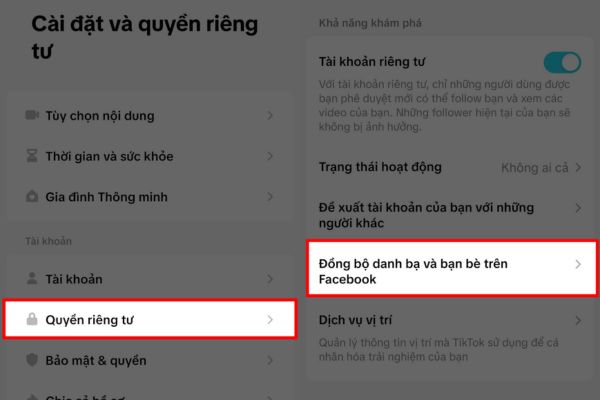
Step 2: Turn off all open sync switches to prevent the application from continuing to read contact data in the future.
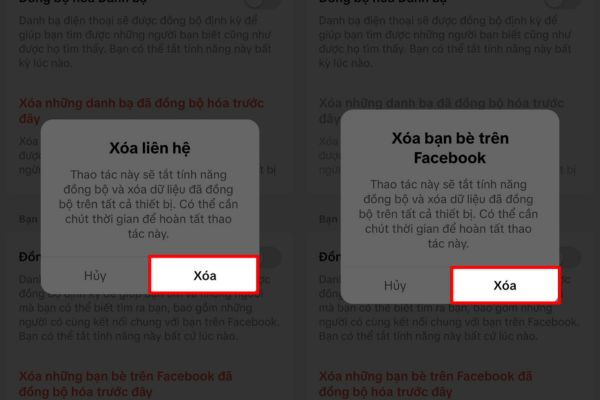
Step 3: Right at this interface, you need to click on the command to delete previously synchronized contacts and delete synchronized Facebook friends.
This data deletion operation is decisive, helping to completely cut off all old contact information stored on the server. From this point on, your account is completely independent and no longer associated with any personal information in real life.
Conclusion
Application How to prevent acquaintances from seeing your Tiktok will help you build a safe boundary in cyberspace. You are in complete control of who can see and interact with the content you post. Don’t forget to share this useful tip with friends who share similar interests anonymously.
Frequently Asked Questions (Q&A)
1. If I turn on a private account, can strangers see my videos?
When you activate this mode, only people approved by you to request tracking can view your videos and personal information.
2. I turned off contact synchronization but why do I still see familiar people appear?
The reason is because you just turned off synchronization and forgot to press the button to delete the data stored by the system from previous links.
3. Will hiding my account reduce engagement if I want to build a channel later?
Certainly yes because private mode will prevent your videos from reaching new users on the platform, so consider carefully the purpose of use.










