

Instructions for receiving pension via VNeID is what you need to know if you want to help your parents and grandparents receive benefits more easily. In the past, every time it was time to receive salary, I saw the elderly people struggling to get around in the hot sun. Instead, now you just have to sit at home and surf your phone and the money automatically dings into your account. Let’s go together AnonyViet Learn these extremely simple steps.
📢 Join the channel Telegram belong to AnonyViet
Update new articles, cool tools and IT tips fastest
Detailed instructions for receiving pension via VNeID
Right below are instructions for receiving pension via VNeID that you can apply immediately.
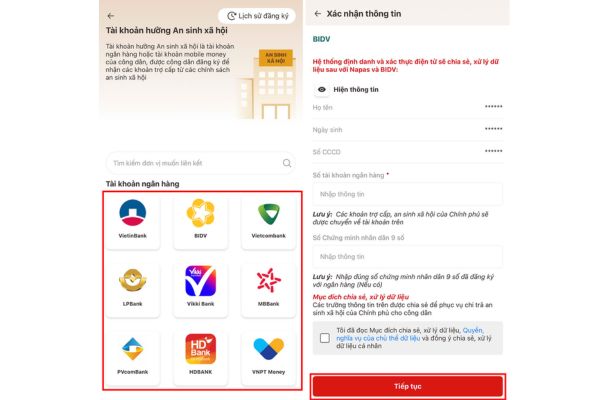
Step 1: In the main interface of VNeID application you find and select the item Social security. After clicking it, the system will switch to a new screen. Here you continue to select the section Social security account.

Step 2: At this step, you choose the bank you want to link with to receive your pension. If you do not use a bank, the system also allows you to choose an e-wallet or official mobile money account.
After choosing the method to receive money, please fill in your account number correctly in the blank box. Remember to double check each number to be sure. Finally you just need to press Continue to complete the registration.
Real experience from users
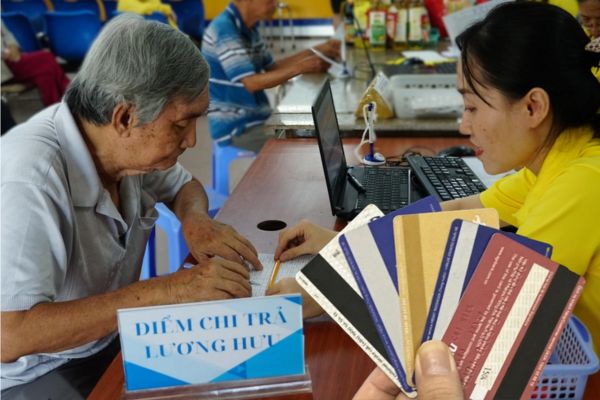
You see, the instructions for receiving pension through VNeID have really changed the habits of many people. I tried doing it myself for my parents at home and they were very surprised at how quickly the government processes the procedure these days. No more having to keep a paper retirement book in fear of it tearing or losing. All data is safely in the smartphone.
However, during the operation process, we sometimes encounter a bit of confusion. Someone entered the wrong account number or chose the wrong bank name. In times like these, just calm down and start over from the beginning.
Conclusion
With just two short steps in Instructions for receiving pension via VNeID means you have completed an important administrative procedure. I believe that anyone who reads this will be able to confidently pick up their phone and do it right away. Instead of wasting time waiting, now the money automatically flows into your pocket. Don’t forget to instruct your grandparents at home to try it out.
Frequently Asked Questions (Q&A)
1. Is it difficult to register for pension on VNeID?
It’s very easy, just go to the Social Security section and select Social Security Account to do it right away.
2. Can I use an e-wallet to receive pension?
Absolutely, the system allows you to choose your bank, e-wallet or official mobile money account.
3. After entering the account number, what to do next?
You just need to check again for accuracy and then click Continue to complete the registration.







