

MultCloud Premium is free This is a great opportunity for you to gather all your scattered cloud accounts into one place. No more remembering and forgetting each person’s password. All operations are now concentrated in a single browser tab. Let’s go together AnonyViet Discover how to receive this delicious gift.
📢 Join the channel Telegram belong to AnonyViet
Update new articles, cool tools and IT tips fastest
The obsession is called cleaning up cloud drives
Surely everyone who works or goes to school these days has a few storage accounts in their pocket. Which is Google Drive to submit assignments OneDrive for company work and then Dropbox to share photos. Many times I want to find an old file but sweat because I don’t remember where to put it.
The worst thing is when a drive says it’s full. You want to transfer a few dozen GB of movies to another drive to make your computer lighter. The traditional way is to plug in the device and download the entire file to your personal computer, then open the other account to download it again. If the network is unstable, you will definitely sit and stare at the screen all evening. It’s really frustrating.
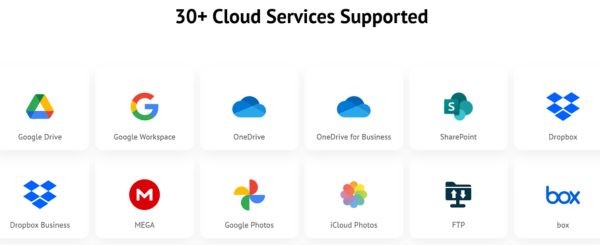
Luckily, I recently discovered a pretty cool tool that helps completely solve this problem. It brings together all providers from Google Drive Box to OneDrive into a single interface. You only need to log in once to manage all those accounts. Moving, copying or synchronizing data takes place entirely on the web. That means you don’t need to spend a single byte of hard drive space to make a transfer station.

Details of the free MultCloud Premium package this time
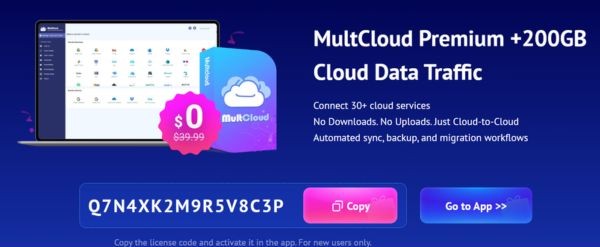
This time there is a giveaway program for free MultCloud Premium packages for new users. When you register successfully, you will receive it immediately 3 months Fully use all the most advanced features of this platform. Comes with that is a data traffic block with a capacity of up to 200GB.
If you calculate in cash, this gift package is worth about $39.90. Not a small number for a convenient tool like this. Instead of spending money to buy, why don’t we take advantage of this promotion to organize our messy documents.

What is 200GB of traffic used for?
Many people who have just heard about it think that this 200GB is the capacity to store files like Google Drive. Actually, that’s not the case. This is the bandwidth used to transfer data. This free MultCloud Premium plan gives you 200GB to perform direct cloud-to-cloud migrations. For example, you have a 50GB folder in Google Drive and want to throw it to OneDrive. When you order a transfer, the system will deduct 50GB from your total 200GB traffic.
You can use this data to do many cool things. For example, migrating all data from one platform to another when changing jobs. Or set up automatic cross-backup synchronization tasks between services to prevent data loss. Their internal file transfer speed is extremely fast because it runs directly on their server and does not depend on your home wifi network.
Instructions for getting MultCloud Premium for free
To get this free MultCloud Premium package, you only need to spend less than 3 minutes. Just follow these steps slowly and you will be successful.
Step 1: You access the promotional link specifically for the program HERE.
Step 2: Copy the promotional code line and click Go to App to install software on your device.
Step 3: On the home page, enter your personal email address to create a brand new account or choose Sign in with Google for quick.
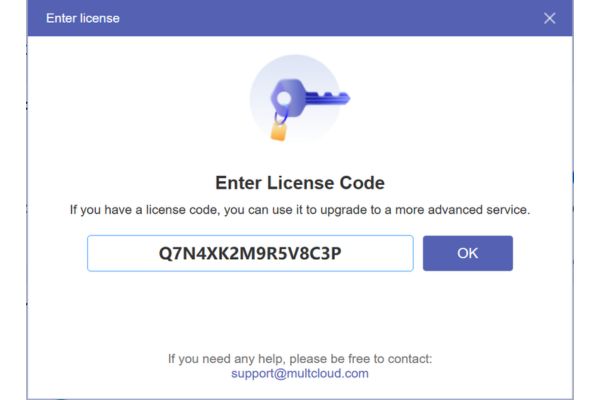
Step 4: Look at the top corner of the screen and you will see a key-shaped button. Click on it, paste the code you just copied and confirm.
That’s it. Your account has been successfully upgraded.
Conclusion
In short, accept the bet MultCloud Premium is free This is a great deal for those who often work with data. Just register and leave it there when you need to transfer large files and pull them out to use. Saves time from having to plug in a device to upload and download. Wish you successful operations and clean up your drive neatly.
Frequently Asked Questions (Q&A)
1. Does this 200GB traffic have an expiry date?
According to information from the program, this 200GB traffic will come with a 3-month term of the Premium package. You should take advantage of this time to clean up your data.
2. When transferring files back and forth, will my original data be deleted?
Absolutely not. The system only executes copy or move commands according to your wishes. Your original files in the cloud are still completely safe unless you actively choose to delete them.
3. Can I register to receive gifts by phone?
Okay. You just need to open the web browser on your phone, click on the promotion link and follow the instructions exactly to receive the code normally.







