• Home
  • News
  • Software
  • Knowledge
  • MMO
  • Tips
  • Security
  • Network
  • Office
AnonyViet - English Version
  • Home
  • News
  • Software
  • Knowledge
  • MMO
  • Tips
  • Security
  • Network
  • Office
No Result
View All Result
  • Home
  • News
  • Software
  • Knowledge
  • MMO
  • Tips
  • Security
  • Network
  • Office
No Result
View All Result
AnonyViet - English Version
No Result
View All Result

How to Sub subtitles automatically inserted into Video with Capcut

AnonyViet by AnonyViet
January 28, 2023
in Software
0

You must have watched many TikTok dub videos and seen subs (subtitles) appear when other people talk or read lines, right? Today I will guide you to subtitles automatically with Capcut.

Join the channel Telegram of the AnonyViet 👉 Link 👈

How to Sub subtitles automatically inserted into Video with Capcut

CapCut is a free all-in-one video editing app that helps you create beautiful videos to post on Tiktok. Capcut’s cool features include ease of use, high-quality videos, and best of all, Capcut has an awesome music library for you to add to your videos.

How to Subtitle text automatically inserted into the video

The feature of Vietnamese subtitles is that you don’t need to type, just read the dialogue, the App will automatically run the text for you. Your job is to align the text to match the time. A 1-minute clip only takes about 30 seconds to create a clip with Vietnamese sub.

First, you need to download Capcut to your phone Android or iOS.

Once downloaded, go to Capcut and select “New Project”.

New project

Next, you choose the video that you want to sub in Vietnamese text. When done, click “Text”.
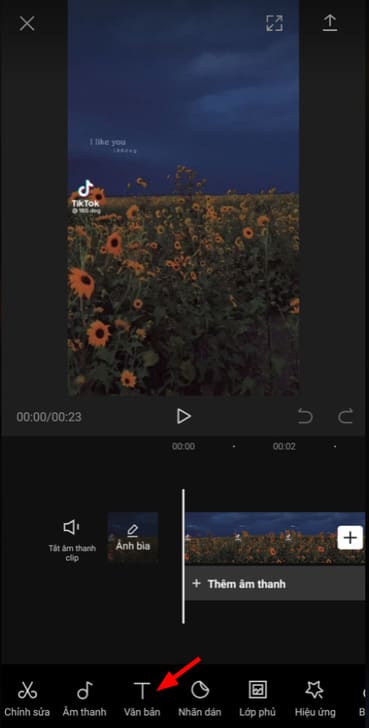
Document

Continue to press “Add text” to subtitle text automatically in the video.
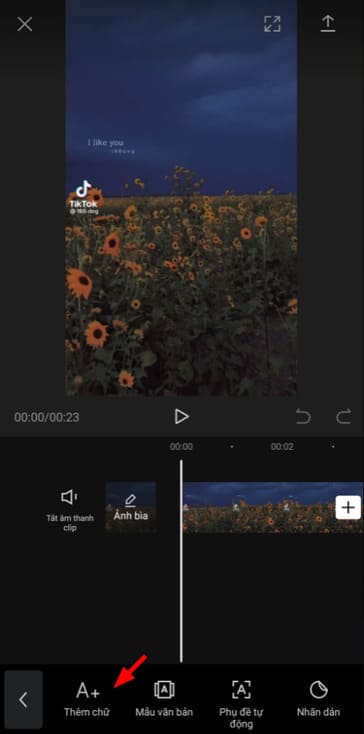
Add words

Now, you click on the microphone icon on the keyboard to voice to text.
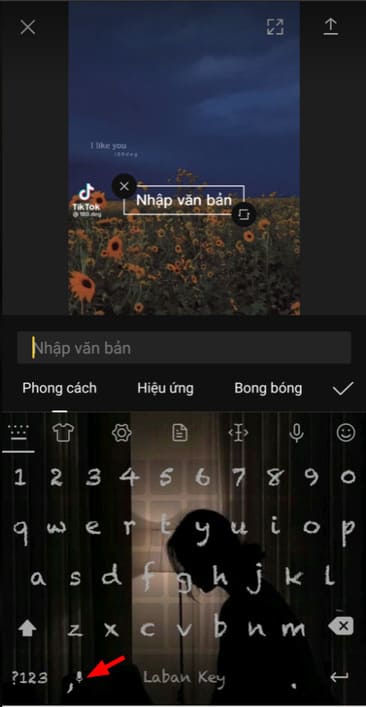
microphone icon

You can also decorate the text by choosing the font, color, … that you like. The font I use is super pretty, I’m sure you’ll like it too.
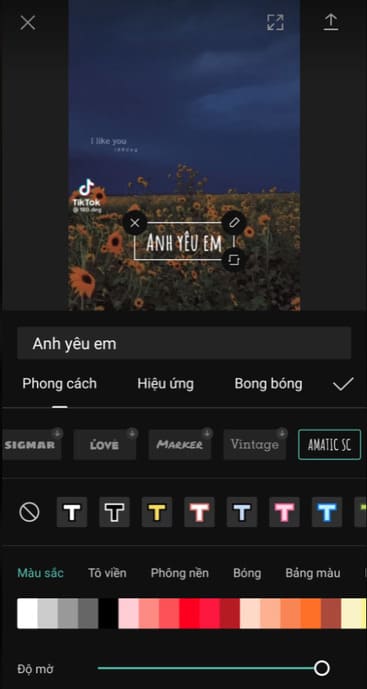
font

You adjust the time to show the text in the video and rewind the video to the place where you want to add the next text. Just repeat the above steps until the video is over. When done, click the up arrow icon to save the video to the device.
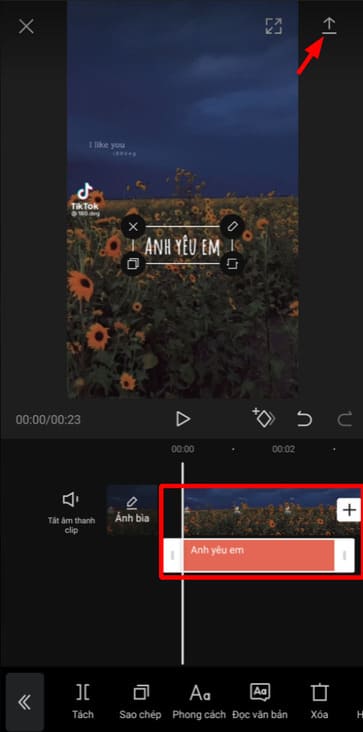
arrow pointing up

Adjust the resolution and frame rate to your liking. Then click “Export”.
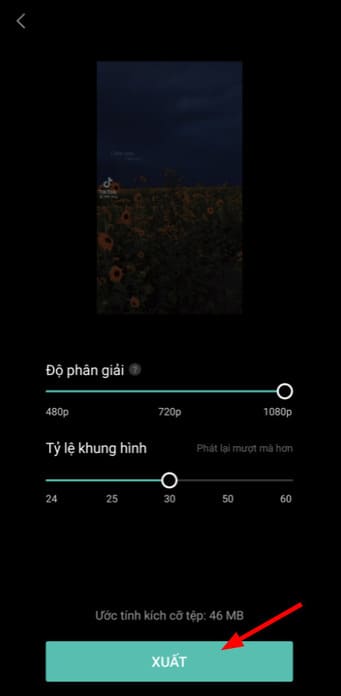
Export

So you have successfully subbed subtitles into the video successfully.

The article achieved: 5/5 – (100 votes)

Tags: AutomaticallyCapCutinsertedsubtitlesvideo
Previous Post

Prevent other websites from leech image link from your Hosting

Next Post

How to use Google Sites

AnonyViet

AnonyViet

Related Posts

How to authenticate the owner’s SIM on VNeID from April 15
Software

How to authenticate the owner’s SIM on VNeID from April 15

April 15, 2026
Review of Galaxy A57 and A37: Some are eight ounces, some are half a pound
Software

Review of Galaxy A57 and A37: Some are eight ounces, some are half a pound

April 14, 2026
JOPDF: Versatile PDF editing software for Windows and Mac
Software

JOPDF: Versatile PDF editing software for Windows and Mac

April 10, 2026
MyVehicle: Convenient and secure motorcycle maintenance reminder app
Software

MyVehicle: Convenient and secure motorcycle maintenance reminder app

April 10, 2026
How to turn off AI on Gmail to absolutely protect personal data
Software

How to turn off AI on Gmail to absolutely protect personal data

April 8, 2026
How to add Settings to Control Center using Shortcuts
Software

How to add Settings to Control Center using Shortcuts

April 7, 2026
Next Post
How to use Google Sites

How to use Google Sites

0 0 votes
Article Rating
Subscribe
Login
Notify of
guest

guest

0 Comments
Oldest
Newest Most Voted
Inline Feedbacks
View all comments

Recent News

How to intercept traffic using Burp Suite to analyze HTTP/HTTPS

How to intercept traffic using Burp Suite to analyze HTTP/HTTPS

April 18, 2026
How to avoid Adblock detection on Youtube with 4 good tips

How to avoid Adblock detection on Youtube with 4 good tips

April 17, 2026
How to transfer ChatGPT data to Claude is extremely simple

How to transfer ChatGPT data to Claude is extremely simple

April 16, 2026
How to authenticate the owner’s SIM on VNeID from April 15

How to authenticate the owner’s SIM on VNeID from April 15

April 15, 2026
How to intercept traffic using Burp Suite to analyze HTTP/HTTPS

How to intercept traffic using Burp Suite to analyze HTTP/HTTPS

April 18, 2026
How to avoid Adblock detection on Youtube with 4 good tips

How to avoid Adblock detection on Youtube with 4 good tips

April 17, 2026
How to transfer ChatGPT data to Claude is extremely simple

How to transfer ChatGPT data to Claude is extremely simple

April 16, 2026
AnonyViet - English Version

AnonyViet

AnonyViet is a website share knowledge that you have never learned in school!

We are ready to welcome your comments, as well as your articles sent to AnonyViet.

Follow Us

Contact:

Email: anonyviet.com[@]gmail.com

Main Website: https://anonyviet.com

Recent News

How to intercept traffic using Burp Suite to analyze HTTP/HTTPS

How to intercept traffic using Burp Suite to analyze HTTP/HTTPS

April 18, 2026
How to avoid Adblock detection on Youtube with 4 good tips

How to avoid Adblock detection on Youtube with 4 good tips

April 17, 2026
No Result
View All Result
  • Home
  • News
  • Software
  • Knowledge
  • MMO
  • Tips
  • Security
  • Network
  • Office

wpDiscuz
0
0
Would love your thoughts, please comment.x
()
x
| Reply