How to use Comet It’s not just about typing in a web address, it’s about giving commands to a smart AI assistant to automate everything. Forget about manual clicking, this free browser will do your travel planning, email management and even online shopping for you.
| Join the channel Telegram belong to AnonyViet 👉 Link 👈 |
What is Comet and why is it special?
Perplexity Comet not a regular web browser. It is a “virtual assistant” deeply integrated into the browser, capable of automatically performing complex operations on the web on your behalf.
Comet’s breakthrough is that it can understand requests in natural language and perform steps such as clicking, filling out forms, comparing information on its own. Used to be a high-end tool that cost up to 200$/monthComet is now completely free, making time-consuming tasks quick with just a few simple commands.
Comet download link: HERE.

Instructions on how to use Comet
Comet is not just a browser, it is a virtual assistant capable of performing complex tasks, helping you solve daily tasks quickly and accurately.
1. Automate email and schedule management
Is your inbox overloaded? Comet will help you clean and organize them scientifically. To quickly summarize important emails, just type the command:
Summary of emails I haven’t read this month.

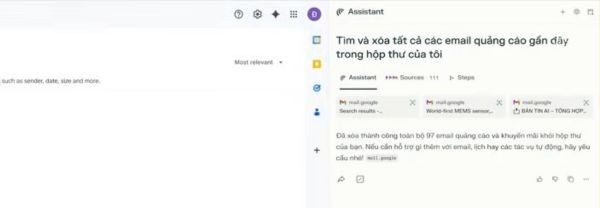
- To clean up your mailbox, try the command:
Find and delete all recent promotional emails in my inbox.
- To automatically create a reminder from an email, you can issue the following command:
This email contains service renewal information, please create a reminder to cancel this package on Google Calendar for me.
2. Make a detailed travel plan from A to Z
Instead of having to search and compare on dozens of websites yourself, you just need to make a detailed request.
You can make a detailed request as follows:
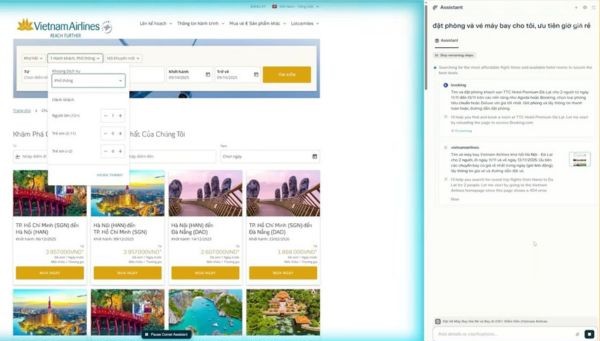
Plan a trip to Da Lat for 2 people from November 11 to November 13, budget no more than 7 million VND/person. Find 4-star hotels near the night market with good reviews and cheap round-trip flights on Vietnam Airlines.
Comet will automatically search, compare and recommend the most suitable hotel and flight options. Your job is just to fill in your personal information to complete the booking.
3. Home shopping and cooking assistant
Do you want to try a new recipe but are afraid of the preparation? Comet will take care of it for you. Try commanding:
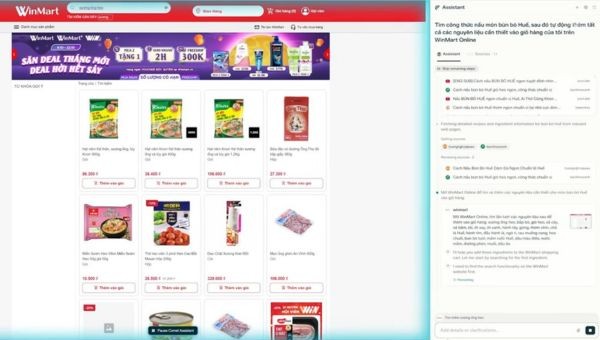
Find a recipe for Hue beef noodle soup, then automatically add all the necessary ingredients to my cart on WinMart Online.
Comet will find the recipe, list the ingredients, then go to the WinMart website and add each item to your cart for you.
4. Summarize and compare information from multiple tabs at the same time
This is one of the features that helps you analyze data visually. After opening the necessary tabs, you just need to ask:
From the open tabs, create a table comparing these AI plans in terms of price, key features, and suitable audience.
This tool automatically extracts data and presents it visually, helping you make quick decisions.
5. Create smart travel routes right on the map
When exploring a new city, planning your travel schedule is simpler than ever. With Google Maps open, issue the command:
Starting from the Temple of Literature-Quoc Tu Giam, create a route for me to visit 5 famous tourist destinations in Hanoi by bicycle.
Comet will automatically search for locations, arrange reasonable routes and display them on Google Maps.

Points to note when using Comet
Although powerful, Comet still has a few things you need to pay attention to for the best experience.
- Comet can consume more system resources than regular browsers. According to testing, it can cost more than approx 15-20% RAM compared to Chrome, so you should consider if you are using a device with weak configuration.
- You still need to monitor complex and important tasks. Because it is an AI tool, Comet can sometimes misunderstand requests or perform them incorrectly. Therefore, always recheck important steps to make sure everything goes as expected.
- Using Comet requires some time to get used to. You will need to change your habits from “searching” to “commanding” to exploit the full potential of this browser.

Conclusion
Through the above examples, it can be seen How to use Comet not only saves time but also opens a new era for interacting with the web. Instead of being the executor, you will become the one giving orders to your AI assistant. Download and experience now to see the difference this powerful tool brings!