
• Home
  • News
  • Software
  • Knowledge
  • MMO
  • Tips
  • Security
  • Network
  • Office
AnonyViet - English Version
  • Home
  • News
  • Software
  • Knowledge
  • MMO
  • Tips
  • Security
  • Network
  • Office
No Result
View All Result
  • Home
  • News
  • Software
  • Knowledge
  • MMO
  • Tips
  • Security
  • Network
  • Office
No Result
View All Result
AnonyViet - English Version
No Result
View All Result

4 ways to quickly open Camera on iPhone that you may not know

AnonyViet by AnonyViet
October 15, 2023
in Software
0

How to quickly open camera on iPhone is one of the useful tricks that many iPhone users want to know. Did you know that you can quickly take photos without unlocking your phone or looking for a camera app? AnonyViet will guide you how to quickly turn on the camera on iPhone with just a few simple steps. Let’s explore together!

Join the channel Telegram belong to AnonyViet 👉 Link 👈

4 ways to quickly open camera on iPhone

Method 1: Swipe left on the lock screen

This is the simplest and fastest way to open the camera above Iphone, just open the device and swipe left. You will see a camera icon appear in the lower right corner, and you can take a photo immediately. This is the method I often use when I want to take urgent photos, because it doesn’t take much time and doesn’t require entering a password or recognizing faces.
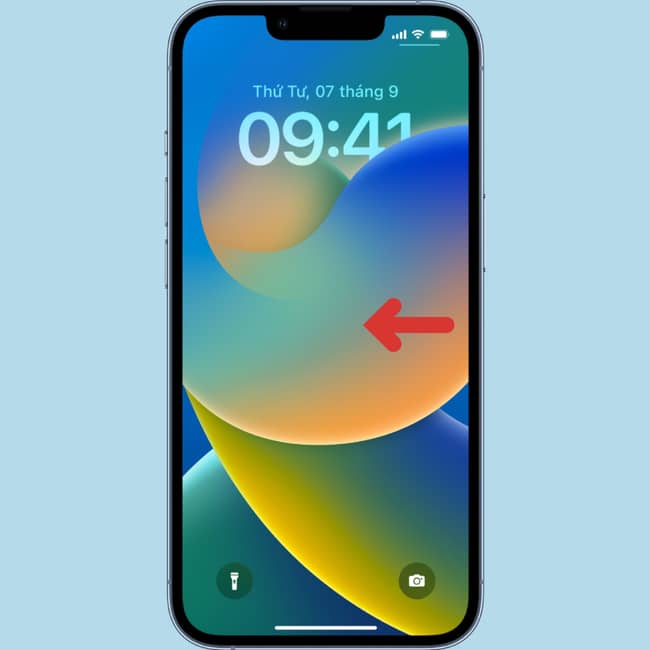
How to quickly turn on the camera on iPhone
4 ways to quickly open camera on iPhone
  • Advantage: Fast and convenient, you don’t need to unlock your iPhone or search for the camera icon on the home screen.
  • Defect: It’s possible to accidentally open other notifications when swiping left, or not be able to review captured photos unless the iPhone is unlocked.

Method 2: Press and hold the camera icon on the lock screen

This method is an alternative to method 1 when you don’t want to swipe left, just press and hold the camera icon on the lock screen. You will see the camera activated immediately, and you can take photos normally.
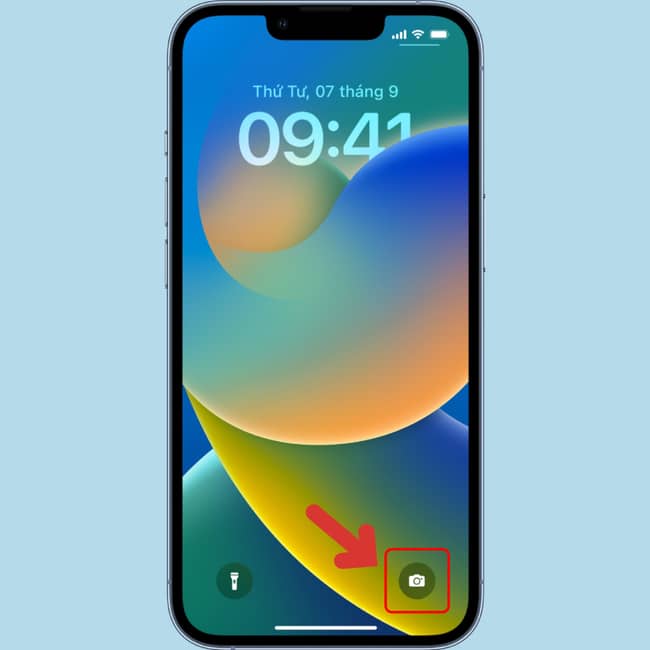
How to quickly turn on camera on iPhone
Long press the camera icon on the lock screen
  • Advantage: Without being bothered by other notifications, you can focus on taking photos.
  • Defect: May not work on older devices.

Method 3: Open via Control Center

This method allows you to open the camera from any screen, even if your iPhone is unlocked, just swipe down from the top right corner (on iPhones with Face ID) or swipe up from the bottom edge (on older models). other iPhone) to open Control Center and tap the camera icon.
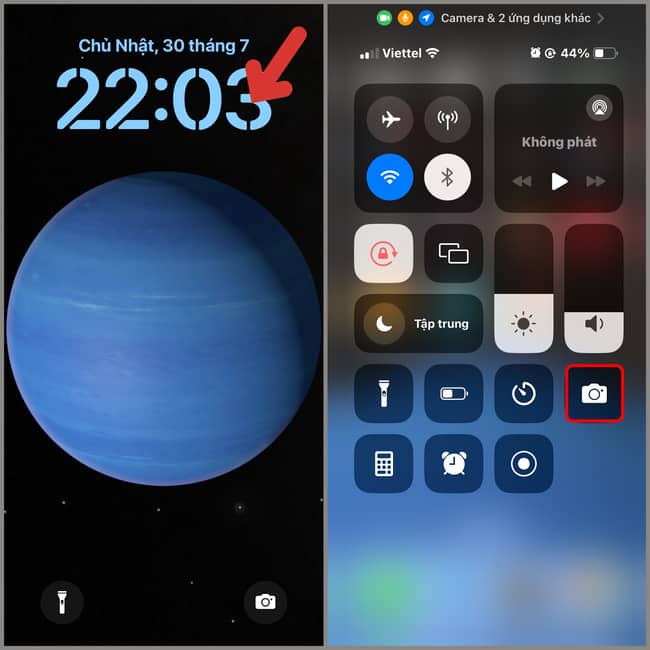
How to quickly turn on the camera on iPhone
Open via Control Center

You will be taken to the camera app immediately, and you can take photos as you like.

  • Advantage: The camera can be opened from any application without having to exit the application in use.
  • Defect: Access to Control Center may not be allowed in some applications, or more work may be required to open Control Center.

Method 4: Open via Siri

This method allows you to open the camera by voice, just activate Siri and say “Open camera” or “Take photo”. You will see the camera activated immediately, and you can take photos with your voice or by pressing the camera button.
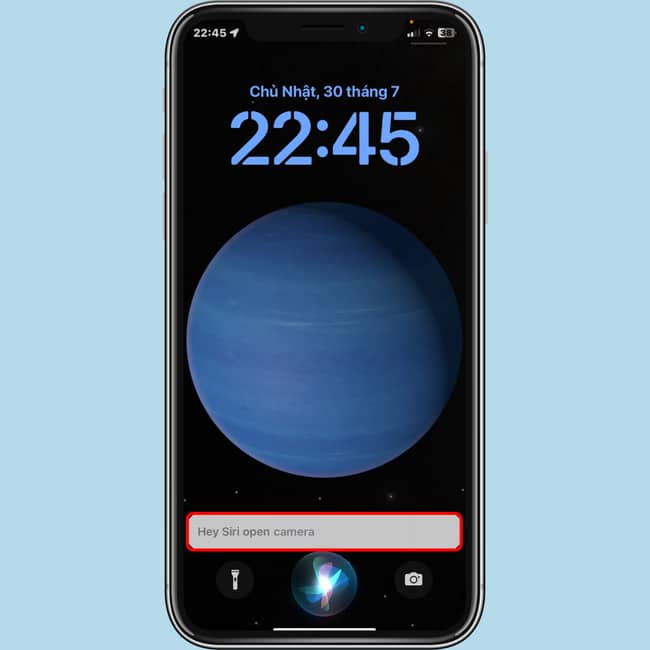
How to quickly turn on the camera on iPhone
Open via Siri

This is the method I use when I want to take a photo quickly without touching the screen, or when I want to take a selfie without anyone’s help.

  • Advantage: Save time and without touching the screen, you can take photos remotely or when your hands are busy.
  • Defect: May not be recognized correctly by Siri or affected by background noise.

Epilogue

So you know 4 How to quickly open camera on iPhone. Each method has its own advantages and disadvantages, you should choose the method that suits your needs and situation. Thank you for following the article, and please leave your comments below in the comments section!


The article scored: 1/5 – (1 vote)

Tags: CameraiPhoneopenQuicklyways
Previous Post

Hot! Get free Godlike Burger game on Epic Games Store

Next Post

“Mixing” images and text is extremely fun with Artbreeder Mixer

AnonyViet

AnonyViet

Related Posts

Hướng dẫn cài đặt iOS 27 Developer Beta
Software

Hướng dẫn cài đặt iOS 27 Developer Beta

June 17, 2026
Instructions on how to activate the new Siri on iOS 27
Software

Instructions on how to activate the new Siri on iOS 27

June 15, 2026
PDF editing application on Android worth 199k is free
Software

PDF editing application on Android worth 199k is free

June 10, 2026
How to buy in-game items for free on iPhone
Software

How to buy in-game items for free on iPhone

June 8, 2026
Practical use of Xiaomi 17T Pro: This is a good phone in 2026
Software

Practical use of Xiaomi 17T Pro: This is a good phone in 2026

June 8, 2026
Instructions to receive 6 months of IObit Malware Fighter 13 Pro for free
Software

Instructions to receive 6 months of IObit Malware Fighter 13 Pro for free

June 7, 2026
Next Post
“Mixing” images and text is extremely fun with Artbreeder Mixer

"Mixing" images and text is extremely fun with Artbreeder Mixer

0 0 votes
Article Rating
Subscribe
Login
Notify of
guest

guest

0 Comments
Oldest
Newest Most Voted
Inline Feedbacks
View all comments

Recent News

Hướng dẫn cài đặt iOS 27 Developer Beta

Hướng dẫn cài đặt iOS 27 Developer Beta

June 17, 2026
How to handle locked SIMs due to lack of standardization

How to handle locked SIMs due to lack of standardization

June 17, 2026
Instructions to receive Claude Fable 5 for free for 30 days

Instructions to receive Claude Fable 5 for free for 30 days

June 15, 2026
Instructions on how to activate the new Siri on iOS 27

Instructions on how to activate the new Siri on iOS 27

June 15, 2026
Hướng dẫn cài đặt iOS 27 Developer Beta

Hướng dẫn cài đặt iOS 27 Developer Beta

June 17, 2026
How to handle locked SIMs due to lack of standardization

How to handle locked SIMs due to lack of standardization

June 17, 2026
Instructions to receive Claude Fable 5 for free for 30 days

Instructions to receive Claude Fable 5 for free for 30 days

June 15, 2026
AnonyViet - English Version

AnonyViet

AnonyViet is a website share knowledge that you have never learned in school!

We are ready to welcome your comments, as well as your articles sent to AnonyViet.

Follow Us

Contact:

Email: anonyviet.com[@]gmail.com

Main Website: https://anonyviet.com

Recent News

Hướng dẫn cài đặt iOS 27 Developer Beta

Hướng dẫn cài đặt iOS 27 Developer Beta

June 17, 2026
How to handle locked SIMs due to lack of standardization

How to handle locked SIMs due to lack of standardization

June 17, 2026
  • Home
  • Home 2
  • Home 3
  • Home 4
  • Home 5
  • Home 6
  • Next Dest Page
  • Sample Page

6789 kv999

No Result
View All Result
  • Home
  • News
  • Software
  • Knowledge
  • MMO
  • Tips
  • Security
  • Network
  • Office

6789 kv999

wpDiscuz
0
0
Would love your thoughts, please comment.x
()
x
| Reply







