Snapvie brings a breath of fresh air to online video storage needs with the ability to preserve original quality. You will no longer have to worry about blurred images or complicated command line operations like before. Let’s find out with AnonyViet what’s special about this platform!
📢 Join the channel Telegram belong to AnonyViet
Update new articles, cool tools and IT tips fastest
Current status of video storage needs
In the digital era, downloading movies from the world’s largest video sharing platform to personal devices has become an essential need. However, the journey to finding a truly quality tool is not easy. Most current websites on the market often heavily advertise their ability to support 4K or even 8K resolution.
However, the harsh reality is that these files have all gone through a rigorous data compression process. As a result, downloaded images have significantly reduced sharpness, lose detail and no longer retain the original quality as when viewed online.
On the other hand, for tech-savvy users, they often look to specialized open source solutions like yt-dlp to ensure file quality. Despite possessing unparalleled power, the fatal drawback of this method lies in the extremely dry command line interface. Having to type complex code and set up a cumbersome configuration environment has created a barrier that is too big for the majority of common users.

Snapvie – The ultimate video download solution from Vietnamese programmers
Realizing the huge gap between low-quality websites on the one hand and overly complicated tools on the other, a Vietnamese software developer named Bui Dang Khoa decided to take action. He devoted himself to researching and launching Snapvie, a personal technology project with the ultimate goal: bringing the power of professional tools to ordinary users through the most user-friendly interface.
The birth of this platform has completely solved a long-standing conundrum. It not only meets the criteria of simplicity and accessibility, but also commits to absolutely preserving the quality of multimedia files, bringing a breath of fresh air to the online community.
Snapvie’s bright spots
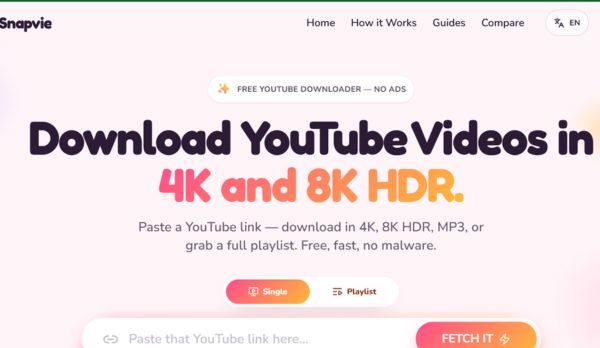
The most impressive highlight and also the sharpest weapon of Snapvie is the ability to handle ultra-sharp video formats. This platform allows users to download files at resolutions up to 8K HDR without any data compression. This is an extremely rare privilege that you will hardly find in other free services.
Even thanks to preserving the original bitrate, the experience of playing back videos offline on large screens is sometimes smoother and sharper than live streaming, because it is not affected by unstable network connections.
Besides that core power, this tool is also equipped with a series of premium features to optimize user experience:
- Supports extracting entire playlists with just one operation, saving maximum time.
- Integrates advanced multi-threaded download mechanism, helping to split files to increase download speed dramatically.
- Provides ultimate flexibility by allowing users to freely choose the output format, from sharp video images to high quality audio files.
Instructions for using Snapvie to download videos
To own an original quality video, you just need to follow these extremely basic steps:
Step 1: Access the video sharing platform and copy the link of the video or playlist you want to store.
Step 2: Open your web browser and access it Snapvie’s homepage.
Step 3: Paste the copied link into the search box located right in the middle of the interface screen. (If you want to download individual videos, choose Singledownload playlist then select Playlist)
Step 4: Click Fetch It.

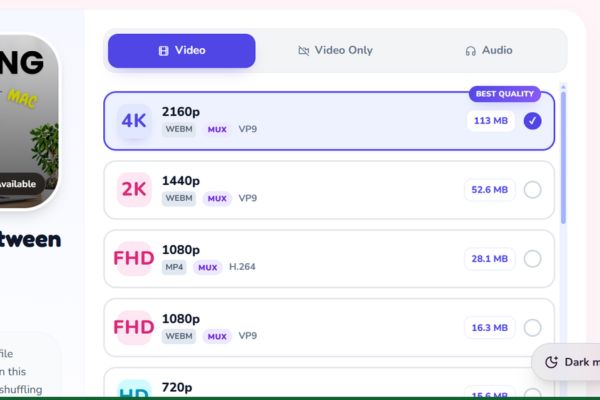
Then select the format (audio or image) and desired resolution, then press the download button and wait for the multi-threaded system to process in a snap.
Future development orientation
According to enthusiastic shares from author Bui Dang Khoa, this project is still in the completion stage and is constantly being upgraded. In the near future, Snapvie will not stop at just one platform but will expand the scope of support to a series of other popular social networks.
With unremitting efforts, this is definitely a “made in Vietnam” technology product to be extremely proud of, worthy of anyone looking for perfection in video quality to experience today.
Conclusion
In short, Snapvie Truly a bright spot among the countless video storage support tools available today. With its ability to retain original quality and user-friendly interface, it deserves a place in your browser bookmarks. Don’t hesitate to experience it now!
Frequently Asked Questions (Q&A)
1. Does this tool reduce video quality when downloaded?
Absolutely not. This platform is committed to preserving the original quality of the video, supporting resolutions up to 8K HDR without undergoing any data compression.
2. Do I need to install software to use?
Unnecessary. All operations are performed directly on your web browser, helping to save computer space and avoid risks of malicious code.
3. Does the system support downloading entire playlists?
Have. You just need to paste the playlist link into the search box, the system will automatically recognize and support you in downloading multiple videos at the same time thanks to the powerful multi-threading mechanism.