JG Cache Cleaner is a great lifesaver when you encounter display errors on a particular website. Instead of deleting your entire browsing history and being signed out of every account, this tool helps you clean up just the page that’s causing the error. Let’s go together AnonyViet Discover details about this extremely useful utility!
📢 Join the channel Telegram belong to AnonyViet
Update new articles, cool tools and IT tips fastest
The obsession of having to delete all web browsing data
Surely all of us have encountered a situation where a website suddenly goes haywire: images are broken, the interface is messy, or the website clearly has new articles but your computer still displays the old version from forever ago. According to a natural reflex, the most classic solution that people often whisper to each other is: “Delete cache and cookies!”.
However, life is not like a dream. Although current browsers support this cleaning feature, they work in a “killing by mistake is better than missing by mistake” style. When you press the delete button, all the data of all the websites you have ever visited will disappear.
What are the consequences? You get thrown off Facebookhad to log in to Gmail again, lost the unfinished shopping cart on Shopee. If you want to deeply intervene in just a single website, you have to open the Developer Tools and fumble through the complicated code. This is really inconvenient and time-consuming for ordinary users.
What is JG Cache Cleaner utility?
To completely solve the above headache problem, the birth of JG Cache Cleaner has completely changed the way we manage cache memory. This is a completely free extension, designed specifically for Google Chrome and Mozilla Firefox. Its main function is extremely simple but extremely powerful: delete the core data of the website you are opening with just a few mouse clicks.
Selective cleaning, no account splashing
The most valuable point of this tool is the ability to “point fingers”. It only interferes with the domain you are accessing. For example, if you’re reading the newspaper and the website crashes, you can just open the utility and clean it up. All data, cookies, and your login sessions in other tabs such as YouTube or Facebook are still kept intact and absolutely safe.

Delete exactly what you need
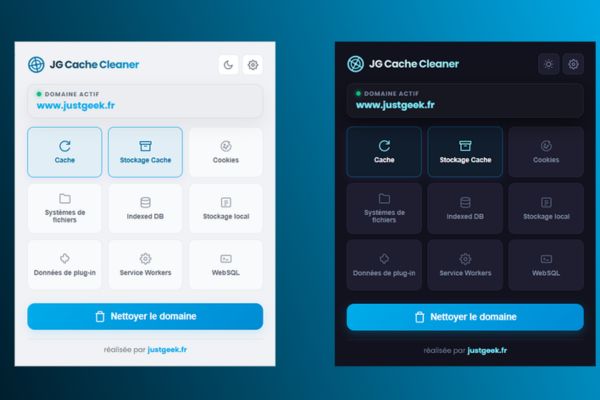
Not only does it stop at clearing the regular cache, this tool also allows you to intervene deeply into the technical components of the web. When you open the interface, you will see a list of data types clearly listed. You can select or deselect as you wish. Supported data types include:
- Cache
- Cookies
- Local Storage
- IndexedDB
- Service Workers
- Storage Cache, File Systems, WebSQL and even data Plug-ins.
Instructions for using JG Cache Cleaner
The tool’s interface is designed to be extremely user-friendly, with a modern and minimalist feel. Right in the top corner of the utility window, the domain name you are working on will appear clearly, helping you never be afraid of deleting the wrong page.
Step 1: Go to Chrome or Firefox’s extension store, find the tool name and click “Add to browser”.

Step 2: Open a website that has a display error or is not updating the content.
Step 3: Click the utility’s icon in the right corner of the screen.
Step 4: Select the types of data you want to clean (for example: Cache, Cookies, Service Workers).
Step 5: Click the button “Clean up domains” (Domain cleanup) and wait a moment.
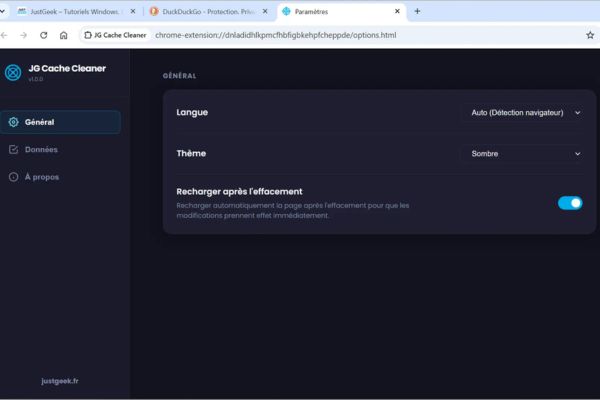
Besides, JG Cache Cleaner’s settings panel allows you to personalize the experience very well. You can change the interface dark background (Dark mode) to reduce glare, choose English or French language. In particular, the “Automatically reload tabs after cleaning” feature is a big plus, helping you avoid having to reach out and press the F5 key to check if the website has no errors or not.
Differences to note when using on Chrome and Firefox
Although this tool works smoothly on both of the most popular browsers today, there are slight differences in the cache management mechanism that you need to understand.
On Google Chrome, the utility can wipe everything (including cache) just for the currently open website. However, on Mozilla Firefox, due to strict security limits from the browser itself, deleting “Cache” will be applied to the entire browser, not just a domain name.
But don’t worry too much! This Firefox limitation only applies to the Cache section. Other important data such as Cookies, Local Storage or IndexedDB still comply with the “only delete on the current page” principle. To avoid confusion, JG Cache Cleaner will display a very clear yellow warning message on the Firefox version every time you accidentally check the box to clear Cache. Thanks to that, you are always in control of all your operations.
Conclusion
In short, JG Cache Cleaner is a compact tool but brings extremely great value to regular internet users. It helps you quickly handle web display errors without disturbing other work tabs. Download this utility immediately to your browser to experience the convenience.
Frequently Asked Questions (Q&A)
1. Is this utility free?
Yes, this extension is completely free and you can download it directly from the official app stores of Google Chrome and Mozilla Firefox.
2. Using Firefox, will I be logged out of other sites?
Are not. Except for the “Cache” section, which is limited by the browser and must be completely deleted, other items such as Cookies and Local Storage are still only deleted on the current page, so you don’t have to worry about your account being thrown away on another site.
3. Is it necessary to restart the browser after deletion?
No need. The utility has an option to automatically reload tabs (auto-reload) immediately after cleaning, helping the website update the new interface immediately.