How to change Gmail address It’s actually not as complicated as many people think. With just a few basic steps, you can immediately have a new login name and still receive mail from the old address. Come on, let’s go together AnonyViet Let’s learn more about this issue.
📢 Join the channel Telegram belong to AnonyViet
Update new articles, cool tools and IT tips fastest
Benefits of changing Gmail address
While using the internet, sometimes the old email name is no longer suitable for your current job or interests. Instead of having to create a completely new account and then waste time converting data, changing the name directly brings much greater benefits.
Once the change process is complete, the new address you just set up will immediately become the official login address. The best thing about changing your Gmail address is that you don’t need to worry about managing multiple cumbersome mailboxes. In fact, emails sent to both the old address and the new address will automatically flow to the same Inbox. Thanks to that, you will never miss any important notifications or messages from partners or friends.
Besides, all your digital assets are kept intact. From old letters filled with memories, to carefully stored photos Google Photosto important document files on Google Drive are not moved at all. At this time, your old address will not disappear. Instead, it takes a back seat and operates silently as a powerful email backend.
Notes before starting work
Although everything sounds very smooth, before proceeding with how to change your Gmail address, you really need to know a few extremely important notes. Do not rush to operate if you are not sure of the following:
- First, the new username you intend to choose must be a unique name on Google’s system.
- Next, this change may cause some slight “shocks” to the services you are using such as Chromebooks or software. Chrome Remote Desktop.
- Therefore, to ensure absolute safety, our sincere advice is to back up all important data before making any changes.
Instructions on how to change Gmail address without losing data
After preparing mentally and carefully backing up, we will go into the practice part. To change your Gmail address, follow the extremely simple steps below:
Step 1: Open a web browser and directly access the Google account management link at: https://myaccount.google.com/google-account-email
Step 2: At the screen interface that has just appeared, find and click the button with the text Change your Google Account email.
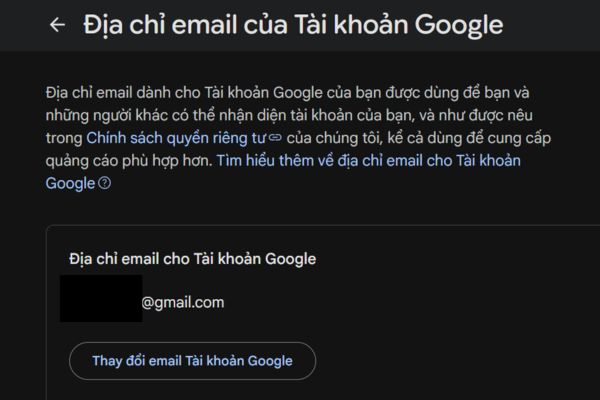
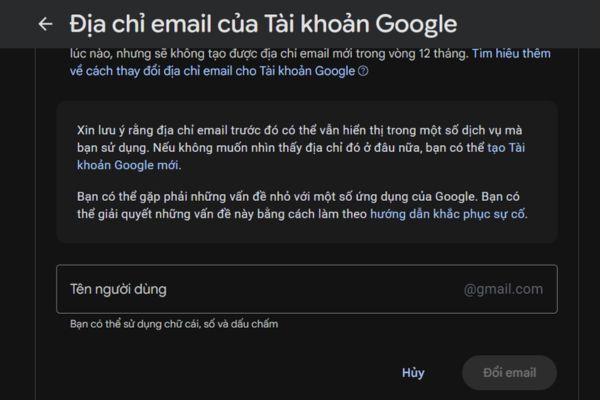
Step 3: At this point, an empty box will appear. You just need to enter your new favorite email address there, then click select Change email to confirm.
With just 3 such short steps, Google’s system will automatically create a new email that runs in parallel with your old email. As mentioned, it’s the same mailbox but you can use any email for transactions. Whether someone else sends mail to the old address or the new address, you will receive it normally without any problems.
Rules from Google you should master
Although changing your Gmail address is very convenient, Google also applies certain restrictions to prevent users from abusing this feature.
Fate of old email address
Specifically, your old address will not be deleted. Instead, it permanently becomes an alternate email attached to the account and especially cannot be reused to create a completely new account. However, the plus point is that you have the right to return to using this old address as your primary address any time you want.
Limit the number of changes allowed
Regarding the number of attempts, Google’s regulations are very clear: Each account is only allowed to create a maximum of 3 new usernames during its entire usage life cycle. Furthermore, you are only allowed to change once within 12 months. Therefore, think carefully before finalizing a new name.
How to display old data
Finally, rest assured that your account data structure has not changed. However, one small detail to note is that some old data items, such as events created in Google Calendar in the past, may still show up as your previous Gmail address. This is completely normal and does not affect the current usage experience.
Conclusion
In short, How to change Gmail address offers a great solution for those who want to refresh their accounts without fear of losing data. As long as you comply with Google’s regulations, everything will go extremely smoothly. Wishing you a successful operation and a good experience!
Frequently Asked Questions (Q&A)
1. After changing my email, will the old data be lost?
No, all old messages, photos in Google Photos and files in Drive are kept intact.
2. How many times can I change my email name?
You can only create a maximum of 3 new usernames during the entire period of use, and can only change once within 12 months.
3. What will happen to the old email after changing it?
It will permanently become an auxiliary email running in parallel, cannot be deleted and you will still receive mail sent to this address normally.