Microsoft has been teasing the “next generation” of Windows for months, but new hints not only show that Microsoft is preparing to update Windows 10, but also launch a newer version, specifically Windows 11.
📢 Join the channel Telegram belong to AnonyViet
Update new articles, cool tools and IT tips fastest
Windows 11 launch event
Software giant Microsoft has announced a new Windows event on June 24, promising to show off “what’s next for Windows.” The event invitation includes an image that looks like the new Windows logo, with light shining through the window, creating an outline that looks a lot like the number 11. I think Microsoft intentionally omitted the horizontal bar on the window to create the number 11.

Microsoft’s Windows event also starts at 11 a.m. ET, which is not the usual start time for Windows and Surface events. After the invitation to participate in the event, Yusuf Mehdithe Microsoft executive said he hasn’t been “excited about a new version of Windows since Windows 95!” This is the first time we’ve heard Microsoft specifically mention a “new version” of Windows is on the way.
The invitation to the event also comes just a week after Nadella made his announcement about the “next generation of Windows.” Nadella promised that Microsoft will soon announce “one of the most important updates to Windows in the last decade.” Microsoft product manager Panos Panay also introduced a “next generation” of Windows earlier this year.
If Microsoft is truly willing to skip Windows 10 and move towards Windows 11, we can expect to see major changes in visuals, graphics, and performance. Microsoft has been working on a version codenamed Sun Valleywhich the company calls a “complete visual overhaul of Windows.”
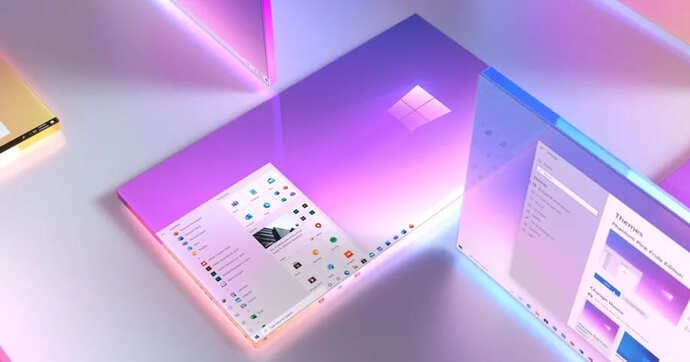
A lot of the visual changes will be taken from Windows 10X, a lightweight version of Windows intended to compete with Chrome OS. Includes a new Start Menu, new system icons, File Explorer improvements, and Windows 95-era dialog box icons that take Windows users back in time. Rounded edges and updates to built-in Windows apps are also planned.
Significant changes beyond the user interface are also being applied to Windows. Microsoft appears ready to address many of the remaining issues, with fixes in store for issues like cross-screen app reordering, the upcoming Xbox Auto HDR feature, and improvements to Bluetooth audio support.
Perhaps the biggest problem waiting to be fixed is the Windows Store. Microsoft has been developing a new app store for Windows in recent months, and rumors suggest it will be a significant change from the current Windows Store. Nadella has promised to “open up greater economic opportunity for developers and creators” with Windows, and the Windows Store seems to be the exact answer to that.
/cdn.vox-cdn.com/uploads/chorus_asset/file/22235025/10xactioncenter.gif "Microsoft is preparing to launch Windows 11")
So far, Microsoft has only announced a 12% cut in commissions for PC games in the Windows Store, but cutting Microsoft’s commissions would be a significant change for developers.
Windows 11 will also support Microsoft’s reinvestment in Windows. Microsoft renewed interest in Windows last year, during a pandemic that demonstrated the operating system’s importance. Windows usage skyrocketed as workers and students around the world turned to laptops and PCs to work from home. PC shipments have also increased sharply over the past year.
However, switching to Windows 11 would still be a surprise move for Microsoft. Previously, the company called Windows 10 “the ultimate version of Windows” in a major effort to position the operating system as a constantly updated service. While there are monthly updates for Windows, more significant changes are usually released twice a year.

Microsoft has struggled with naming these updates. We’ve seen the Anniversary Update, the Fall Creators Update, or as simple as the November 2019 Update. Recently, Microsoft has also adopted a different naming scheme, like 20H1 or 21H1 to show both the year of release and the time of year the update was rolled out.
The move to Windows 11 doesn’t necessarily solve Microsoft’s update naming problem, but if the company adopted the same naming scheme as Windows 11.1, it would certainly help both consumers and IT administrators quickly understand which version is the latest.
OEMs will also be happy to see the release of Windows 11. New versions of Windows always drive new hardware sales and renewed interest in the operating system. If Microsoft can do that with the new user interface in Windows 11, it will be a turning point marking the return of Microsoft’s golden age.
It won’t be long until we know that Microsoft is ready to release Windows 11. The Windows 11 event will start at 11 a.m. ET on June 24, so stay tuned.
Frequently asked questions
What is Windows 11?
Windows 11 is the next generation of the Windows operating system, promising to bring major changes in user interface, performance and new features, officially announced by Microsoft on June 24.
What changes does Windows 11 have compared to Windows 10?
Windows 11 is expected to feature a completely redesigned user interface, with a new Start Menu, new system icons, and improvements to File Explorer. There are also performance improvements, app support, and the new Windows Store.
When will Windows 11 be released?
Official information about the Windows 11 release date will be announced at the launch event on June 24.