Web reading stories during work hours is a hotly discussed topic among office workers recently. Surely everyone who goes to work is bored at work and wants to pull out their phone to read a few chapters of a novel but is afraid that the boss will pass by. Understanding that suffering, author Nguyen Tran Hai Phong created an extremely magical screen camouflage tool. Let’s go together AnonyViet Discover now.
📢 Join the channel Telegram belong to AnonyViet
Update new articles, cool tools and IT tips fastest
Stealth Reader – Super cool website for reading stories during work hours
Everyone who works in an office knows how boring it is to sit and look at a computer screen for 8 hours. Many days when the boss is away or the work is done, you just want to pull out your phone to finish the series that is reaching its climax. But unfortunately the company cameras are pointed straight at my face, and my boss sometimes hovers back and forth like a ninja. Every time I hear footsteps, my hands reflexively press Alt Tab repeatedly, my heart beats and my legs tremble.

It is because of that fear that the author Nguyen Tran Hai Phong sat down and coded an extremely awesome website for reading stories during work hours. Its name is Stealth Reader. The sole purpose of this website is to help you disguise your reading screen into working software that looks very professional and busy.
What does Stealth Reader have that you guys are excited to share?
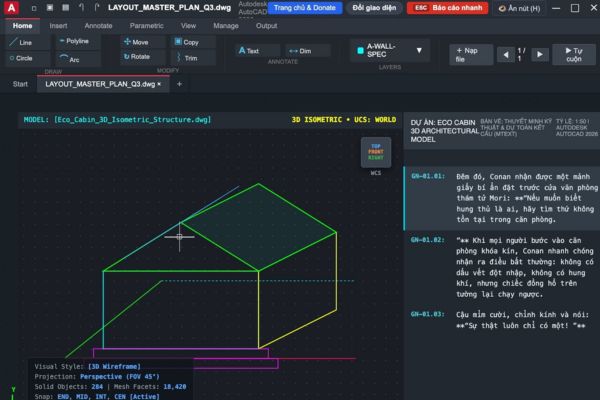
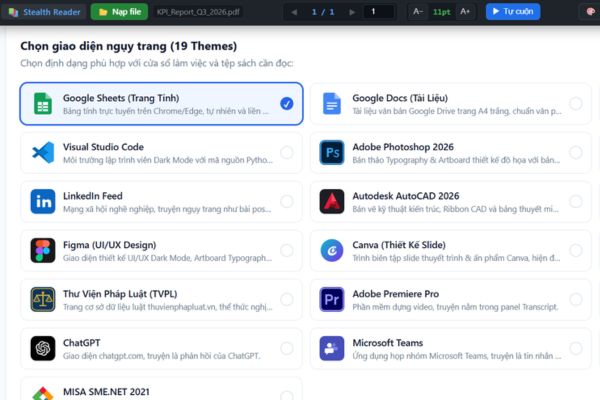
The first time I visited this website, I was really shocked by the psychology of its creator. The system gives you to 19 camouflage themes different. If you are an accountant, there is a Google Sheets interface or Excel. If you work as a coder, the dark Visual Studio Code interface will look very dangerous. Even those who work in design or engineering have some experience with AutoCAD or Figma interfaces.
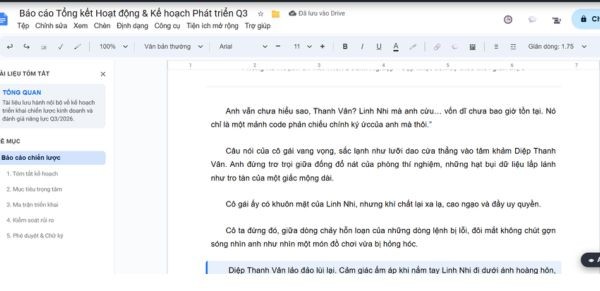
Thanks to that, no matter what department you sit in, you can choose a perfect cover. The boss passes by and glances at the screen, only to see a bunch of data, charts, or lines of code running vertically and horizontally. The boss will definitely nod and silently praise how diligently the employees have been analyzing data these days. But the boss didn’t know it was at the pillar Log Description There, the staff is passionately reading the scene where the male lead attacks monsters.
Instructions on how to use the web to read stories during work hours
There’s no need to install any heavy software, just open the browser and you’re done.
Step 1: Visit the website https://thedeceiver.site/ on your company computer.
Step 2: Right on the main screen, you will see a list of 19 camouflage skins. Choose the one that best suits your current job. For example, I often use Google Sheets because it seems the most popular.
Step 3: Look at the left corner of the screen, click the button Load files. Now you just need to select the story file in txt format that you have already downloaded to your computer.
Step 4: Wait a second for the system to load data. Then the content of your story will be neatly tucked into a certain box on the emulator screen. For example, in the Sheets interface, it is in the column Log Description.
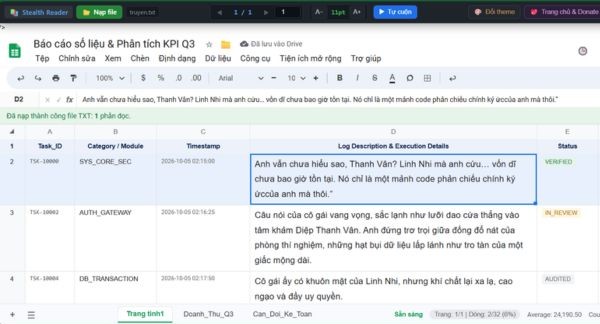
Step 5: Press H key on the keyboard to hide all control toolbars. Click again if you want it to appear.
Step 6: If you’re too lazy to click to change pages, just click the button Self-rolling Let the system automatically scroll down the text slowly for you to read.
Conclusion
Through this article, you probably know how to do beamsI read stories on the web during work hours as smooth as possible. The tools are available, but the important thing is that your acting skills must be natural. Don’t look at the Excel screen with a smile on your face, your boss will immediately become suspicious. I hope you guys do it successfully and don’t get ganked by your boss.
Frequently Asked Questions (Q&A)
1. Is this website free?
Yes, currently it is completely free for everyone to use freely.
2. Can you read the comics on here?
No, the system only supports loading text files to read text stories.
3. Is there any way for the boss to find out?
If the boss stops and carefully reads each line on the screen, it will definitely be obvious, but if you glance at it, it’s very difficult to tell.