View lyrics without internet on Apple Music is an extremely useful feature, allowing you to freely sing along to your favorite tunes even when on a plane or in a place without an internet connection. If you don’t know how to take advantage of this great utility, don’t worry. AnonyViet will guide you in detail step by step to activate and use this feature on both iPhone and Mac.
| Join the channel Telegram belong to AnonyViet 👉 Link 👈 |
Why should you know how to view song lyrics offline?
In an always-connected world, sometimes we find ourselves in situations without internet, such as when traveling, traveling by plane, or simply wanting to save mobile data.
Offline lyrics viewing feature of Apple Music was born to solve this problem, ensuring your music experience is never interrupted. You can follow every word and gain a deeper understanding of your favorite song anytime, anywhere.

How to view lyrics without internet on Apple Music
To enjoy the lyrics even when there is no network on the device iOSyou only need to perform two main stages: storing the song and displaying the lyrics.
Step 1: Store songs to your device
- First, you need to collect the songs you want to see lyrics into a new playlist or add them to an existing playlist by clicking the three-dot icon and selecting “Add to Playlist“.
- Next, please access the section “Library” (Library) on the toolbar, then select “Playlists” to navigate to the playlist you just created.
- Here, you will see one download icon (cloud image with arrow pointing down) in the upper right corner, click on it to have the system automatically download all the songs in the playlist to your device.
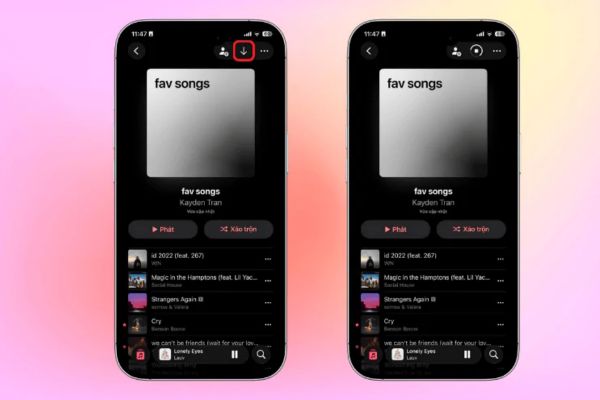
Step 2: Enjoy the lyrics in offline mode
Once the download is complete, these songs are completely stored on your device.
Now, just open any of those songs and tap Lyrics icon (icon shaped like a quotation mark) in the bottom left corner of the screen.
The lyrics will immediately appear and run in sync with the music, absolutely no need for an internet connection.

How to view lyrics without internet on Mac
Essential requirements for Mac
To use this feature, you need to make sure your Mac has been updated to the latest version macOS Catalina 10.15.4 or newer.
The steps are simple
Step 1: Please open it Music application on your Mac. Then you find and play a track you downloaded from Apple Music.
To display the words, you just need to click Lyrics icon (icon shaped like a quotation mark) is located in the top right corner of the application window. Lyrics will be displayed and synchronized in real time with the currently playing melody.
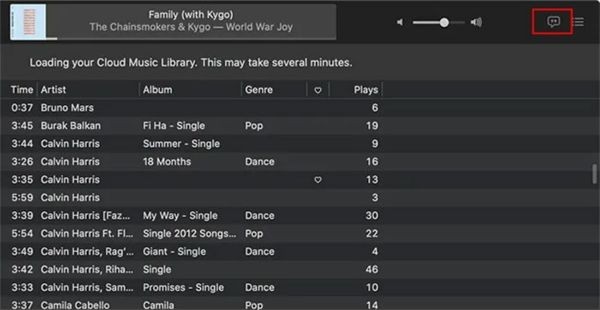
Step 2: If you want a more immersive experience, use key combinations Cmd + Shift + F to enable full-screen lyrics view.
To exit this mode, you can press the key Esc or click the lyrics icon again.

Conclusion
With the above simple instructions, now you can easily View lyrics without internet on Apple Music on all your devices. This feature really enhances the music listening experience, helping you not miss any emotional moments with melodies and lyrics. Download your favorite songs now and enjoy music to the fullest, anywhere!