How to see the package Viettel is using This is an extremely important operation that mobile users often forget. Regularly checking helps you understand remaining incentives and avoid unexpected charges. Below are the simplest lookup methods that anyone can do.
| Join the channel Telegram belong to AnonyViet 👉 Link 👈 |
Benefits of checking your package regularly
Understanding your account information is more valuable than you think. First, this operation helps users know exactly what services are active on the SIM, such as 4Gvoice, SMS or value-added services (ringback music, missed call notification). Thanks to that, you can easily manage your spending and avoid unreasonable deductions.
In addition, periodic checks help detect and promptly cancel packages that are no longer needed or were registered incorrectly. This is also the basis for you to compare and switch to new, more suitable packages, optimize usage efficiency and save monthly budget.

5+ ways to see the package Viettel is using
To meet the diverse needs of users, the network provides many different lookup channels from traditional to modern. Below are details of each method for you to choose the most suitable method for you.
Method 1: Compose an SMS message
This is a “save” method when the phone does not have an internet connection. Extremely simple operation and applicable to all models.
- Syntax: Compose KTTK sent to 191.
- Cost: Free.
Immediately after that, the system will respond to a message containing complete information: package name, remaining data volume, calling minutes, promotional messages and expiration date. This way is very convenient to control services anytime, anywhere for both prepaid and postpaid subscribers.

Method 2: Look up via My Viettel application
If you are using a smartphone, My Viettel is the most intuitive management tool. You can download the app right on the App Store or Google Play.
Step 1: Install and launch My Viettel application.
Step 2: Fill in your subscription number and enter the OTP authentication code to log in.
On the main screen, all information about the package, remaining incentives and expiration date will be clearly displayed. This is a modern way of checking, helping users have an overview of their account.

Method 3: Use USSD command code
Another quick solution that doesn’t require installing an app is to use USSD codes.
Step 1: Go to the dialer, press *098# and press the key Call.

Step 2: The screen will display a list of options. You find the number corresponding to the item Check your package (usually the “Check, Call” section) and click Send.
The system will return detailed information about active data, voice and SMS packages on the SIM.

Method 4: Call directly to Viettel switchboard
If you want direct support from staff, you can contact the customer service hotline. 24/7 call center staff is always ready to advise you.
- Switchboard 1800 8098: Free calls, specialized support for mobile and data services.
- Switchboard 198: Fee 200 VND/minute, fast and in-depth support.
When calling, you only need to provide authentic information, the staff will help look up the package name, incentives and instructions on canceling or changing the package if necessary.

Method 5: Check information on the website
For those who often work on computers, searching via the Viettel Telecom website is also very convenient.
Step 1: Visit the home page vietteltelecom.vn.
Step 2: Log in with your phone number and enter the OTP code.
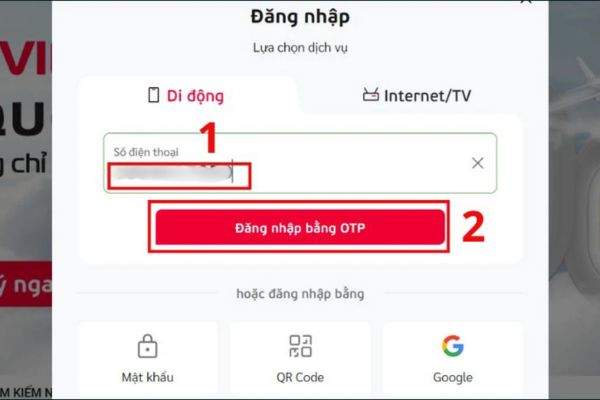
Step 3: Click on the section Account management. The web interface will display all packages in use with specific deadlines, making it easy for you to track.

Things to keep in mind when testing
In order for the testing process to go smoothly, users need to pay attention to a few small points.
- Make sure you are checking the correct subscription number to look up, especially when logging in on the App or Web if you own multiple SIMs.
- When using text messages, you need to compose the correct KTTK syntax and send to 191. Wrong syntax or sending the wrong number will not receive a response.
- If using App or Web, make sure the network connection is stable.
- Avoid checking continuously in a short time to avoid having the system temporarily lock the function due to suspicion of spam.

Conclusion
With detailed instructions on How to see the package Viettel is usingmanaging telecommunications spending is now easier than ever. Don’t let the money in your account “evaporate” because of unnamed services. Please check now and adjust the package to suit your needs!