How to check electricity on VNEID Is the perfect solution for the worry of bills soaring every summer. Instead of waiting for the notice, you can actively monitor the family’s electricity consumption. This article Anonyviet Will guide you step by step in detail.
| Join the channel Telegram belong to Anonyviet 👉 Link 👈 |
Why should track periodic consumption index?
Many people have a habit of only paying attention to the final amount to pay but ignore the monitoring of the power consumption. This is a flaw that can lead to unnecessary risks. The initiative to check will bring many practical benefits:
Effective spending control
By comparing the consumption between months, you can recognize the family’s electricity habits and adjust it properly, avoid wasting and save a significant cost.
Early detection of abnormalities
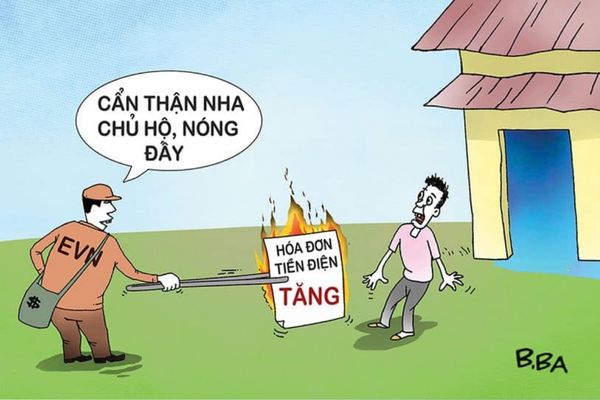
Suppose your family has a long trip, but the electricity bill that month is still unusually high. This may be a sign of electrical leakage, damaged electrical equipment or even errors in the process of recording the meter index. Early detection helps you contact the electricity unit immediately for timely handling plan, safety protection and property for the family.
Building energy saving habits
When the numbers are clearly displayed, you will be more aware in turning off unnecessary devices, using electricity more intelligently, contributing to environmental protection and reducing financial burden.
Instructions on how to check electricity on VNEID
With the orientation to become a “super application” to serve the people, Vneid Constantly updated and added utility features. Electrical information search feature is a clear evidence for this effort. Now, with just a few simple steps, you can review the whole history of your family’s electricity. Please follow these steps:
Step 1: First, open the VNEID application on your phone and proceed to log in to your electronic identification account level 2.
Step 2: At the main interface of the application, find and select the item Other services. A list of utilities will appear, surf and choose Look up electricity information.
Step 3: Here, the application will give you two options: “Look up yourself” and “look up for others”.
Case 1: Look up for yourself
- Select Look up for yourself.
- Payment period: default is 1you keep the same.
- Management unit: Select Power Corporation that is providing services for your area. For example:
If you are in Hanoi, choose “Hanoi Electricity Corporation”.
If you are in other Northern provinces, choose “Northern Power Corporation”.
If you are in Da Nang, Hue, Quang Nam … choose “Central Power Corporation”.
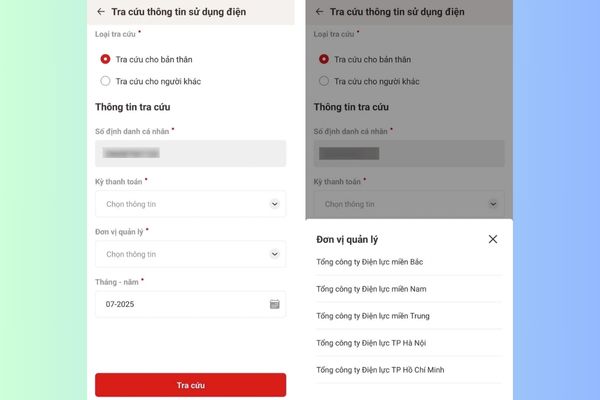
- Month – Year: Choose the specific month and year that you want to see the invoice.
- After filling out, press the button Search.
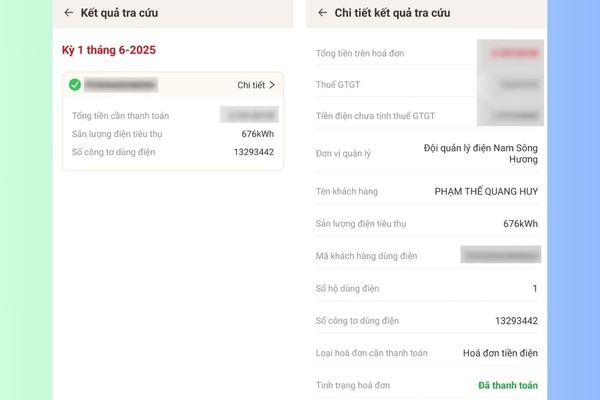
The results will be displayed immediately, including core information such as: electricity output (KWH number), the number of meters and the total amount paid. To see more detailed analysis, you can click the button Detail.
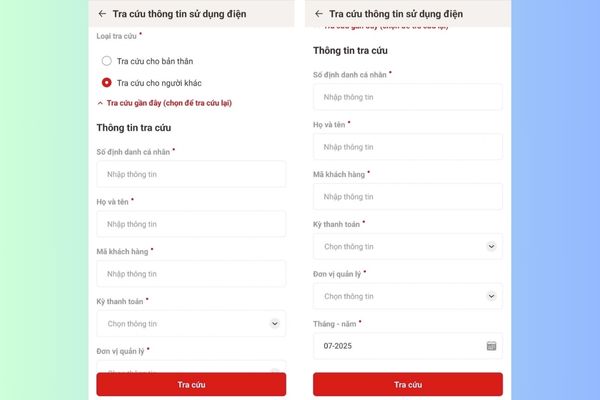
Case 2: Export other people
This feature is extremely useful when you want to help relatives and friends (those who are not familiar with technology or without smartphones) check their invoices.
- Select Look up for others.
- You need to fill out the information of the person to look up, including: Personal identification number and full name.
- Customer code: You can find this code on the old electricity bills, in SMS notification of the monthly electricity bill that the electricity company sends.
- The “Payment period”, “management unit”, “month – month” you fill in the same as when looking up for yourself.
- Finally, press Search To see the results.
Important note you need to know
To ensure successful lookup, you need to remember a prerequisite: This feature only works when you are household headthat is, the person who signed a contract to buy and sell electricity with the electricity company.
This means that, if you are a family member but not the name of the contract, when using the feature “search for yourself”, the system will not return the results. This is a reasonable personal information security mechanism, ensuring that only contract owners have access to electricity consumption data.
Conclusion
How to check electricity on VNEID Really very simple and convenient, right? Do not hesitate, open the VNEID application immediately and test your family. This will help you form a habit of tracking and saving long -term costs!