How to chat anonymously on Gemini is a great feature, allowing you to exchange information privately without worrying about saving history. This is the perfect solution for sensitive work or simply when you want a temporary chat space. Let’s go together AnonyViet Discover how to activate and important notes when using this feature.
| Join the channel Telegram belong to AnonyViet 👉 Link 👈 |
What is anonymous chat on Gemini and how does it work?
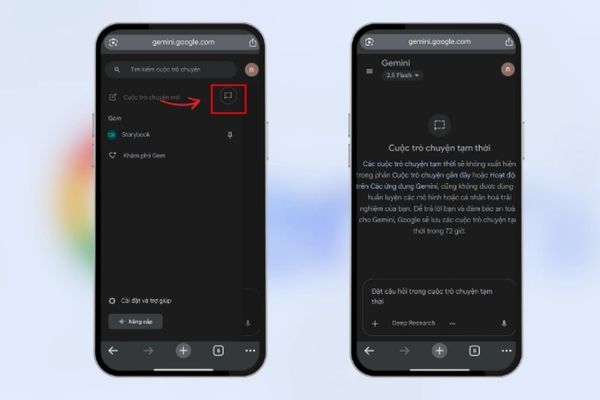
Basically, anonymous chat is a temporary session with Gemini. Any conversations that take place in this mode will not be recorded in your activity history. When you close the chat window or start a new chat in regular mode, the anonymous session will end and the previous exchange will disappear. You can easily identify this feature through the dashed frame icon located right next to the button to create a new conversation.

How to chat anonymously on Gemini on your computer
The use of this feature on web version of Gemini extremely simple. You just need to follow these steps:
- Open a web browser and go to Gemini’s home page, then log in to your Google account.
- At the main interface, find and click the image icon dashed frame located next to the “New chat” button.
- Immediately after clicking, a new chat interface will appear with the label “Incognito chat” to confirm you are in the correct mode. Now, you can start your conversation.
- To finish, simply close the tab or click the icon again to return to regular chat mode.
If you don’t see this icon, try reloading the page or make sure your browser is updated to the latest version.

Use anonymous chat on your phone (iOS & Android)
On the mobile app, turning on private mode is equally quick. The steps taken on both iOS and Android operating systems are almost similar.
- Make sure you’re using the latest version of the Gemini app by checking the App Store or Google Play Store.
- Open the app, on the chat start screen you will see an icon dashed frame. Click on it to enable this feature.
- When you no longer need to use it, you can close the application or start a new chat in normal mode to exit the incognito session.
Important notes for absolute security
Although history is not saved, incognito mode does not mean completely “invisible”. To ensure maximum security for your information, you need to remember a few principles:
- You should absolutely avoid sharing sensitive information such as passwords, bank accounts, or credit card numbers in chat, as the data may be processed temporarily for system security purposes.
- For increased privacy, you can visit the section Setting (Settings) -> Privacy (Privacy) of Gemini and turn off the option “Help improve Gemini” (Help improve Gemini) to not send anonymous data back to developers.
- For uploaded files or images, consider deleting them after ending the conversation if you want to ensure they no longer exist on any temporary servers.

Conclusion
Understanding How to chat anonymously on Gemini will help you master this tool more safely and effectively. This is an ideal solution for conversations that need privacy, leaving no traces in activity history. Please apply the above instructions and security tips for the most comfortable and secure experience!