How to authenticate the owner’s SIM on VNeID is a topic of interest to many mobile users recently. This helps you strictly control the phone numbers in your name, thereby promptly preventing unnecessary legal risks. Let’s learn about this process in detail with AnonyViet!
📢 Join the channel Telegram belong to AnonyViet
Update new articles, cool tools and IT tips fastest
The risks of not managing the phone number in your name
In the past, many users had the habit of buying, lending or transferring SIM cards to others but skipping the step of updating owner information. This situation accidentally creates a large hole, putting those phone numbers at risk of being used by bad guys to commit fraud and violate the law without the owner’s knowledge.
In practice, proactively learning how to authenticate Original SIM on VNeID is an extremely necessary step to protect yourself. Thanks to the new policy, people are now empowered to look up the entire list of subscribers associated with their personal information.
From this system, you have the full right to confirm and retain the numbers that are actually in use, and at the same time send feedback to immediately remove unfamiliar numbers or numbers that are no longer in use.

Instructions on how to authenticate the owner’s SIM on VNeID
Starting from April 15, the process of reviewing subscriber information has been completely digitized on the national electronic identification application. Below is the sequence of operations you need to perform:
Step 1: Sign in VNeID application on your phone, then on the home screen displaying notifications, click on the item Access functions.
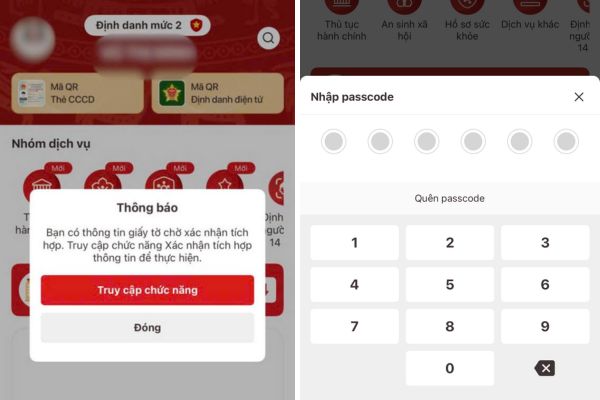
Step 2: Conduct security authentication using passcode or using fingerprint or face depending on the account configuration on your device.
Step 3: Click on the item phone number for the system to start extracting data.
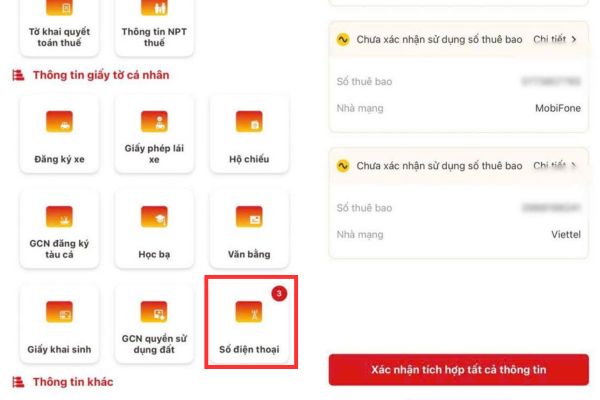
Step 4: Select the integration request and click directly on it to view detailed information about the subscribers in your name.
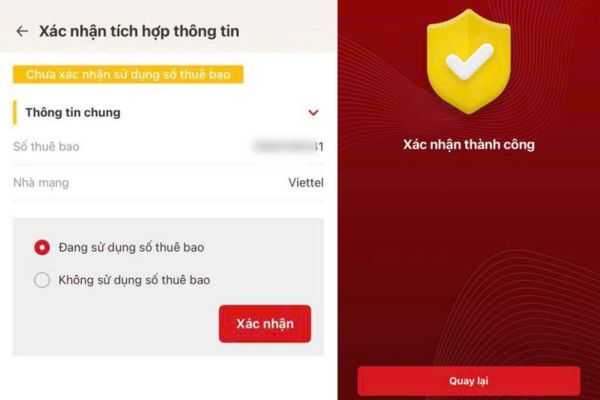
Step 5: Make a handling decision by choosing to confirm integration of information for the currently used number, or confirm not to integrate information for unfamiliar numbers.
Step 6: Wait for the screen to display a message confirming successful integration, then press return to navigate to the main screen.
The network operator’s handling process for subscribers is reflected
As soon as the system records citizen feedback about an unusual phone number, telecommunications businesses will immediately intervene. Specifically, the network operator will proactively contact the reported subscriber number directly to request verification from the current user.
All procedures for re-registering owner information must be completed strictly within 5 working days. Understanding how to authenticate the owner’s SIM on VNeID will help you speed up this purification process, forcing those who are illegally using your SIM to come forward.
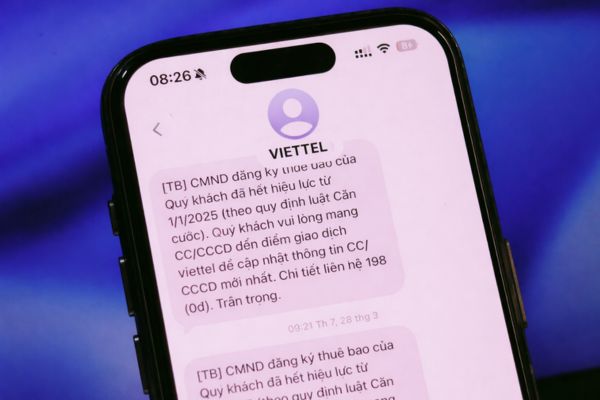
In case the person using that phone number intentionally ignores it or cannot verify it, the network operator will apply a one-way communication lock measure. If this situation continues and there are no signs of improvement, the telecommunications service of that phone number will be affected two-way lock permanently, and at the same time the service provision contract will also be liquidated in accordance with the provisions of law.
Conclusion
In short, mastery How to authenticate the owner’s SIM on VNeID is extremely necessary to protect your personal information. Don’t let strange phone numbers bring unnecessary legal trouble in the future. Open the app and check today to always feel secure when using telecommunications services!
Frequently Asked Questions (Q&A)
1. How long does it take for the network to request to verify information?
After receiving feedback from the VNeID application, the network operator will contact and request the current subscriber to complete the verification procedure within 5 days.
2. What happens if the reported subscriber refuses to go for verification?
That subscriber will be blocked from one-way communication by the network operator. If it continues to not be repaired, it will be locked two-way and eventually the service contract will be liquidated.
3. I have used the phone number to register for VNeID level 2, do I need to re-authenticate?
You will be exempted from the re-authentication procedure, unless you change your mobile phone device after June 15, 2026.