• Home
  • News
  • Software
  • Knowledge
  • MMO
  • Tips
  • Security
  • Network
  • Office
AnonyViet - English Version
  • Home
  • News
  • Software
  • Knowledge
  • MMO
  • Tips
  • Security
  • Network
  • Office
No Result
View All Result
  • Home
  • News
  • Software
  • Knowledge
  • MMO
  • Tips
  • Security
  • Network
  • Office
No Result
View All Result
AnonyViet - English Version
No Result
View All Result

How to use Messenger without a Facebook account

AnonyViet by AnonyViet
October 22, 2026
in Tips
0

Have you ever created a Facebook account just to log in to Messenger and text with friends? But the reality is that you can use Messenger without that Facebook account.

📢 Join the channel Telegram belong to AnonyViet


👉 Go to Telegram AnonyViet

Update new articles, cool tools and IT tips fastest

How to use Messenger without a Facebook account

There was a time when Facebook only required a phone number to use Messenger. However, around 2019, this social networking giant began to tighten security and privacy issues. So the features that previously did not require a Facebook account have been removed.

But Messenger still doesn’t require an active Facebook account. “Activity” is a very important word here. The disabled account you are using can still use Messenger. And I will guide you to do that in this article.

Note: “Deactivating” your Facebook account is not the same as deleting it. You will be able to return to the social network at any time and all your profile information and content will be restored.

How to use Messenger without a Facebook account

If you once had a Facebook account but have now deactivated it to delete it, you can still use Messenger without restoring your account. Therefore, many people are afraid to delete their Facebook account for fear of losing access to Messenger, don’t worry! You can still use Messenger to text with friends normally.

First, you need to log in Facebook. Click the down arrow button in the top right corner.
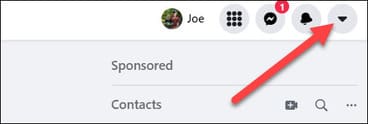
How to use Messenger without a Facebook account

Next select “Settings & Privacy” / Settings & privacy
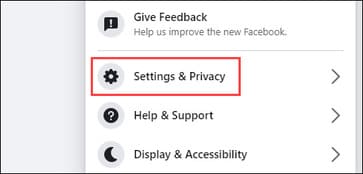
Settings & Privacy

Select next “Settings” / Setting.
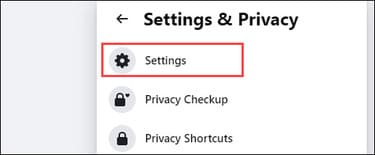
Settings

In the left column, select “Your Facebook Information” / “Your information on Facebook“.
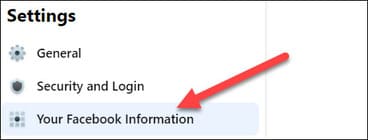
Your Facebook Information

Scroll down and select “Deactivation and Deletion” / “Disable and delete”
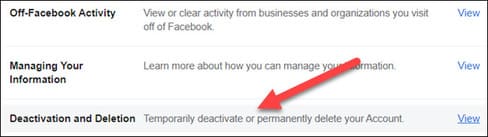
Deactivation and Deletion

If you choose incorrectly, please identify it. You need to select “Deactivate Account” / “Disable account”. is not “Delete Account” and then click “Continue to Account Deactivation”.
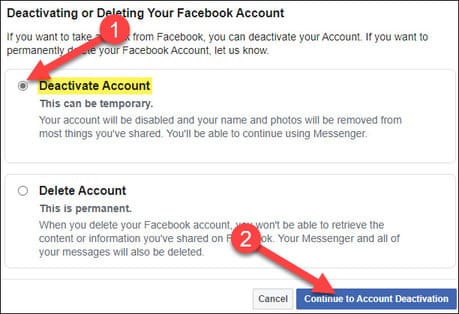
Continue to Account Deactivation

You will be asked to enter your Facebook account password and after entering, select “Continue”.
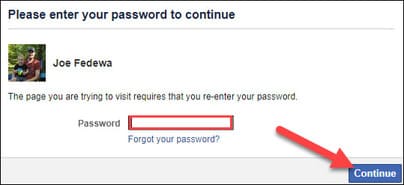
Continue

Next, Facebook will ask you to choose a reason for deactivation. You can also choose not to receive emails from Facebook. After you deactivate, your friends can still invite you to events, tag you, and ask you to join groups.
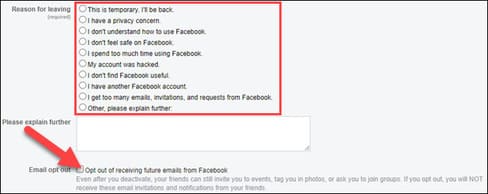
reason for deactivation

The last part explains that your Messenger account will remain active unless you deactivate it from the Messenger app. Click “Deactivate” to finish.

Deactivate

That’s it! Your Messenger conversations will be completely unaffected. You can do everything you were doing before, except now you don’t have a Facebook profile. This is a great way to stay in touch with your Facebook friends without actually being on Facebook. If you want to use Facebook and chat at the same time, turn on the function chat bubbles Come on up.

Frequently asked questions

Can I use Messenger without an active Facebook account?

Maybe. You can still use Messenger if your Facebook account has been deactivated, but not deleted.

What does deactivating a Facebook account mean and does it affect Messenger?

Disable temporarily hides your Facebook account. You can still restore at any time. Your Messenger still works normally after disabling it.

If I delete my Facebook account, will I lose access to Messenger?

Have. Deleting your Facebook account will result in losing access to Messenger. Deactivating an account is different, Messenger still works.


Previous Post

Instructions on how to exit iOS 27 Beta and update to the official version

Next Post

Receive copyright for 3 Halloween software worth $150

AnonyViet

AnonyViet

Related Posts

Cách Đăng ký Nhận Code ChatGPT Business
Tips

Cách Đăng ký Nhận Code ChatGPT Business

November 2, 2026
Instructions for cleaning LG TV with Antigravity to help it run faster
Tips

Instructions for cleaning LG TV with Antigravity to help it run faster

October 30, 2026
Quét lỗ hổng bảo mật cho Vide Coding bằng Security Audit Skill
Tips

Quét lỗ hổng bảo mật cho Vide Coding bằng Security Audit Skill

October 27, 2026
Instructions for registering for OxionAI Pro for 1 year with many powerful AI models
Tips

Instructions for registering for OxionAI Pro for 1 year with many powerful AI models

October 24, 2026
How are Windows 11 Pro and Windows 10 Pro different?
Tips

How are Windows 11 Pro and Windows 10 Pro different?

October 23, 2026
Instructions for using CleanYourTV: Remove ads on Android TV, Google TV
Tips

Instructions for using CleanYourTV: Remove ads on Android TV, Google TV

October 23, 2026
Next Post
Receive copyright for 3 Halloween software worth 0

Receive copyright for 3 Halloween software worth $150

0 0 votes
Article Rating
Subscribe
Login
Notify of
guest

guest

0 Comments
Oldest
Newest Most Voted

Recent News

Tool to get transcript of entire YouTube channel extremely fast and free

Tool to get transcript of entire YouTube channel extremely fast and free

November 10, 2026
Keysoff 11.11 discount: Office 2024 Pro only .58, Windows 11 Pro from .58

Keysoff 11.11 discount: Office 2024 Pro only $26.58, Windows 11 Pro from $15.58

November 9, 2026
How to create an Android App using Google AI Studio without code

How to create an Android App using Google AI Studio without code

November 9, 2026
Holding OPPO Find X10 to watch movies all night: Real experience

Holding OPPO Find X10 to watch movies all night: Real experience

November 9, 2026
Tool to get transcript of entire YouTube channel extremely fast and free

Tool to get transcript of entire YouTube channel extremely fast and free

November 10, 2026
Keysoff 11.11 discount: Office 2024 Pro only .58, Windows 11 Pro from .58

Keysoff 11.11 discount: Office 2024 Pro only $26.58, Windows 11 Pro from $15.58

November 9, 2026
How to create an Android App using Google AI Studio without code

How to create an Android App using Google AI Studio without code

November 9, 2026
AnonyViet - English Version

AnonyViet

AnonyViet is a website share knowledge that you have never learned in school!

We are ready to welcome your comments, as well as your articles sent to AnonyViet.

Follow Us

Contact:

Email: anonyviet.com[@]gmail.com

Main Website: https://anonyviet.com

Recent News

Tool to get transcript of entire YouTube channel extremely fast and free

Tool to get transcript of entire YouTube channel extremely fast and free

November 10, 2026
Keysoff 11.11 discount: Office 2024 Pro only .58, Windows 11 Pro from .58

Keysoff 11.11 discount: Office 2024 Pro only $26.58, Windows 11 Pro from $15.58

November 9, 2026
  • Home
  • Home 2
  • Home 3
  • Home 4
  • Home 5
  • Home 6
  • Next Dest Page
  • Sample Page

say88 tỷ lệ kèo nhà cái kèo nhà cái 5 febet

No Result
View All Result
  • Home
  • News
  • Software
  • Knowledge
  • MMO
  • Tips
  • Security
  • Network
  • Office

say88 tỷ lệ kèo nhà cái kèo nhà cái 5 febet

wpDiscuz
0
0
Would love your thoughts, please comment.x
()
x
| Reply