• Home
  • News
  • Software
  • Knowledge
  • MMO
  • Tips
  • Security
  • Network
  • Office
AnonyViet - English Version
  • Home
  • News
  • Software
  • Knowledge
  • MMO
  • Tips
  • Security
  • Network
  • Office
No Result
View All Result
  • Home
  • News
  • Software
  • Knowledge
  • MMO
  • Tips
  • Security
  • Network
  • Office
No Result
View All Result
AnonyViet - English Version
No Result
View All Result

How to add application to your favorite bar

AnonyViet by AnonyViet
August 14, 2025
in Software
0

The favorite bar on Samsung phones is a great tool to help you quickly access the commonly used applications without spending time searching on the long list. Have you ever felt that Thanh loved the default a bit “inconvenient” because it only contained a few apps? Don’t worry, Anonyviet will show you how Add application to your favorite bar Easily, increase the number of apps to maximize to optimize the use experience.

Join the channel Telegram belong to Anonyviet 👉 Link 👈

What is Thanh favorite on Samsung and why should be customized?

Favorite Thanh (Favorites Tray) is an area right on the main screen or in the application menu of the phone Samsungwhere you can pin the most common applications. By default, it only contains about 4-5 applications, depending on the model.
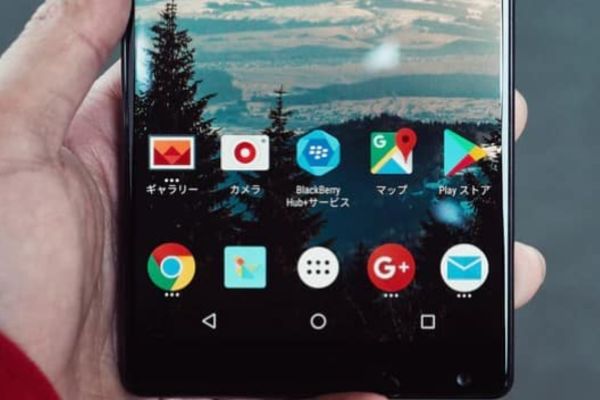
Thanh favorite on Samsung

However, with a few simple steps, you can fully expand this space to add applications to your favorite bar, save time and increase equipment efficiency.

This customization not only brings convenience but also helps you personalize your phone in your own style. If you are a multitasking person or like everything at your fingertips, don’t miss this guide!

Instructions for adding applications to Samsung favorite bar

To expand your favorite bar on Samsung and add more applications, you will need to use the application Good Lock – A custom tool developed by Samsung itself. Here are the detailed steps:

Step 1: First, open the Good Lock application on your phone. If not, you can download it for free from the Galaxy Store. After opening the application, read and confirm the terms used to continue.
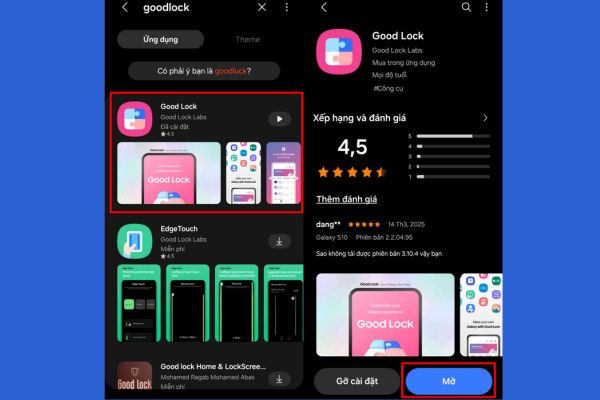
How to add applications to your favorite bar

Step 2: Next, in the Good Lock interface, pull down and find items Homeup. Click to download and install this module. After the installation is complete, select the button Start To activate Homeup.
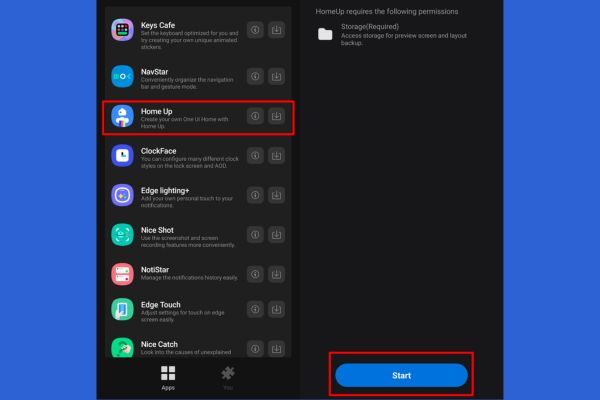
Find section homeup
Find section homeup

Step 3: After activating Homeup, you will see a slider. Please deceive to mode Bounce To enable this feature. Next, select the item Home Screen In the optional list.
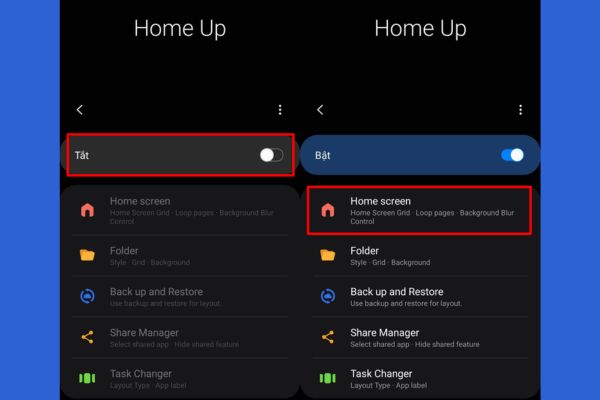
Select Home Screen
Select Home Screen

Step 4: In the Home Screen menu, find items FaVorites Max Count. Here, you can adjust the maximum number of applications displayed on your favorite bar. Pull the slider up to the maximum, usually 9 Application, to have more storage space.

Once completed, exit and check your favorite bar on the main screen – now it is much more spacious!
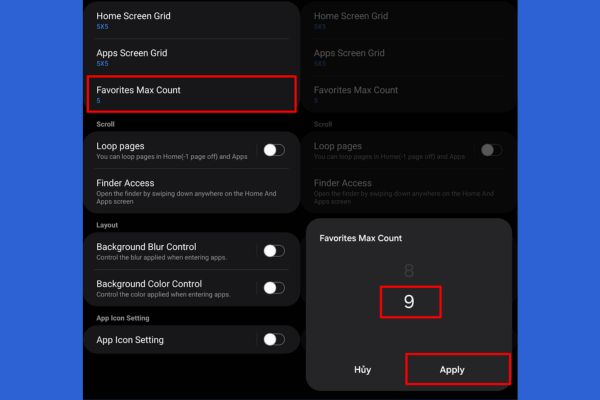
Find the Favorites Max Count

Benefits when adding applications to their favorite bar

After performing the above steps, you will notice a clear difference. The favorite Thanh can now accommodate up to 9 applications instead of just 4-5 as before. This means that you can pin applications like ZaloFacebook, Gmail, or any tools you often use without surfing the application menu.

Not only convenient, this also helps you save time, especially when you are busy. For example, you need to quickly open the notes in the meeting or check the message urgently – everything is right in front of your eyes.

Conclusion

Job Add application to your favorite bar On Samsung is not only simple but also brings outstanding use efficiency. With just a few minutes set up through Good Lock and Homeup, you have turned your phone into a assistant ready to serve all needs in a snap!


Tags: Addapplicationbarfavorite
Previous Post

Wowhay.com – The door opens the world of modern knowledge and network culture

Next Post

Online driving exam preparation: Support theory and practice

AnonyViet

AnonyViet

Related Posts

Instructions on how to get Norton 360 Deluxe for 1 year for free
Software

Instructions on how to get Norton 360 Deluxe for 1 year for free

July 19, 2026
Is Xiaomi Redmi A7 a valuable choice in the popular smartphone segment?
Software

Is Xiaomi Redmi A7 a valuable choice in the popular smartphone segment?

July 14, 2026
Compact design, durable battery, excellent camera: Review of OPPO Reno 16 Pro 5G
Software

Compact design, durable battery, excellent camera: Review of OPPO Reno 16 Pro 5G

July 12, 2026
Download the free 3D Pinball Space Cadet game on the App Store now
Software

Download the free 3D Pinball Space Cadet game on the App Store now

July 12, 2026
Learn new skills with iPad 11 (A16) 128GB: when is enough, when should you upgrade to a higher level?
Software

Learn new skills with iPad 11 (A16) 128GB: when is enough, when should you upgrade to a higher level?

July 10, 2026
Instructions for taking free buses in Ho Chi Minh City from July 2026
Software

Instructions for taking free buses in Ho Chi Minh City from July 2026

July 9, 2026
Next Post
Online driving exam preparation: Support theory and practice

Online driving exam preparation: Support theory and practice

0 0 votes
Article Rating
Subscribe
Login
Notify of
guest

guest

0 Comments
Oldest
Newest Most Voted

Recent News

Instructions for Logo Design in just a few clicks with Logaster

Instructions for Logo Design in just a few clicks with Logaster

July 20, 2026
Clean Tam – Accompanying the green space of every Vietnamese family

Clean Tam – Accompanying the green space of every Vietnamese family

July 20, 2026
3 coolest ways to turn off your computer

3 coolest ways to turn off your computer

July 19, 2026
Instructions on how to get Norton 360 Deluxe for 1 year for free

Instructions on how to get Norton 360 Deluxe for 1 year for free

July 19, 2026
Instructions for Logo Design in just a few clicks with Logaster

Instructions for Logo Design in just a few clicks with Logaster

July 20, 2026
Clean Tam – Accompanying the green space of every Vietnamese family

Clean Tam – Accompanying the green space of every Vietnamese family

July 20, 2026
3 coolest ways to turn off your computer

3 coolest ways to turn off your computer

July 19, 2026
AnonyViet - English Version

AnonyViet

AnonyViet is a website share knowledge that you have never learned in school!

We are ready to welcome your comments, as well as your articles sent to AnonyViet.

Follow Us

Contact:

Email: anonyviet.com[@]gmail.com

Main Website: https://anonyviet.com

Recent News

Instructions for Logo Design in just a few clicks with Logaster

Instructions for Logo Design in just a few clicks with Logaster

July 20, 2026
Clean Tam – Accompanying the green space of every Vietnamese family

Clean Tam – Accompanying the green space of every Vietnamese family

July 20, 2026
  • Home
  • Home 2
  • Home 3
  • Home 4
  • Home 5
  • Home 6
  • Next Dest Page
  • Sample Page

say88 tỷ lệ kèo nhà cái kèo nhà cái 5 febet

No Result
View All Result
  • Home
  • News
  • Software
  • Knowledge
  • MMO
  • Tips
  • Security
  • Network
  • Office

say88 tỷ lệ kèo nhà cái kèo nhà cái 5 febet

wpDiscuz
0
0
Would love your thoughts, please comment.x
()
x
| Reply