• Home
  • News
  • Software
  • Knowledge
  • MMO
  • Tips
  • Security
  • Network
  • Office
AnonyViet - English Version
  • Home
  • News
  • Software
  • Knowledge
  • MMO
  • Tips
  • Security
  • Network
  • Office
No Result
View All Result
  • Home
  • News
  • Software
  • Knowledge
  • MMO
  • Tips
  • Security
  • Network
  • Office
No Result
View All Result
AnonyViet - English Version
No Result
View All Result

Control your mouse with your face with Animouse

AnonyViet by AnonyViet
February 4, 2023
in Software
0

Animouse is software that helps us control the computer mouse through a webcam device to help record facial movements, and based on that, identify and move your computer mouse at the discretion of the user. The requirement to use the software is that the user needs to equip a webcam device or use a laptop with a built-in camera.

Join the channel Telegram belong to AnonyViet 👉 Link 👈

First, you download and install the software as usual (download link at the end of the article).

Step 2: You click to open the file Animouse.exe after it has been installed

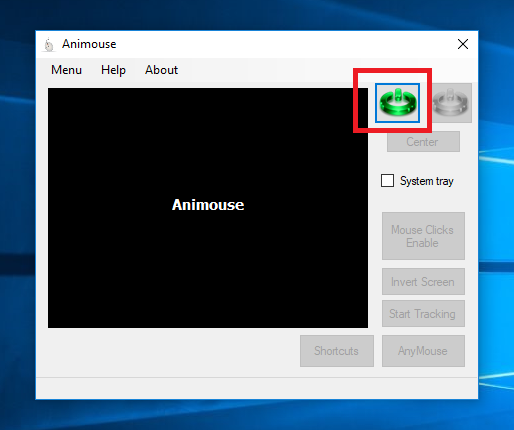
Step 3: On the program interface, for the tool to start recording and recognizing your face, click the blue button as shown below:
Control your mouse with your face with Animouse 4

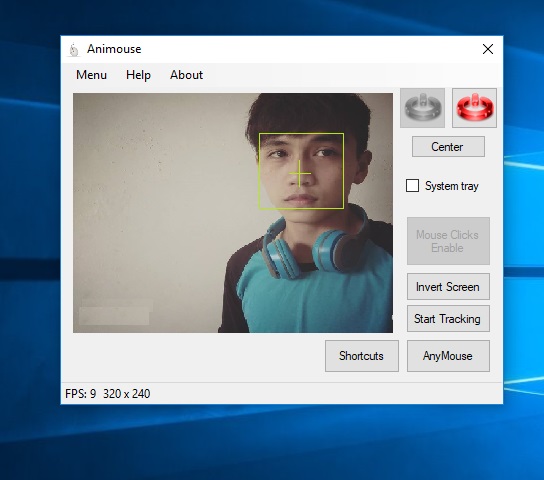
Step 4: Wait a few seconds for the tool to start connecting to the webcam
Control your mouse with your face with Animouse

Step 5: Press Start Tracking to start controlling the mouse with your face

To activate more facial mouse click function, click the . button Mouse clicks enable.

Now, when you want to click on a certain location, you use your face to move the mouse pointer to press the button and leave the mouse pointer in this position for a while, the software will automatically wait for a while. moment and note the user wants to click on the selected location and will automatically click there.

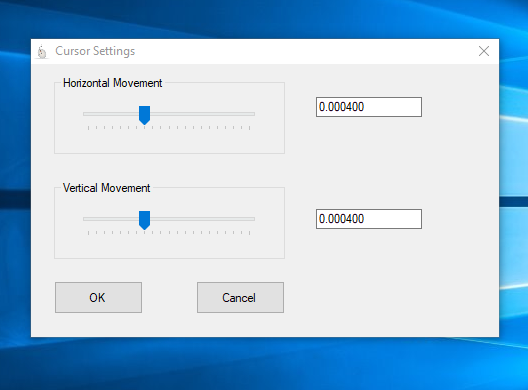
In case you find that the mouse pointer moves slower than the face, you can change it by clicking Menu on the interface bar => Cursor Settings
Control your mouse with your face with Animouse 6

Note : In case it is difficult for you to use Animouse, press the key combination Ctrl + A twice Immediately the mouse pointer will be automatically moved back to the center of the computer screen, so you can start moving the mouse pointer again more easily.

AnonyViet wishes you success !!

N1412

The article achieved: 5/5 – (100 votes)

Tags: AnimousecontrolFacemouse
Previous Post

How to subscribe to Amazon Prime Video HBO to watch movies for free

Next Post

5 new updates in the F8 Facebook conference (With Facebook Dating)

AnonyViet

AnonyViet

Related Posts

Cat Gatekeeper: Cat gatekeeper utility, uniquely helps to “quit” social networks
Software

Cat Gatekeeper: Cat gatekeeper utility, uniquely helps to “quit” social networks

May 7, 2026
Instructions on how to upgrade CapCut Pro for free using Filza
Software

Instructions on how to upgrade CapCut Pro for free using Filza

May 5, 2026
TikTok Pro Tools: “all in one” utility for Top Top addicts
Software

TikTok Pro Tools: “all in one” utility for Top Top addicts

May 4, 2026
Create an avatar to celebrate April 30 with a beautiful red flag shirt with yellow stars
Software

Create an avatar to celebrate April 30 with a beautiful red flag shirt with yellow stars

April 30, 2026
How to get 2 months of Super Duolingo for free worth 300k
Software

How to get 2 months of Super Duolingo for free worth 300k

April 30, 2026
How to create a Face Sticker Collection using ChatGPT
Software

How to create a Face Sticker Collection using ChatGPT

April 29, 2026
Next Post
5 new updates in the F8 Facebook conference (With Facebook Dating)

5 new updates in the F8 Facebook conference (With Facebook Dating)

0 0 votes
Article Rating
Subscribe
Login
Notify of
guest

guest

0 Comments
Oldest
Newest Most Voted
Inline Feedbacks
View all comments

Recent News

Cat Gatekeeper: Cat gatekeeper utility, uniquely helps to “quit” social networks

Cat Gatekeeper: Cat gatekeeper utility, uniquely helps to “quit” social networks

May 7, 2026
How to block pop-up ads on Safari without installing an app

How to block pop-up ads on Safari without installing an app

May 6, 2026
Instructions on how to upgrade CapCut Pro for free using Filza

Instructions on how to upgrade CapCut Pro for free using Filza

May 5, 2026
TikTok Pro Tools: “all in one” utility for Top Top addicts

TikTok Pro Tools: “all in one” utility for Top Top addicts

May 4, 2026
Cat Gatekeeper: Cat gatekeeper utility, uniquely helps to “quit” social networks

Cat Gatekeeper: Cat gatekeeper utility, uniquely helps to “quit” social networks

May 7, 2026
How to block pop-up ads on Safari without installing an app

How to block pop-up ads on Safari without installing an app

May 6, 2026
Instructions on how to upgrade CapCut Pro for free using Filza

Instructions on how to upgrade CapCut Pro for free using Filza

May 5, 2026
AnonyViet - English Version

AnonyViet

AnonyViet is a website share knowledge that you have never learned in school!

We are ready to welcome your comments, as well as your articles sent to AnonyViet.

Follow Us

Contact:

Email: anonyviet.com[@]gmail.com

Main Website: https://anonyviet.com

Recent News

Cat Gatekeeper: Cat gatekeeper utility, uniquely helps to “quit” social networks

Cat Gatekeeper: Cat gatekeeper utility, uniquely helps to “quit” social networks

May 7, 2026
How to block pop-up ads on Safari without installing an app

How to block pop-up ads on Safari without installing an app

May 6, 2026
No Result
View All Result
  • Home
  • News
  • Software
  • Knowledge
  • MMO
  • Tips
  • Security
  • Network
  • Office

wpDiscuz
0
0
Would love your thoughts, please comment.x
()
x
| Reply