• Home
  • News
  • Software
  • Knowledge
  • MMO
  • Tips
  • Security
  • Network
  • Office
AnonyViet - English Version
  • Home
  • News
  • Software
  • Knowledge
  • MMO
  • Tips
  • Security
  • Network
  • Office
No Result
View All Result
  • Home
  • News
  • Software
  • Knowledge
  • MMO
  • Tips
  • Security
  • Network
  • Office
No Result
View All Result
AnonyViet - English Version
No Result
View All Result

How to add a link to an Instagram Story

AnonyViet by AnonyViet
January 26, 2023
in Software
0

Sharing links through Instagram Stories is easy and available to all users. Instagram provides a simple tool to add links to websites or posts in Stories and I will show you how to add links to Stories in this article.

Join the channel Telegram of the AnonyViet 👉 Link 👈

How to add a link to an Instagram Story

Along with photos and videos in Instagram Stories, you can add direct links instead of the Swipe Up feature. The new “Links” feature is one of the “stickers” you can include in your Story. You no longer have to type part of the URL text.

One limitation of the “Links” stickers is that you can only add one sticker per Story.

How to add a link to an Instagram Story

To get started, open the URL you want to include in your Story on your smartphone or tablet and copy it.

Next, open the app Instagram on your iPhone, iPad or Android. Click “Your Story” in the top row on the Home tab.
How to add a link to a Story on Instagram 11

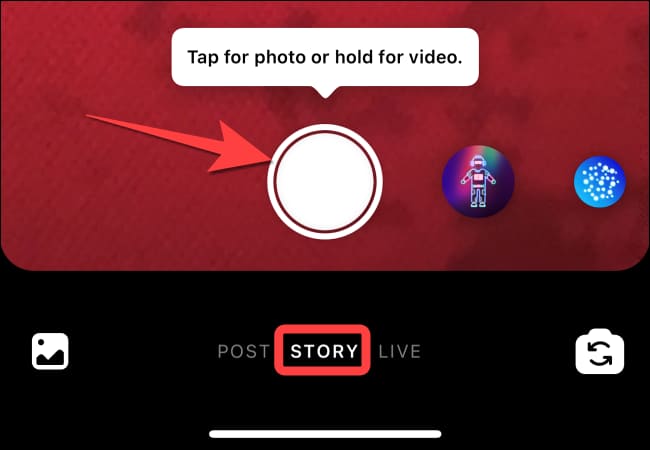
Make sure you are on the “Story” tab. Press the shutter button or hold down to record a video.
How to add a link to a Story on Instagram 12

After you take a photo or record a video, tap the sticker icon at the top of the screen.

How to add a link to a Story on Instagram 13

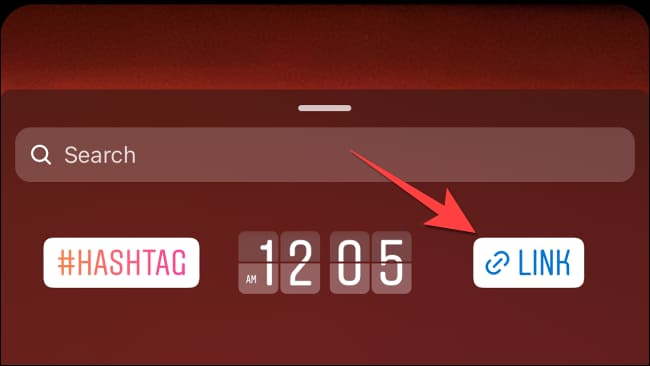
Now, scroll down a bit and select the “Links” sticker.
How to add a link to a Story on Instagram 14

Paste the link you copied earlier or enter a new link and press “Done”.

How to add a link to a Story on Instagram 15

Place the “Links” sticker with the URL anywhere.

How to add a link to a Story on Instagram 16

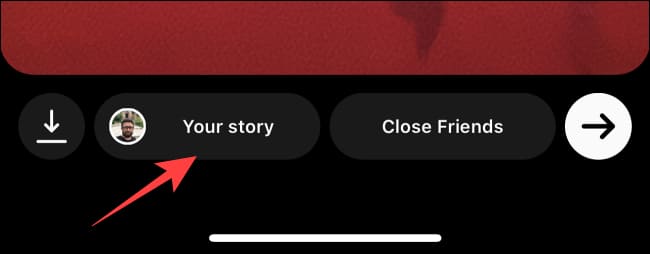
Select “Your Story” in the lower left corner to add it to your Story or select “Close Friends” to show it to a few friends you have selected.

How to add a link to a Story on Instagram 17

So that’s it then. You can now easily share relevant links in your Stories and make them more interesting and informative (or selling) to everyone.

In addition, you can also hide the likes of Instagram posts here.

The article achieved: 5/5 – (100 votes)

Tags: AddInstagramlinkStory
Previous Post

Cover 44: How to Customize Number Formats in Excel

Next Post

How to use Spotlight on MacOS like a Pro

AnonyViet

AnonyViet

Related Posts

Receive copyright for 3 Halloween software worth 0
Software

Receive copyright for 3 Halloween software worth $150

October 23, 2026
Instructions for receiving 3 months of MultCloud Premium for free with 200GB data
Software

Instructions for receiving 3 months of MultCloud Premium for free with 200GB data

October 17, 2026
Instructions for receiving pension through VNeID without going to the ward
Software

Instructions for receiving pension through VNeID without going to the ward

October 16, 2026
Record first, choose focus later: how to use 4K 60 fps Cinema mode on iPhone 18 Pro
Software

Record first, choose focus later: how to use 4K 60 fps Cinema mode on iPhone 18 Pro

October 15, 2026
How to receive 22k from Viettel Tammi on the occasion of 22nd birthday
Software

How to receive 22k from Viettel Tammi on the occasion of 22nd birthday

October 15, 2026
3 valuable upgrades on Samsung Galaxy A08 compared to its predecessor A07
Software

3 valuable upgrades on Samsung Galaxy A08 compared to its predecessor A07

October 12, 2026
Next Post
How to use Spotlight on MacOS like a Pro

How to use Spotlight on MacOS like a Pro

0 0 votes
Article Rating
Subscribe
Login
Notify of
guest

guest

0 Comments
Oldest
Newest Most Voted

Recent News

Receive copyright for 3 Halloween software worth 0

Receive copyright for 3 Halloween software worth $150

October 23, 2026
How to use Messenger without a Facebook account

How to use Messenger without a Facebook account

October 22, 2026
Instructions on how to exit iOS 27 Beta and update to the official version

Instructions on how to exit iOS 27 Beta and update to the official version

October 22, 2026
Instructions for updating PHP to avoid PHP2Shell

Instructions for updating PHP to avoid PHP2Shell

October 22, 2026
Receive copyright for 3 Halloween software worth 0

Receive copyright for 3 Halloween software worth $150

October 23, 2026
How to use Messenger without a Facebook account

How to use Messenger without a Facebook account

October 22, 2026
Instructions on how to exit iOS 27 Beta and update to the official version

Instructions on how to exit iOS 27 Beta and update to the official version

October 22, 2026
AnonyViet - English Version

AnonyViet

AnonyViet is a website share knowledge that you have never learned in school!

We are ready to welcome your comments, as well as your articles sent to AnonyViet.

Follow Us

Contact:

Email: anonyviet.com[@]gmail.com

Main Website: https://anonyviet.com

Recent News

Receive copyright for 3 Halloween software worth 0

Receive copyright for 3 Halloween software worth $150

October 23, 2026
How to use Messenger without a Facebook account

How to use Messenger without a Facebook account

October 22, 2026
  • Home
  • Home 2
  • Home 3
  • Home 4
  • Home 5
  • Home 6
  • Next Dest Page
  • Sample Page

say88 tỷ lệ kèo nhà cái kèo nhà cái 5 febet

No Result
View All Result
  • Home
  • News
  • Software
  • Knowledge
  • MMO
  • Tips
  • Security
  • Network
  • Office

say88 tỷ lệ kèo nhà cái kèo nhà cái 5 febet

wpDiscuz
0
0
Would love your thoughts, please comment.x
()
x
| Reply