• Home
  • News
  • Software
  • Knowledge
  • MMO
  • Tips
  • Security
  • Network
  • Office
AnonyViet - English Version
  • Home
  • News
  • Software
  • Knowledge
  • MMO
  • Tips
  • Security
  • Network
  • Office
No Result
View All Result
  • Home
  • News
  • Software
  • Knowledge
  • MMO
  • Tips
  • Security
  • Network
  • Office
No Result
View All Result
AnonyViet - English Version
No Result
View All Result

Update the ID number to social insurance before April 1!

AnonyViet by AnonyViet
March 25, 2025
in Knowledge
0

On March 12, 2025, Ho Chi Minh City Social Insurance (Social Insurance) officially issued a notice of 1423/TB-BHXH, asking people to participate in social insurance and health insurance to update the number of citizen or personal identification numbers into the system. If you do not know how to do it, don't worry! This article will guide you to gradually check and Update the ID number in social insurance On both phone and computer in a simple and easy way.

Join the channel Telegram belong to Anonyviet 👉 Link 👈

Why should you update the ID number in social insurance?

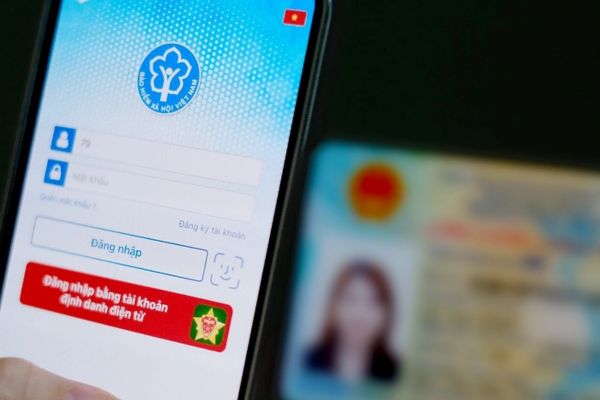
Digital information update Citizenship identity (CCCD) is not only a mandatory requirement but also has many practical benefits. According to the notice of Ho Chi Minh City Social Insurance, from April 1, 2025, records without CCCD or personal identification numbers will not be resolved. This may cause interrupting your rights if the information has not been synchronized.

Moreover, when the data is updated correctly, you will easily look up information insurancemanage VSSID accounts and process related procedures without trouble. So how to check and do this? Let's explore now!
Why should you update the ID number in social insurance?

Check the number of Identity has been updated on VSSID yet

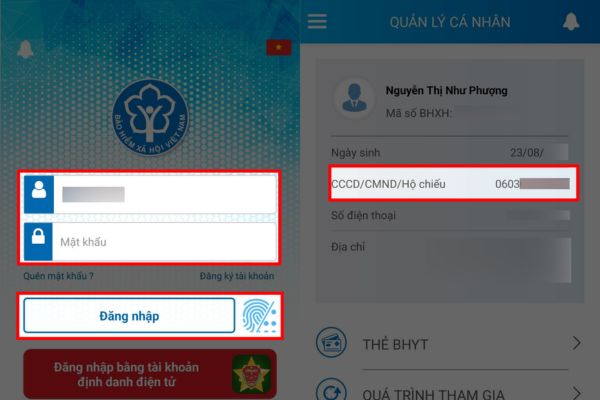
Before embarking on updates, you should check if your VSSID account has displayed CCCD. This saves time and avoids unnecessary operation. Here's how:

Step 1: Download and open the VSSID application on the phone (or access the social insurance public service portal on the browser).

Step 2: Log in with your VSSID account, enter the password and confirmation code.

Step 3: Check personal information. If the CCCD item has been displayed correctly, you do not need to do anything. If you are still the old ID number, switch to the update step immediately.
Check the number of Identity has been updated on VSSID yet

Instructions to update the number of identity to social insurance on the phone

If you find that VSSID account does not have a CCCD number, you can make updates right on the phone with the following steps:

Step 1: Access Social insurance service portal via VSSID application or browser on the phone. Select the item “Log inAnd enter account information.
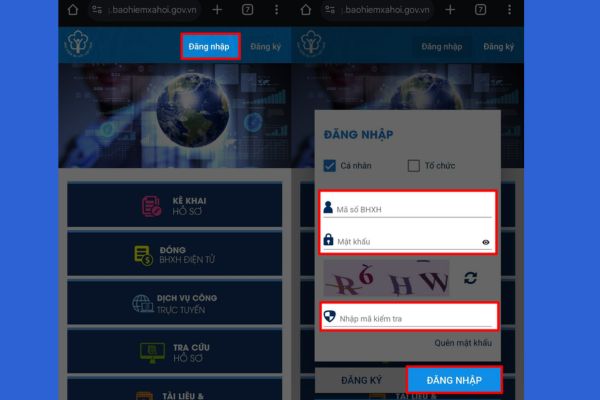
Log in account
Log in account

Step 2: After successful login, click Human -shaped icon (Usually in the top right corner).

Step 3: Find items “Account information“, Pull down the part”Identity information”Enter your new CCCD number and click the confirmation to complete.

With only 3 simple steps, you have updated the ID number into social insurance without the need for social insurance agency. Do not forget to check the information after updating to make sure there is no mistake!
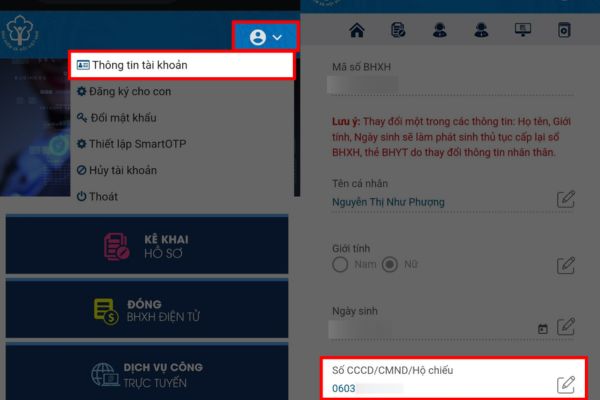
Scroll down the
Scroll down the “Identity Number of Information” section

How to add identity to social insurance on computers

If you are familiar with your computer, the update process is not complicated. Please follow the instructions:

Step 1: Open the browser, access the social insurance service portal at the official address. Log in with VSSID account.

Log in with VSSID account

Step 2: Confirm successfully login to enter the personal information management interface.
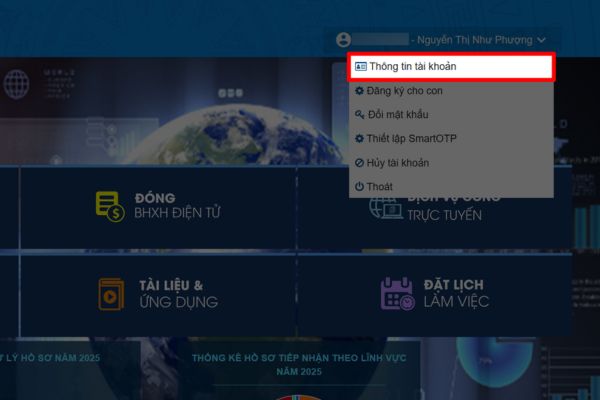
Go to the personal information management interface

Step 3: Find personal information, enter the new CCCD number in the corresponding box and press the saving to complete.

This process is extremely fast, it only takes about 5 minutes and you have completed the information. This is an ideal way for those who want to update the identity number in social insurance in an accurate and professional way.
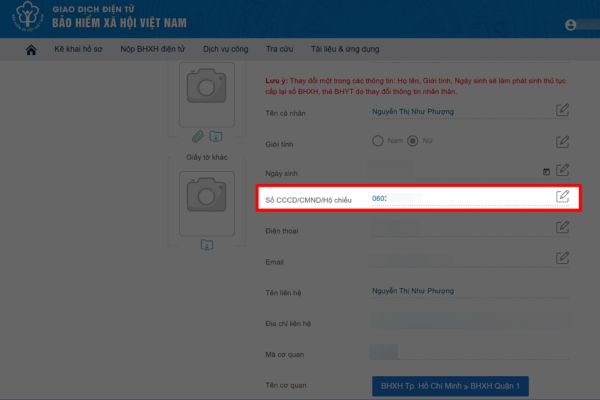
Enter the new CCCD number in the corresponding box

Important note when updating the ID number into social insurance

To ensure the process goes smoothly, you should note some of the following points:

  • Check the number of CCCDs before saving, avoiding the wrong import leading to the need to be revised.
  • Make sure the internet connection is stable so as not to be interrupted when logging or updated.
  • If you have difficulty, you can contact the social insurance switchboard (1900.9068) for timely support.

Important note when updating the ID number into social insurance

Conclude

Job Update the ID number in social insurance Not only is it a mandatory requirement but also a way for you to protect your rights in the future. With the detailed instructions above, whether using a phone or computer, you can perform this operation easily. Action immediately to avoid unnecessary problems before the deadline 01/4/2025. Do not forget to check the information after updating to make sure everything is perfect!


Tags: AprilinsurancenumbersocialUpdate
Previous Post

Emupedia: Play the childhood game store 8x, 9x right in the browser

Next Post

Some entertainment statements with Google Assistant reduces stress

AnonyViet

AnonyViet

Related Posts

Instructions on how to view a 3D exhibition about Party history right at home
Knowledge

Instructions on how to view a 3D exhibition about Party history right at home

November 15, 2025
How to create an order on Shopee to send items to relatives
Knowledge

How to create an order on Shopee to send items to relatives

November 12, 2025
Download training materials on Applying AI in teaching and learning in 2025
Knowledge

Download training materials on Applying AI in teaching and learning in 2025

November 8, 2025
How to delete SMS and iMessage in iCloud to free up space
Knowledge

How to delete SMS and iMessage in iCloud to free up space

November 7, 2025
Beware: Using AI to “create found images” of pets/lost items to demand ransom
Knowledge

Beware: Using AI to “create found images” of pets/lost items to demand ransom

October 26, 2025
Instructions for creating your own AI voice in just 10 seconds
Knowledge

Instructions for creating your own AI voice in just 10 seconds

October 24, 2025
Next Post
Some entertainment statements with Google Assistant reduces stress

Some entertainment statements with Google Assistant reduces stress

0 0 votes
Article Rating
Subscribe
Login
Notify of
guest

guest

0 Comments
Oldest
Newest Most Voted
Inline Feedbacks
View all comments

Recent News

Instructions on how to edit Facebook scheduled posts

Instructions on how to edit Facebook scheduled posts

November 16, 2025
Suggested AI command to create a rustic and charming image of a Ban Lien girl

Suggested AI command to create a rustic and charming image of a Ban Lien girl

November 16, 2025
Windows 10 will have a new, simpler interface

Windows 10 will have a new, simpler interface

November 16, 2025
Share Key Active Visual Studio 2026

Share Key Active Visual Studio 2026

November 15, 2025
Instructions on how to edit Facebook scheduled posts

Instructions on how to edit Facebook scheduled posts

November 16, 2025
Suggested AI command to create a rustic and charming image of a Ban Lien girl

Suggested AI command to create a rustic and charming image of a Ban Lien girl

November 16, 2025
Windows 10 will have a new, simpler interface

Windows 10 will have a new, simpler interface

November 16, 2025
AnonyViet - English Version

AnonyViet

AnonyViet is a website share knowledge that you have never learned in school!

We are ready to welcome your comments, as well as your articles sent to AnonyViet.

Follow Us

Contact:

Email: anonyviet.com[@]gmail.com

Main Website: https://anonyviet.com

Recent News

Instructions on how to edit Facebook scheduled posts

Instructions on how to edit Facebook scheduled posts

November 16, 2025
Suggested AI command to create a rustic and charming image of a Ban Lien girl

Suggested AI command to create a rustic and charming image of a Ban Lien girl

November 16, 2025
  • Home
  • Home 2
  • Home 3
  • Home 4
  • Home 5
  • Home 6
  • Next Dest Page
  • Sample Page

new88 trang chủ shbet trang chủ f168 trang chủ qq88 nhà cái 78win

No Result
View All Result
  • Home
  • News
  • Software
  • Knowledge
  • MMO
  • Tips
  • Security
  • Network
  • Office

new88 trang chủ shbet trang chủ f168 trang chủ qq88 nhà cái 78win

wpDiscuz
0
0
Would love your thoughts, please comment.x
()
x
| Reply