Google Assistant is a powerful tool that can make your life easier in many ways. However, it is not only about productivity and practicality. Here are some interesting things that you may not know about Google Assistant such as listening to jokes, playing games and looking for Easter eggs.
| Join the channel Telegram belong to Anonyviet 👉 Link 👈 |

How to launch Google Assistant
These statements will operate on many devices that support Google Assistant, including iPhone, iPad, Android, smart speakers and smart screen. You do not need devices like Nest Home or Google Home to launch Google Assistant, simply using your phone or tablet.
To start, you just need to launch Google Assistant and say the commands below whenever the device is listening. For speakers and monitors, you just need to say “Hey, Google” to call assistant assistant.
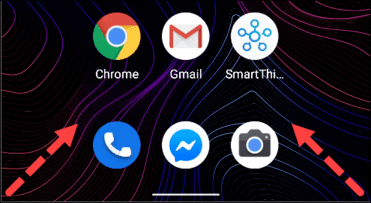
On Android, there are several ways for you to launch Google Assistant. The simplest way is to say “OK, Google” or “Hey, Google”. On newer devices, you can launch Google Assistant by swiping from the bottom of the screen on the left or right corner.
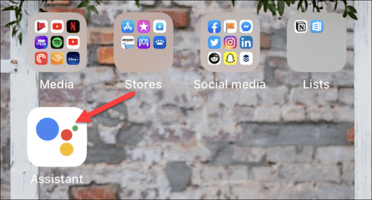
On iPhone and iPad, you must install the Google Assistant app, then launch this application from the main screen. After you open the application, say “OK, Google” or click on the microphone icon and Google Assistant will start hearing you speak. If you do not know how Activate Google Assistant Vietnamese Then follow the instructions of the previous post.
Now, I will show you some interesting things you can do with Google Assistant right away.
Joking with Google Assistant
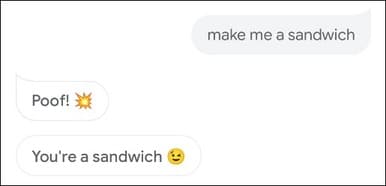
You can ask or say the following jokes to get funny answers from Google:
- What Goes Up, But Never Comes Down? /What goes up, but never go down?
- Do you know the muffin man?
- Why did the Chicken Cross The Road? / Why does the chicken cross the street?
- WHO Let the Dogs Out? / Who put the dog out?
- What is your favorite dessert? / What is your favorite dessert?
- Do you like to exercise? / Do you like exercise?
- Make me a sandwich. / Make me a sandwich.
You can also ask Google Assistant to tell jokes for you. If you ask a joke about a specific topic, Google will tell you.
Here are some different ways you can ask:
- Tell me a joke. / Tell me a joke.
- Tell me a kid's joke. / Tell me a joke of children.
- Tell me a dad joke. / Tell me a father's jokes.
- Tell me a knock-knock joke. / Tell me a joke story.
- Tell me a pun. / Tell me with a pun.
- Read poetry for me
Play with Google Assistant
If you can't joke with Google Assistant, there are some games that you can play. Google also does not ask for any application to download, you just need to use your voice.
Here are some options:
- Are you feeling lucky?: Just say, “Hey, Google, I'm Feeling Lucky,” and a quiz game will begin. You can play with someone or another group.

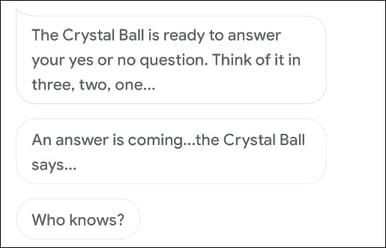
- Crystal Ball: Say “Hey, Google Crystal Ball” and like Magic 8-Ballthen you can ask or not. After that, Google will give you a confusing response.
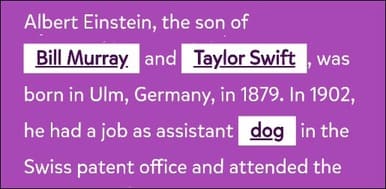
- Mad Lubs: Say “Hey, Google, Play Mad Libs”And Google Assistant will ask you to choose a category that you can do through voice or touch. The game will guide you to fill in the blank and then read you the final answer.
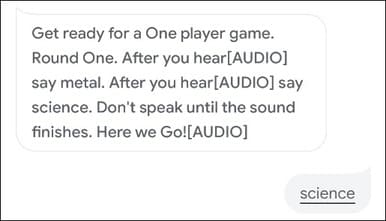
- Ding dong coconut: If you say, “Hey, Google, Play Ding Dong Coconut,” You can play a memory game that requires you to link words with sound. You must remember which word is accompanied by sound and many other words added when you play for a long time.
To find more games, just explore game of Google Assistant. There are many things for you to choose and they only require Google Assistant to play.
Google Assistant's Eggs
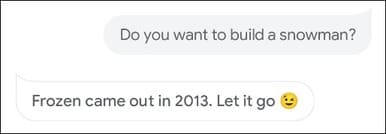
Google loves Easter Eggs and Assistant no exception. These are really not traditional jokes, but there are some things that are still very funny.
Try asking or saying any of the following:
- Do you like the iPhone?
- Do you like Android?
- Use the Force.
- May the force be with you.
- Aren's you a little short for a storemoRooper?
- I am Your Father.
- Talk Like Yoda.
- Where in the world is Carmen Sandiego?
- Open the Pod Bay Door.
- Do you know Hal 9000?
- How much wood wuss a waterchuck chuck if a waterchuck Could Chuck Wood?
- How many roads must a man walk down?
- Where is waldo?
- Who's on First?
- You want the truth?
- What is the Airspeed Velocity of An Unladen Swallow?
- To be, or not to be?
- Mirror, Mirror on the Wall, Who's the Fairest of Mon?
- Do you want to build a snowman?
- What do you mean I'M Funny?
- Are you Afraid of the Dark?
- Wherefore Art Thou, Romeo?
- What would you do for a klondike bar?
- How many licks does it take to get to the center of a tootsie pop?
- Show me the money.
- Can you rap?
- Do you Speak Morse Code?
Don't forget Google assistant also help you Find songs through melody there.
The beauty of Google Assistant is that there are many things that it can do. I only provide you with typical statements. You need to talk or search for funny stories about Google Assistant more if you want to know everything about it. You can also search for The same interesting thing on Chrome.