If using Excel is quite complicated with cumbersome calculation functions, and too many mouse clicks, then Ultimate Suite for Excel helps you simplify operations with just a few mouse clicks. Ultimate Suite for Excel synthesizes more than 60 frequently used features and 300 options in Excel. This is a tool with the same function KuTools save you time when working on Excel.
| Join the channel Telegram of the AnonyViet 👉 Link 👈 |

Ultimate Suite for Excel – A versatile utility toolkit for Excel
Ultimate Suite for Excel is a third-party extension toolkit that adds support for Microsoft Excel, developed by 4Bits. This software creates more intelligent and professional data management tools, which can help users automatically perform different data operations on reports, merge multiple cells, integrate multiple spreadsheets, delete duplicate row data, etc. Therefore, with its help, users will be able to save a lot of time when working with Microsoft Excel.
Ultimate Suite For Excel combines many types of functionality together to easily solve most common Excel problems and requirements in an automated and very easy to use way. You can increase your productivity by 50% when you use this toolkit together with Excel.. Plus, it supports all versions (both 32 bit and 64 bit) of Microsoft Excel from most Excel 2003 to Excel. 2019 latest and most premium.
All in all, Ultimate Suite for Excel can be your indispensable assistant as long as your daily work requires Microsoft Office Excel in school, small office or large company.
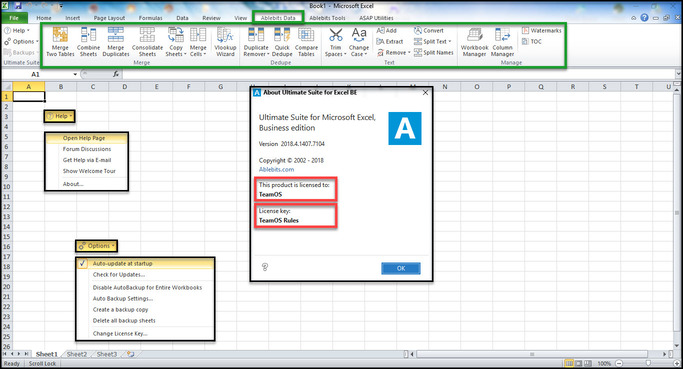
main function
Ultimate Suite for Excel with the following features, help you work with just a few clicks.
| FEATURE |
DETAIL |
| Merge: Merge cells, merge cells, join cells |
- Merge two tables and add missing columns and rows.
- Merge and merge two tables based on key columns.
- Summarize data from multiple ranges.
- Copy data from selected ranges to a worksheet.
- Turn the work sheet into a workbook and place the resulting tables in a file.
- Combine identically named worksheets into one.
- Copy selected worksheets to a worksheet.
- Merge selected rows or columns.
- Joining several cells holds all the data.
|
| Compare |
- Compare two tables for duplicate and unique values.
- Find unique values in a table.
- Find and delete, select, color, copy, or move duplicates in an Excel sheet.
- Find and process duplicates and their first occurrences.
|
| Combine and Split |
- Combine duplicate rows and paste unique data into one line.
- Split a large table into separate lists according to the values in the selected column.
- Split the multipart name into multiple columns.
|
| Convert |
- Convert the summary table to a list.
- Convert your board into label cards.
- Swap two ranges in your worksheet or workbook.
- Choose vertically or horizontally.
- Convert rows to columns and vice versa.
|
| Randomly choose and fill |
- Generate unique random numbers.
- Get random dates and Booleans.
- Save custom lists with values to get random data from them.
- Generate strong passwords, codes and test data.
- Shuffle cells by row, column, or within the selected range.
- Select a certain amount or percentage of data at random.
- Fill in the empty cells with the value above or below.
|
| Find and check |
- Look for partial duplicates, misspellings, and misspelled words.
- Search and replace data in values, formulas, hyperlinks, and comments.
- Search and export or select found values.
- Find and fix broken references to other workbooks.
|
| Cut, extract content |
- Cut extra leading, trailing, between spaces….
- Add text to selected cells by position.
- Split a column with text into multiple columns.
- Change the text case in your Excel sheet.
- Convert numbers stored as text to numbers.
- Text extraction.
- Delete characters by position.
- Remove formatting in your table.
- Remove non-printing, numbers, text characters, symbols, and punctuation.
- Convert line breaks and other characters to any custom symbols.
|
| Select and calculate |
- Count and sum cells based on their color.
- Select certain color to count or sum the cells.
- Apply Average/Max/Min functions to color data.
- Select cells by type.
- Select cells by value.
- Keep the same selection when switching between sheets.
- Select any value in your list to filter your table.
- Search for cells based on their value or color.
- Apply basic calculations to selected cells.
|
| Quick utility |
- Delete blank rows, columns, and sheets.
- View all open workbooks and spreadsheets in one pane.
- Instantly move columns in your table.
- Insert watermark in Excel
- Add a table of contents
- Get cell or range address to Clipboard.
- Convert formulas to relative or absolute.
- Insert a picture comment in 2 clicks.
- Change the comment shape.
- Opinion management.
- Replace formulas with values.
|
Download
Download Ultimate Suite for Excel 2020 Full
Version Ultimate Suite for Excel already activated copyright, just download and install and use together with Excel.
Supported Excel versions:
- Excel for Office 365
- Excel 2019
- Excel 2016
- Excel 2013
- Excel 2010
- Excel 2007
The article achieved: 5/5 – (100 votes)