Tool to download videos without watermark was born to help people easily save sharp movies without any problems. Instead of having to endure pirated download sites that force you to constantly watch ads or intentionally suffocate your download bandwidth, you can absolutely choose a smarter option. This useful tool works smoothly on both the intuitive web interface and the extremely convenient Telegram chatbot.
📢 Join the channel Telegram belong to AnonyViet
Update new articles, cool tools and IT tips fastest
Why are current video download websites annoying?
Currently, the need to download videos from entertainment platforms such as TikTok, YouTube or Facebook for learning materials, research or offline entertainment is huge. However, when looking for solutions on the internet, we often fall for poor quality intermediary websites with a lot of bad experiences.
Just click or touch anywhere on the screen, a series of new advertising windows will automatically open. More worryingly, these advertising pages often contain sensitive content, fake warnings about virus-infected devices or entice the installation of malicious applications, posing a very high risk of information insecurity.

Limited bandwidth speed
Many video download sites intentionally squeeze download bandwidth to extremely low levels. They force users to watch long advertising videos or require them to sign up for a monthly paid account for faster download speeds, causing unnecessary waste of time for users.
Downloaded videos have errors or reduced quality
There are many cases where the video after processing loses sound, the image is blurred or the resolution is reduced compared to the original on the application. This directly affects the quality of work of those who need sharp video documents for reference.
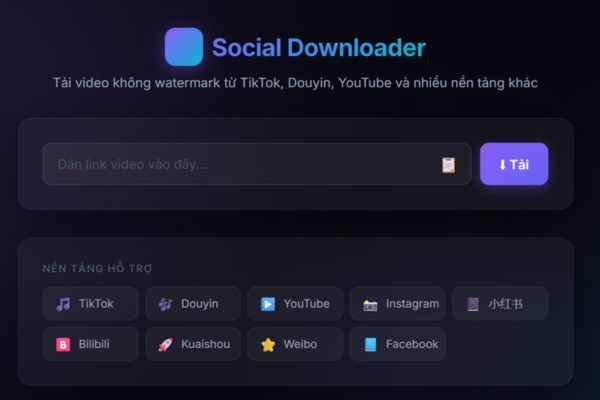
To completely overcome the above disadvantages, a compact solution was born to bring the smoothest and most intuitive download experience to everyone. When it comes to storing short videos as creative resources, a watermark-free video downloader that works smoothly is essential. This tool is operated completely non-profit on a separate VPS server system, ensuring maximum stability and information security.
Below is a specific comparison table between using this new watermark-free video download tool compared to conventional solutions currently available online:
| Comparison criteria | Regular video download website | New watermark-free video download tool |
| Display advertising | Dense, annoying auto-jumping popups | Does not contain spam ads |
| Waiting time | Required to wait 10 – 30 seconds | Process and enable downloads instantly |
| Log in to your account | Requires login or purchase of VIP package | Completely free, no account required |
| Support platform | Usually only supports a few social networks | Multi-platform (TikTok, Douyin, YouTube, Facebook,…) |
| User interface | Confusing, many fake buttons | Minimalist, intuitive and extremely easy to operate |
This watermark-free video downloader allows you to download content directly via your mobile browser or computer without having to install any other intermediary applications.
Method 1: Through the website
Step 1: You access the official video download website at the address https://downloader.aishop.vn/ using popular browsers like Chrome, Safari or Edge.
Step 2: You open the social networking application (TikTok, Douyin, YouTube,…) containing the video you want to download, select the share icon and click copy link.
Step 3: Return to the website interface, paste the link you just copied into the input box with the words “Paste the video link here“.
Step 4: You click on the button “Load” purple color right next to it to start downloading the video to your device.
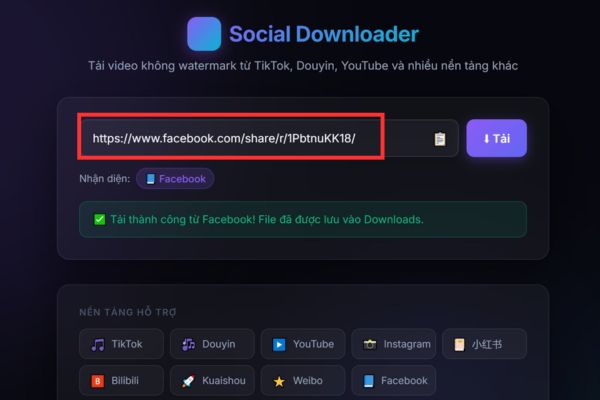
Method 2: Use Telegram bot
For those who often work on mobile, integrating a watermark-free video download tool directly Telegram bots will help simplify every step. You don’t need to open a web browser, just send the link into the chat box and the bot will automatically return the original quality file to you in a few short seconds. To start using, please follow the detailed instructions below:
Step 1: You start the application Telegram on your phone or computer, search for the official bot account @Socialdownloadbyjacknguyen_bot then press the button “Start” to start chatting.
Step 2: Navigate to the social networking app that has the video you want to download, tap the video sharing button, and copy the video’s link.
Step 3: Return to the chat interface with the bot on Telegram, paste the copied video link into the message edit box and then click send like a normal message.
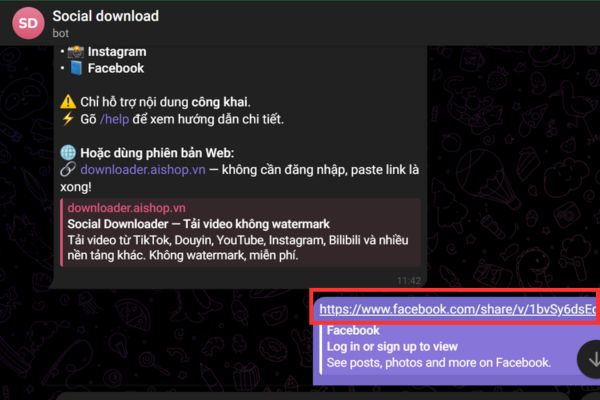
Step 4: You wait for the server system to process the video data for about 3 to 5 seconds without needing to perform any other operations.
Step 5: Click on the item HD.
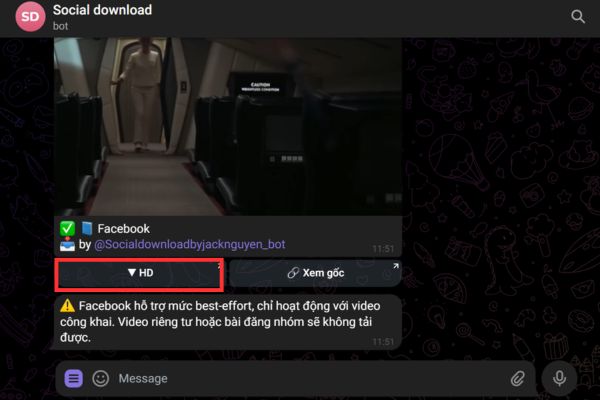
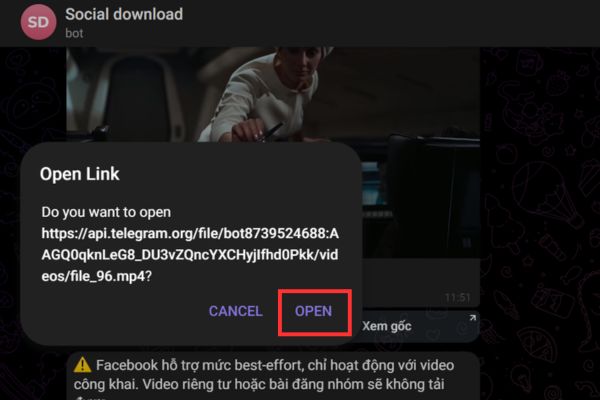
Select Open The video will automatically be downloaded to the device.
Conclusion
In general, owning a watermark-free video downloader that works stably and does not contain junk ads will make your daily work and entertainment experience much smoother. If you find the tool useful, don’t hesitate to share it widely with your friends to experience it.
Frequently Asked Questions (Q&A)
1. Does this watermark-free video download tool limit the number of downloads per day?
Absolutely not. The system is designed to support users in downloading unlimited videos and completely free of charge.
2. Do I need to install any software to use the Telegram Bot version?
You don’t need to install any other third-party software, just have the Telegram app available on your device and message directly with the bot to receive videos.
3. Does the video downloaded through this tool retain the original high quality resolution?
Have. The system always prioritizes scanning, analyzing and downloading files with the best image and sound quality formats from the original video source.