• Home
  • News
  • Software
  • Knowledge
  • MMO
  • Tips
  • Security
  • Network
  • Office
AnonyViet - English Version
  • Home
  • News
  • Software
  • Knowledge
  • MMO
  • Tips
  • Security
  • Network
  • Office
No Result
View All Result
  • Home
  • News
  • Software
  • Knowledge
  • MMO
  • Tips
  • Security
  • Network
  • Office
No Result
View All Result
AnonyViet - English Version
No Result
View All Result

Summary of Facebook tricks in just 1 Tool

AnonyViet by AnonyViet
February 17, 2023
in Tips
0

Hi everybody !! I’m back here again. Please introduce myself, I am Duy Nhat and the author of the two articles below. Today I will share another very unique Facebook Tool.

Join the channel Telegram belong to AnonyViet 👉 Link 👈
  1. Tut add friends to facebook group with just 1 Click
  2. Tut get customer information email phone number on Facebook

Received the positive support of everyone in the previous 2 posts. Today I bring a Tool that does a lot of things on facebook. Now, let me briefly talk about its features.

You can check out my two previous posts! You can comment on topics for yourself at Facebook: fb.com/duynhat38

  • Post in the Facebook group.
  • Up the posted post
  • Auto Emotions
  • Seeding articles (like, comment, reply)
  • Add friends to the group
  • And some other features you can discover for yourself!

Speaking of which, you must be eagerly waiting for Tool. Normally it will cost a fee but for the sake of the community today I will share it for free for everyone. I haven’t touched it for a long time, so I don’t know if it’s still usable, please test it and give me feedback in the comment section.

Download Tool

Just leave a comment here or post on the fanpage. I will review and respond to your request. For now, download the tool and experience it.

Download

Backup link

Remember to skip the ad to support me!

Python code with the same function

In addition to the Tool above, I also share with you a code written in python with a lot of functions and easy to use. Below, I have detailed instructions for use with 6 steps.

Python code link

Backup link

Remember to skip the ad to support me!

User manual

B1: You download the above Tut Python to your computer and extract it.

B2: You unzip it, you will see the instruction file and choose the code you like.

Step 3: Open the code you need with notepad or C++

B4: Copy the code.

B5: You open Facebook and press F12 or right-click to select inspect element and switch to Tab Console to enter commands.
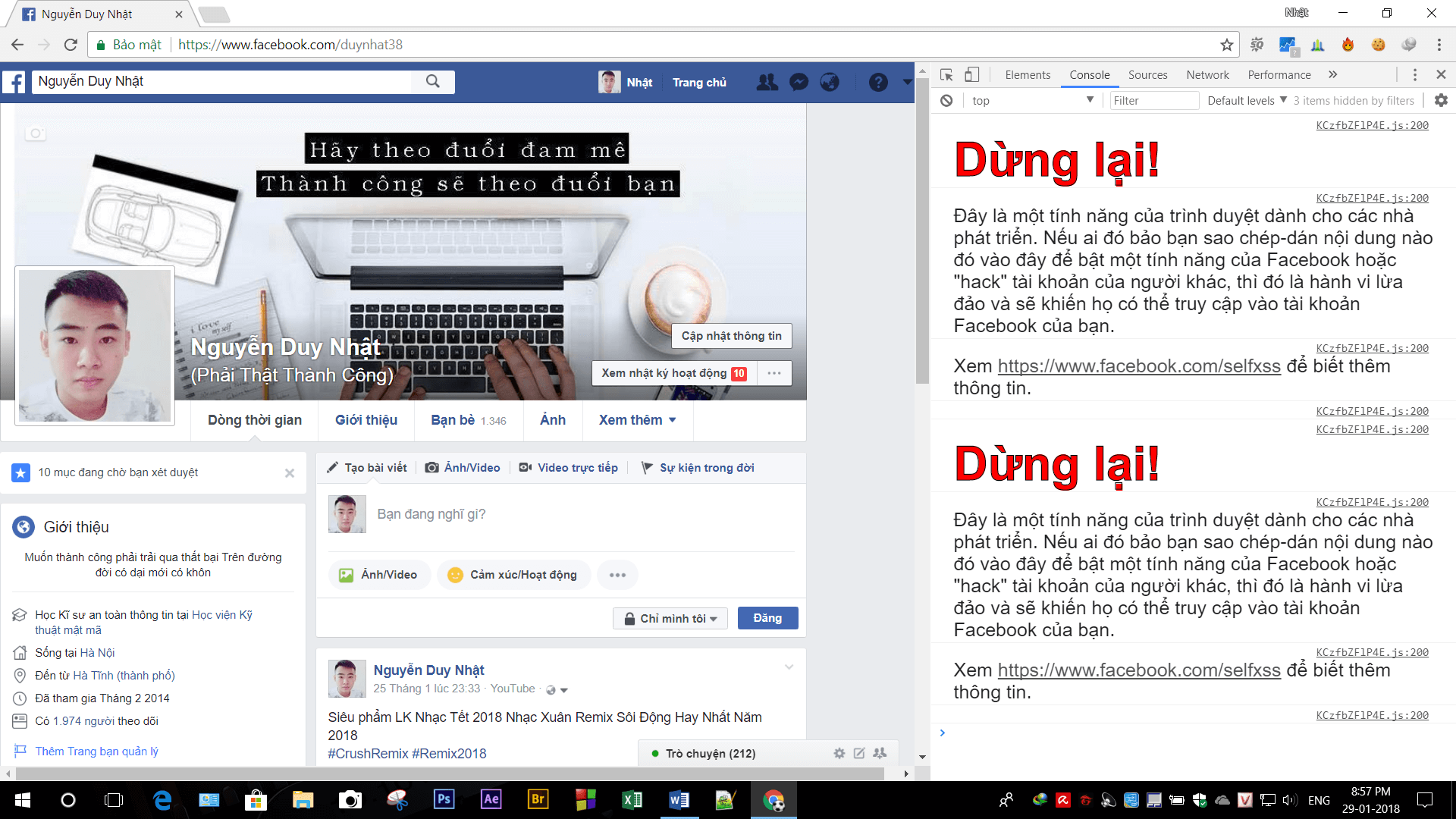
Summary of Facebook tricks in just 1 Tool

B6: Paste the code and enter to enjoy!

Thank you for following the article, do not forget to like and share to support me.
Like Fanpage or follow website for quick updates of new articles.

Good luck
Duy Nhat & Lmint.

The article achieved: 5/5 – (100 votes)

Previous Post

How to create GTA V style images with action on Photoshop

Next Post

How to Verify Facebook protects accounts in the style of BsLVeriF

AnonyViet

AnonyViet

Related Posts

How to add sliders to Facebook Stories to easily rewind videos
Tips

How to add sliders to Facebook Stories to easily rewind videos

April 21, 2026
How to change the default font on Windows 10
Tips

How to change the default font on Windows 10

April 13, 2026
5 tips for using a Browser to replace an App (helps save RAM, time and money)
Tips

5 tips for using a Browser to replace an App (helps save RAM, time and money)

April 13, 2026
How to make funny MeMe photos without Photoshop within 10 seconds
Tips

How to make funny MeMe photos without Photoshop within 10 seconds

April 11, 2026
How to quickly design your own Logo without Photoshop
Tips

How to quickly design your own Logo without Photoshop

April 10, 2026
How to convert Website into App on Windows
Tips

How to convert Website into App on Windows

April 9, 2026
Next Post
How to Verify Facebook protects accounts in the style of BsLVeriF

How to Verify Facebook protects accounts in the style of BsLVeriF

0 0 votes
Article Rating
Subscribe
Login
Notify of
guest

guest

0 Comments
Oldest
Newest Most Voted
Inline Feedbacks
View all comments

Recent News

Instructions for looking up prescriptions on VNeID instead of paper medical books

Instructions for looking up prescriptions on VNeID instead of paper medical books

April 26, 2026
Tips to completely turn off CAPTCHA codes on iPhone and Mac are super simple

Tips to completely turn off CAPTCHA codes on iPhone and Mac are super simple

April 25, 2026
Compare Poco X8 Pro and Poco X7 Pro: A new step for the “king” of mid-range performance

Compare Poco X8 Pro and Poco X7 Pro: A new step for the “king” of mid-range performance

April 24, 2026
How to compress online videos for free without losing quality

How to compress online videos for free without losing quality

April 24, 2026
Instructions for looking up prescriptions on VNeID instead of paper medical books

Instructions for looking up prescriptions on VNeID instead of paper medical books

April 26, 2026
Tips to completely turn off CAPTCHA codes on iPhone and Mac are super simple

Tips to completely turn off CAPTCHA codes on iPhone and Mac are super simple

April 25, 2026
Compare Poco X8 Pro and Poco X7 Pro: A new step for the “king” of mid-range performance

Compare Poco X8 Pro and Poco X7 Pro: A new step for the “king” of mid-range performance

April 24, 2026
AnonyViet - English Version

AnonyViet

AnonyViet is a website share knowledge that you have never learned in school!

We are ready to welcome your comments, as well as your articles sent to AnonyViet.

Follow Us

Contact:

Email: anonyviet.com[@]gmail.com

Main Website: https://anonyviet.com

Recent News

Instructions for looking up prescriptions on VNeID instead of paper medical books

Instructions for looking up prescriptions on VNeID instead of paper medical books

April 26, 2026
Tips to completely turn off CAPTCHA codes on iPhone and Mac are super simple

Tips to completely turn off CAPTCHA codes on iPhone and Mac are super simple

April 25, 2026
No Result
View All Result
  • Home
  • News
  • Software
  • Knowledge
  • MMO
  • Tips
  • Security
  • Network
  • Office

wpDiscuz
0
0
Would love your thoughts, please comment.x
()
x
| Reply