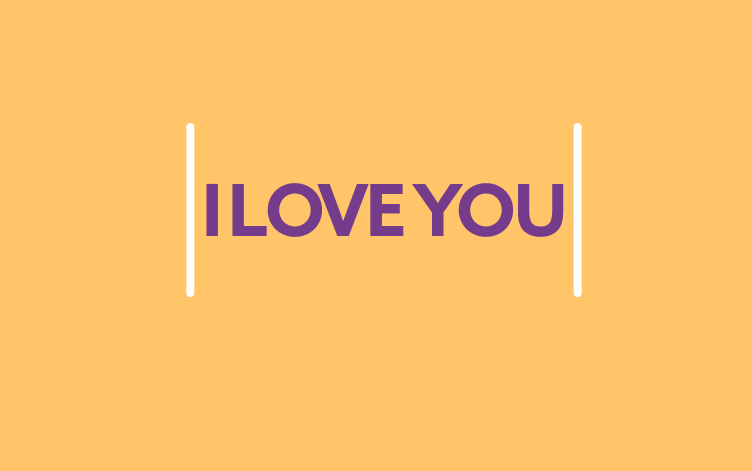
Recently, the Chinese online community has exploded with the heart-shaped code trend of the valedictorian Li in the movie “FIRE ENGLISH, HEAT ME”. It is known that this super cool confession scene appeared in episode 5 of the movie “Light me up, warm you” (Lighter and princess dress).
| Join the channel Telegram of the AnonyViet 👉 Link 👈 |

This warm pink heart was drawn by Ly Luan for Chu Van with HTML code. After that, he still did not forget to challenge Chu Van by asking her to decipher it herself. The reason this confession is so hot and viral is because of the couple’s romance along with Ly Luan’s title of valedictorian and IT scholar.
So in this article, I will guide you guys to swing the trend together by creating a heart-shaped code and uploading it on the web to send your crush confessing. Especially at the end of the article, I will share the heart beat code that is very similar to that of the valedictorian Ly.
Create a code to show your heart condition
First, you create a new folder and name this folder “Heart” or you can also name it differently depending on your preference.
Next in this folder, you create the file index.html and copy the code below into that file.
<!DOCTYPE HTML PUBLIC "-//W3C//DTD HTML 4.0 Transitional//EN">

<HTML>

 <HEAD>

  <TITLE> New Document </TITLE>

  <META NAME="Generator" CONTENT="EditPlus">

  <META NAME="Author" CONTENT="">

  <META NAME="Keywords" CONTENT="">

  <META NAME="Description" CONTENT="">

  <style>

  html, body {

  height: 100%;

  padding: 0;

  margin: 0;

  background: #000;

}

canvas {

  position: absolute;

  width: 100%;

  height: 100%;

}

  </style>

 </HEAD>


 <BODY>

  <canvas id="pinkboard"></canvas>

  <script>

  /*

 * Settings

 */

var settings = {

  particles: {

    length:   500, // maximum amount of particles

    duration:   2, // particle duration in sec

    velocity: 100, // particle velocity in pixels/sec

    effect: -0.75, // play with this for a nice effect

    size:      30, // particle size in pixels

  },

};


/*

 * RequestAnimationFrame polyfill by Erik Möller

 */

(function(){var b=0;var c=["ms","moz","webkit","o"];for(var a=0;a<c.length&&!window.requestAnimationFrame;++a){window.requestAnimationFrame=window[c[a]+"RequestAnimationFrame"];window.cancelAnimationFrame=window[c[a]+"CancelAnimationFrame"]||window[c[a]+"CancelRequestAnimationFrame"]}if(!window.requestAnimationFrame){window.requestAnimationFrame=function(h,e){var d=new Date().getTime();var f=Math.max(0,16-(d-b));var g=window.setTimeout(function(){h(d+f)},f);b=d+f;return g}}if(!window.cancelAnimationFrame){window.cancelAnimationFrame=function(d){clearTimeout(d)}}}());


/*

 * Point class

 */

var Point = (function() {

  function Point(x, y) {

    this.x = (typeof x !== 'undefined') ? x : 0;

    this.y = (typeof y !== 'undefined') ? y : 0;

  }

  Point.prototype.clone = function() {

    return new Point(this.x, this.y);

  };

  Point.prototype.length = function(length) {

    if (typeof length == 'undefined')

      return Math.sqrt(this.x * this.x + this.y * this.y);

    this.normalize();

    this.x *= length;

    this.y *= length;

    return this;

  };

  Point.prototype.normalize = function() {

    var length = this.length();

    this.x /= length;

    this.y /= length;

    return this;

  };

  return Point;

})();


/*

 * Particle class

 */

var Particle = (function() {

  function Particle() {

    this.position = new Point();

    this.velocity = new Point();

    this.acceleration = new Point();

    this.age = 0;

  }

  Particle.prototype.initialize = function(x, y, dx, dy) {

    this.position.x = x;

    this.position.y = y;

    this.velocity.x = dx;

    this.velocity.y = dy;

    this.acceleration.x = dx * settings.particles.effect;

    this.acceleration.y = dy * settings.particles.effect;

    this.age = 0;

  };

  Particle.prototype.update = function(deltaTime) {

    this.position.x += this.velocity.x * deltaTime;

    this.position.y += this.velocity.y * deltaTime;

    this.velocity.x += this.acceleration.x * deltaTime;

    this.velocity.y += this.acceleration.y * deltaTime;

    this.age += deltaTime;

  };

  Particle.prototype.draw = function(context, image) {

    function ease

      return (--t) * t * t + 1;

    }

    var size = image.width * ease(this.age / settings.particles.duration);

    context.globalAlpha = 1 - this.age / settings.particles.duration;

    context.drawImage(image, this.position.x - size / 2, this.position.y - size / 2, size, size);

  };

  return Particle;

})();


/*

 * ParticlePool class

 */

var ParticlePool = (function() {

  var particles,

      firstActive = 0,

      firstFree   = 0,

      duration    = settings.particles.duration;


  function ParticlePool(length) {

    // create and populate particle pool

    particles = new Array(length);

    for (var i = 0; i < particles.length; i++)

      particles[i] = new Particle();

  }

  ParticlePool.prototype.add = function(x, y, dx, dy) {

    particles[firstFree].initialize(x, y, dx, dy);


    // handle circular queue

    firstFree++;

    if (firstFree   == particles.length) firstFree   = 0;

    if (firstActive == firstFree       ) firstActive++;

    if (firstActive == particles.length) firstActive = 0;

  };

  ParticlePool.prototype.update = function(deltaTime) {

    var i;


    // update active particles

    if (firstActive < firstFree) {

      for (i = firstActive; i < firstFree; i++)

        particles[i].update(deltaTime);

    }

    if (firstFree < firstActive) {

      for (i = firstActive; i < particles.length; i++)

        particles[i].update(deltaTime);

      for (i = 0; i < firstFree; i++)

        particles[i].update(deltaTime);

    }


    // remove inactive particles

    while (particles[firstActive].age >= duration && firstActive != firstFree) {

      firstActive++;

      if (firstActive == particles.length) firstActive = 0;

    }


  };

  ParticlePool.prototype.draw = function(context, image) {

    // draw active particles

    if (firstActive < firstFree) {

      for (i = firstActive; i < firstFree; i++)

        particles[i].draw(context, image);

    }

    if (firstFree < firstActive) {

      for (i = firstActive; i < particles.length; i++)

        particles[i].draw(context, image);

      for (i = 0; i < firstFree; i++)

        particles[i].draw(context, image);

    }

  };

  return ParticlePool;

})();


/*

 * Putting it all together

 */

(function(canvas) {

  var context = canvas.getContext('2d'),

      particles = new ParticlePool(settings.particles.length),

      particleRate = settings.particles.length / settings.particles.duration, // particles/sec

      time;


  // get point on heart with -PI <= t <= PI

  function pointOnHeart

    return new Point(

      160 * Math.pow(Math.sin

      130 * Math.cos

    );

  }


  // creating the particle image using a dummy canvas

  var image = (function() {

    var canvas  = document.createElement('canvas'),

        context = canvas.getContext('2d');

    canvas.width  = settings.particles.size;

    canvas.height = settings.particles.size;

    // helper function to create the path

    function to

      var point = pointOnHeart

      point.x = settings.particles.size / 2 + point.x * settings.particles.size / 350;

      point.y = settings.particles.size / 2 - point.y * settings.particles.size / 350;

      return point;

    }

    // create the path

    context.beginPath();

    var t = -Math.PI;

    var point = to

    context.moveTo(point.x, point.y);

    while (t < Math.PI) {

      t += 0.01; // baby steps!

      point = to

      context.lineTo(point.x, point.y);

    }

    context.closePath();

    // create the fill

    context.fillStyle="#ea80b0";

    context.fill();

    // create the image

    var image = new Image();

    image.src = canvas.toDataURL();

    return image;

  })();


  // render that thing!

  function render() {

    // next animation frame

    requestAnimationFrame(render);


    // update time

    var newTime   = new Date().getTime() / 1000,

        deltaTime = newTime - (time || newTime);

    time = newTime;


    // clear canvas

    context.clearRect(0, 0, canvas.width, canvas.height);


    // create new particles

    var amount = particleRate * deltaTime;

    for (var i = 0; i < amount; i++) {

      var pos = pointOnHeart(Math.PI - 2 * Math.PI * Math.random());

      var dir = pos.clone().length(settings.particles.velocity);

      particles.add(canvas.width / 2 + pos.x, canvas.height / 2 - pos.y, dir.x, -dir.y);

    }


    // update and draw particles

    particles.update(deltaTime);

    particles.draw(context, image);

  }


  // handle (re-)sizing of the canvas

  function onResize() {

    canvas.width  = canvas.clientWidth;

    canvas.height = canvas.clientHeight;

  }

  window.onresize = onResize;


  // delay rendering bootstrap

  setTimeout(function() {

    onResize();

    render();

  }, 10);

})(document.getElementById('pinkboard'));

  </script>

 </BODY>

</HTML>
And this is the basic directory structure of this project.
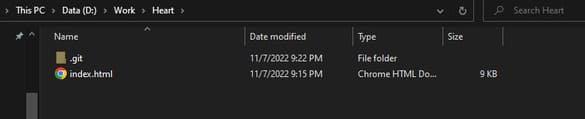
Next, I will guide you to put this heart code on the web.
Put the code on the website using Github Page
First, you download and install git here. Next is Create Github account.
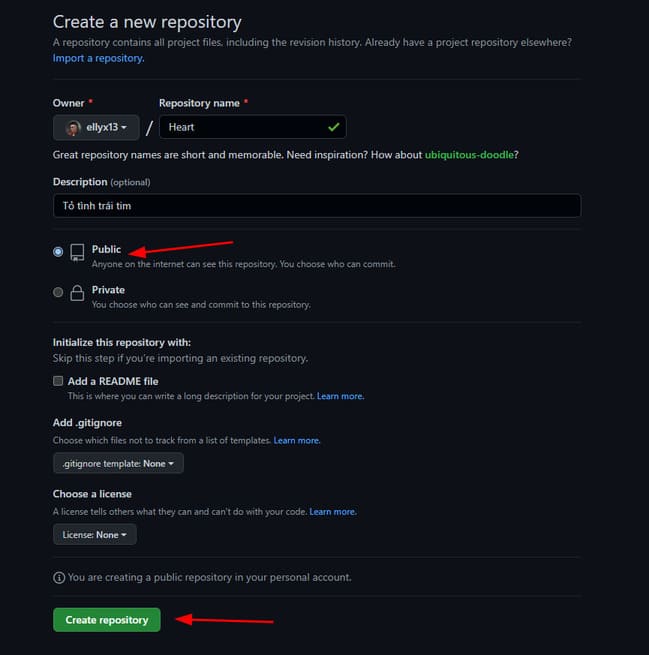
After creating a Github account, you create a new repo by clicking “Create a new repository” on the homepage.
Name the repo as you like, but remember to choose “Public” there you go and press “Create repository”.
Go back to your computer, open cmd in the newly created Heart folder and type the following git commands:
git init
git remote add origin "URL của repo vừa tạo"
git add --all

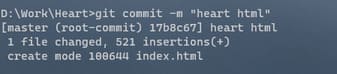
Add content to this commit using the command
git commit -m "nội dung bạn muốn"
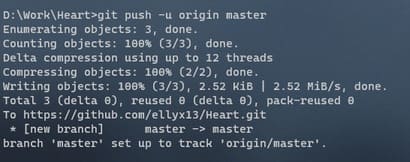
Finally push this repo to github with the command:
git push -u origin master
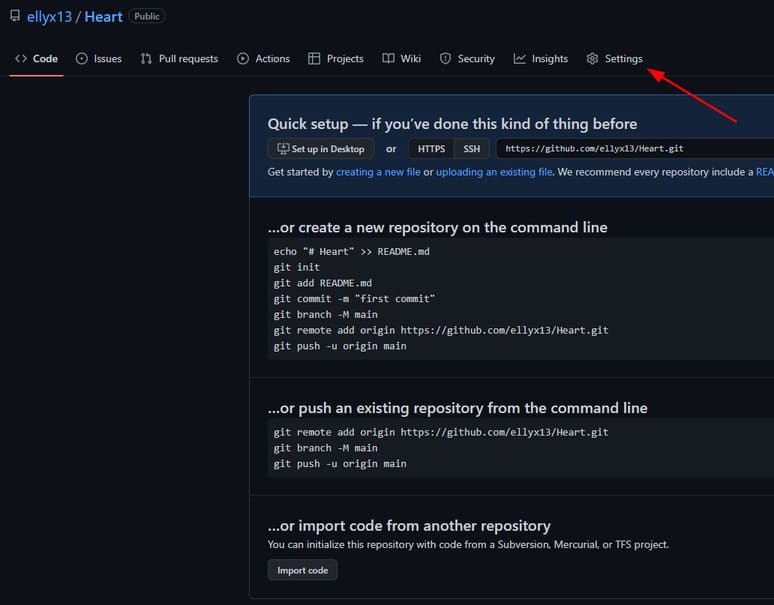
Go back to the repo’s github page and press “Settings”.
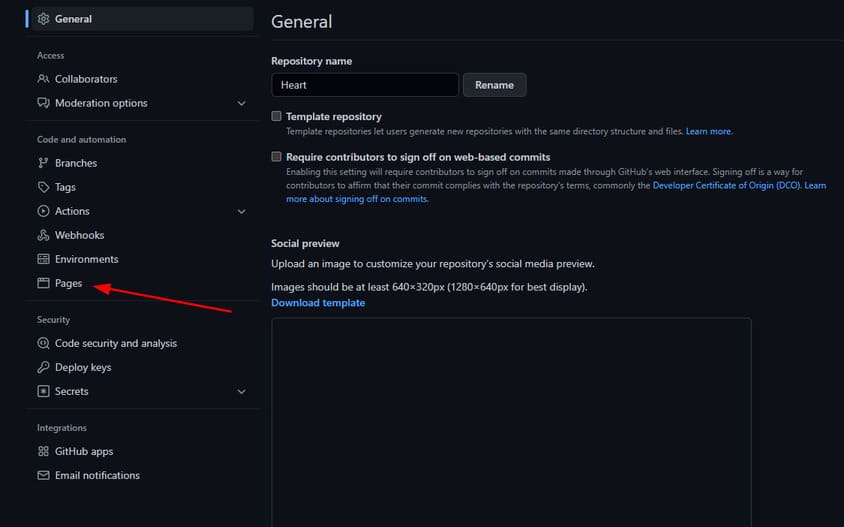
Next choose “Pages”.
In Source, you choose “Deploy from a branch”.
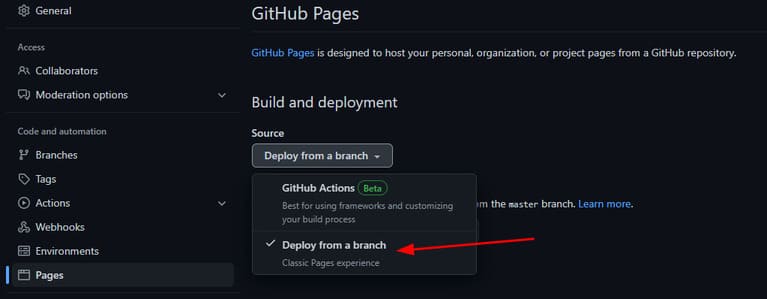
Select branch as “master” and the folder is “root”.
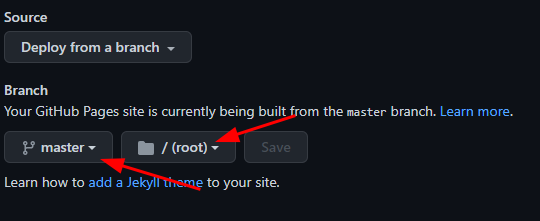
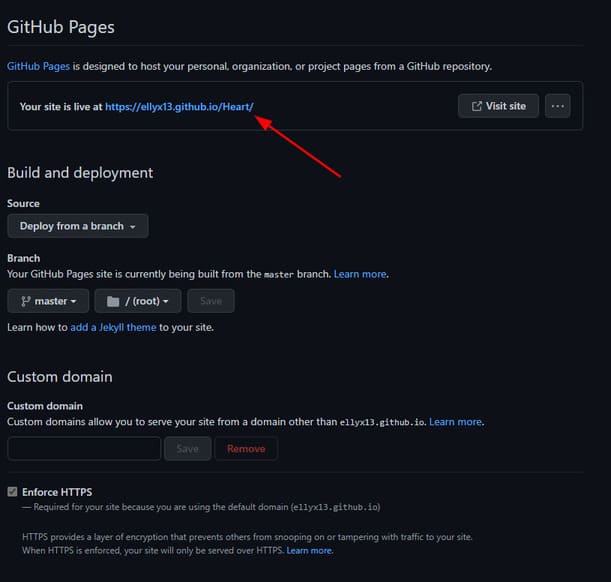
If successful, you will see the website’s URL appear under Github Pages.
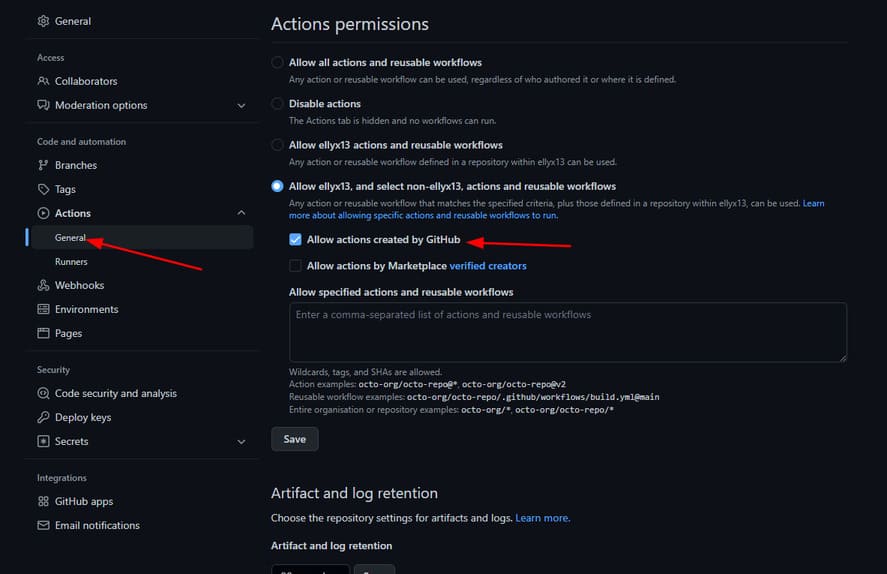
Otherwise, you come in Actions -> General and select as shown below. Then do the selection again Source.
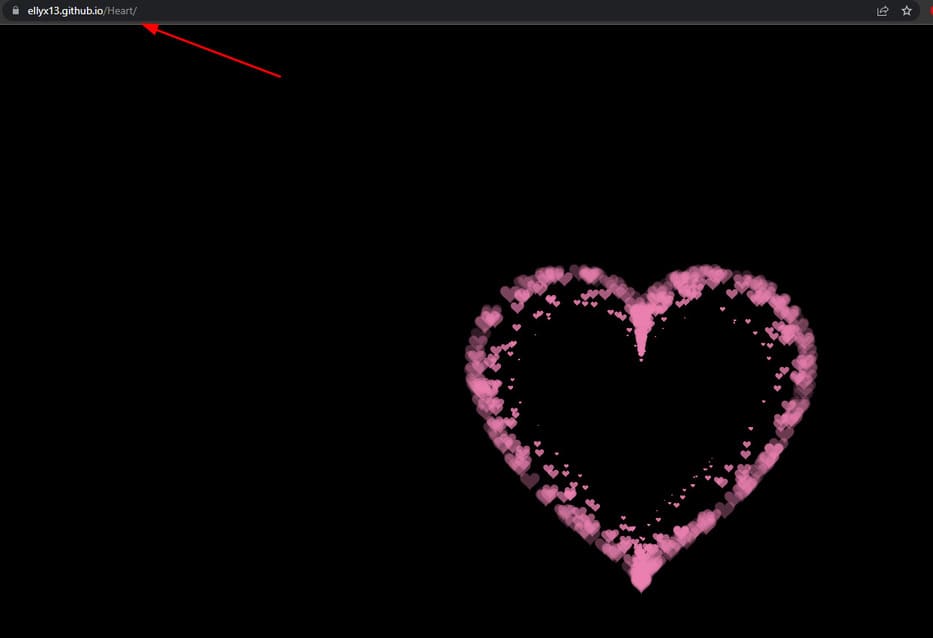
So you have successfully pushed the code to the website. Let’s go confess to your crush.
The code of the beating heart of valedictorian Ly
To get the heart beat code, you just need to access this github page and download the heartbeats.html file.
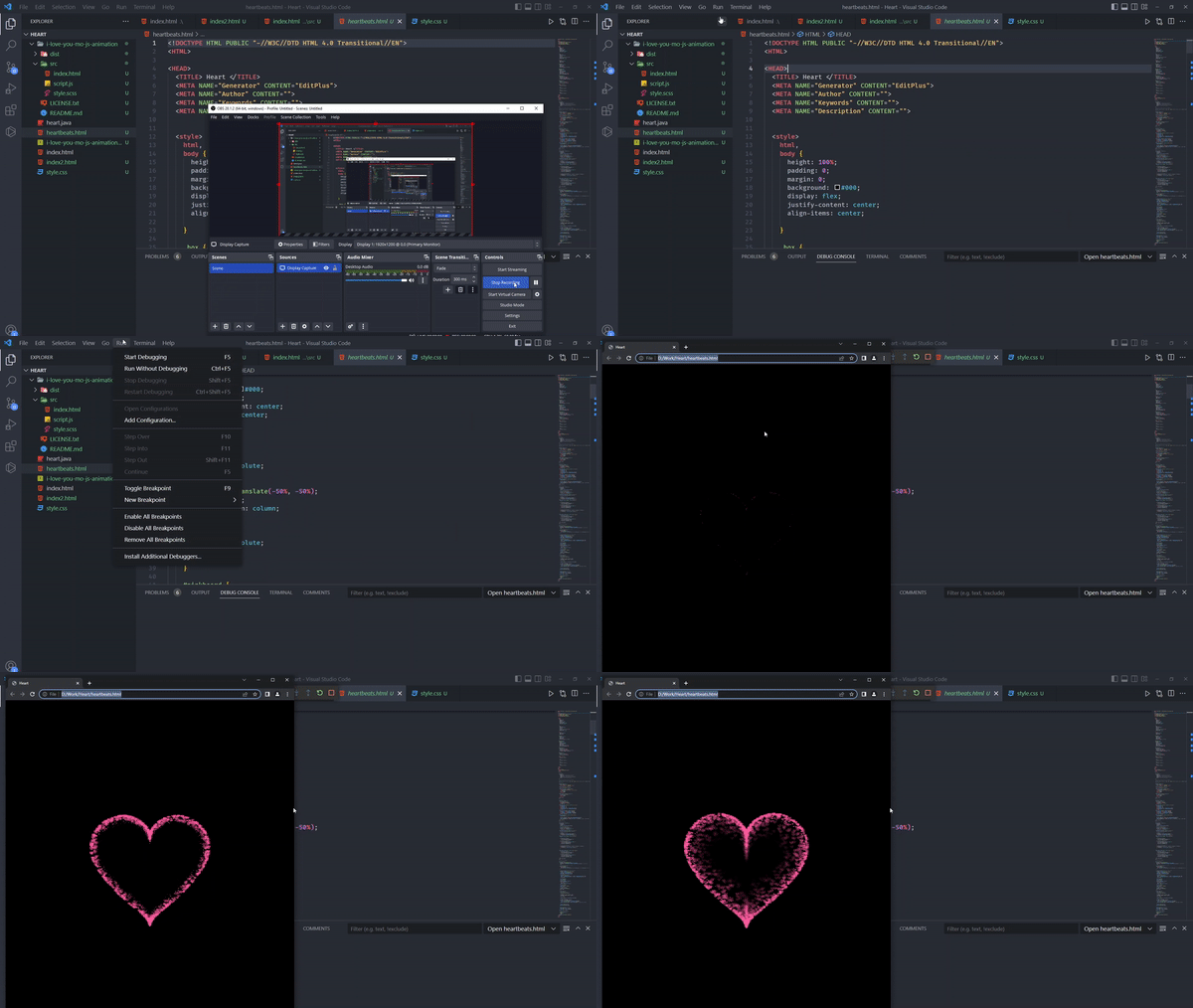
In addition, you can also use the same cute confession code for those of you who like yellow here. If your crush still doesn’t agree, Anonyviet still has it confession web like this again.