Prompt wrote the script with Adam’s voice is the secret “weapon” of many content creators on TikTok today. Instead of having to sit and ponder over each word, you can completely ask AI to do this in the blink of an eye. Let’s go together AnonyViet Discover how to use this divine command!
📢 Join the channel Telegram belong to AnonyViet
Update new articles, cool tools and IT tips fastest
Why do you need a prompt to write a standard Adam voice script?
If you surf often TikToksurely you have heard many times a warm, confident and sometimes slightly teasing male voice named “Adam”. This is one of the hottest AI voices on the ElevenLabs platform. However, for this voice to be fully engaging, you can’t just throw it a dry piece of text. Instead, having a prompt to write a detailed Adam voice script will help the AI understand the context, thereby pausing and emphasizing in the right places.
Many people often complain that the AI voice sounds “fake” or is too monotone. The core reason is due to poor content preparation. Therefore, when you paste the prompt to write Adam’s voice script into tools like Gemini or ChatGPT, you are setting up a perfect framework, forcing the AI to write in a casual, emotional speaking style that matches the characteristics of the character Adam.

Share the prompt to write a script with a standard Adam voice
To create a complete audio clip, you just need to follow the following sequence. Very simple and anyone can do it.
Step 1: First, copy the prompt to write the complete Adam voice script below
Bạn là một nhà sáng tạo nội dung TikTok chuyên nghiệp, chuyên viết kịch bản voice-over cho giọng đọc "Adam" đang cực kỳ hot trên ElevenLabs. Hãy viết một kịch bản thoại (Voice Only) hoàn chỉnh dựa trên các thông tin dưới đây.

THÔNG TIN YÊU CẦU:

Tên sản phẩm/Chủ đề: {Tên sản phẩm hoặc dịch vụ, ví dụ: Kem nền chống nắng Mistine / Mặt nạ đất sét}
Thời lượng video: {Thời lượng mong muốn, ví dụ: 30s, 43s, 45s}
Mốc thời gian & Từ khóa bắt buộc (nếu có): {Ví dụ: Ở giây thứ 12 phải nêu "làm hoàn toàn từ thảo mộc..." hoặc Giây thứ 5 nhắc tới "kiềm dầu SPF 50+"}
Thông tin sản phẩm & USP nổi bật: {Liệt kê các ưu điểm, thành phần, công dụng của sản phẩm, ví dụ: Mỏng nhẹ, chứa 82% tinh chất dưỡng, che khuyết điểm tốt, kháng nước}
Nguồn nội dung gốc (nếu có): {Có thể dán đoạn tin nhắn gốc, dàn ý thô hoặc bài viết review của bạn vào đây}
Hành động kêu gọi (CTA): {Ví dụ: Giỏ hàng góc trái kìa dứt lẹ kẻo hết / Đăng ký kênh ngay nha}
CÁC NGUYÊN TẮC BẮT BUỘC KHI VIẾT KỊCH BẢN GIỌNG "ADAM":

1. Phong cách & Nhân xưng:

Tông giọng phải "nhây nhây", lôi cuốn, hài hước, tự nhiên như người thật đang trò chuyện trực tiếp.
Xưng hô thân mật với người xem bằng các từ thương hiệu như: "các dợ", "mấy dợ", "mấy ní", "con dợ".
Thường kết thúc video bằng từ "Dứt!" hoặc "Dứt lẹ!".
2. Quy tắc viết chữ cho AI đọc chuẩn:

BẮT BUỘC KHÔNG dùng chữ số: Tất cả các con số, phần trăm, số màu phải được viết hoàn toàn bằng chữ để AI không bị đọc vấp (Ví dụ: viết "không một Fig" thay vì "01 Fig", "tám mươi hai phần trăm" thay vì "82%", "ba năm" thay vì "3 năm").
Cách ngắt nghỉ: Sử dụng linh hoạt dấu ba chấm ... và dấu phẩy , để tạo các khoảng dừng ngắt hơi tự nhiên cho AI.
Nhấn mạnh âm lượng: VIẾT HOA các từ cần nhấn mạnh, đặc biệt là các USP lớn (Ví dụ: "MÀU NÀY RỬA ĐƯỢC!", "KHÔNG chứa Silicone").
3. Chèn Audio Tags của ElevenLabs V3:

Đan xen liên tục các thẻ biểu cảm bằng tiếng Anh đặt trong dấu ngoặc vuông [...] ở đầu câu thoại hoặc giữa các vế câu để AI diễn sâu và tự nhiên nhất.
Sử dụng đa dạng các thẻ biểu cảm như: [gasp], [excited], [whispering], [clears throat], [giggles], [happy], [sad], [confident], [playful], [frustrated], [sarcastic], [dry tone], [sighs], [laughs softly].
Tránh lặp đi lặp lại một vài thẻ quen thuộc để mỗi video có một màu sắc biểu cảm riêng biệt.
Hãy tiến hành viết kịch bản thoại (Voice Only) đáp ứng đầy đủ tất cả các yêu cầu trên. Chỉ xuất ra phần kịch bản thoại sạch để tôi sao chép ngay lập tức.
In this pattern, there will be parts enclosed in curly braces {…}. Your job is to fill in specific information, for example: what the video topic is, desired duration (30 seconds or 1 minute), keywords to emphasize, and a call to action at the end of the video. Thanks to that, the generated script will closely follow your intentions.
Step 2: After you have filled in all the information, copy the entire text. Next, access Gemini websitepaste the content into the chat box and press Enter.
Just wait a few seconds, AI will return you a complete scenario. Please read it once to check if you like it or not. If you want to change, you can completely ask AI to correct it directly or edit it yourself to the best fit.
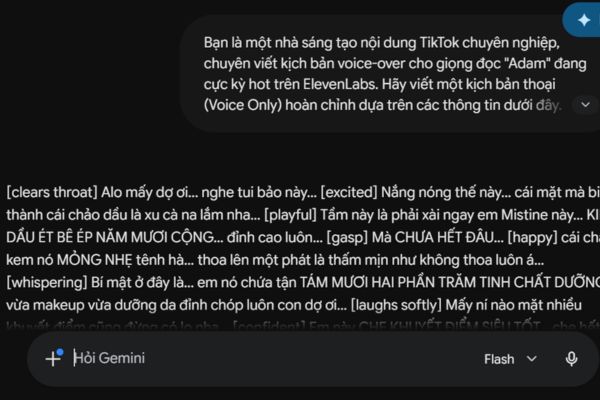
Step 3: Once you have content you like, copy the entire script and transfer it to the page ElevenLabs (Remember to register for an account if you don’t have one).
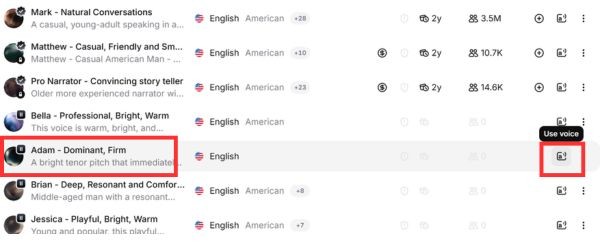
Step 4: Then access the tab Voices > Select Popular Tiktok voices.
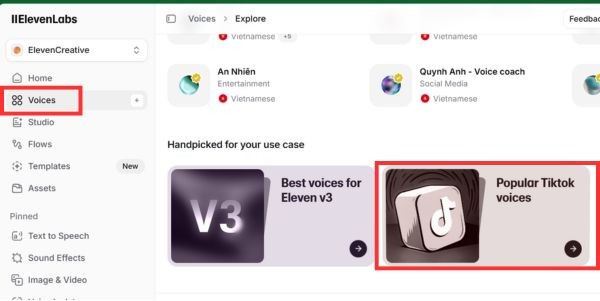
Scroll down and read the voice immediately Adam – Dominant, Firm and click on the letter a icon to Use voice.
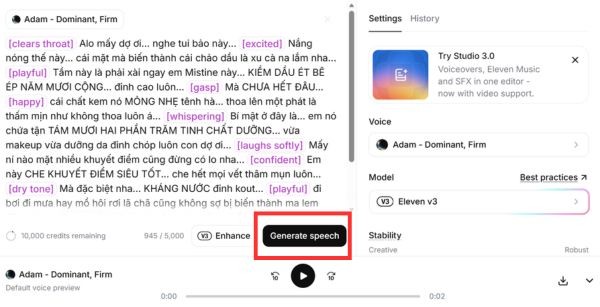
Step 5: Now you put the script you just created in the blank box and insert emotional tags in English placed in square brackets before the sentences. For example [playful] , [laughs] good [confident]. These cards will command ElevenLabs to adjust the tone to be as lively as possible.
Finally, press the button Generate to create sound.
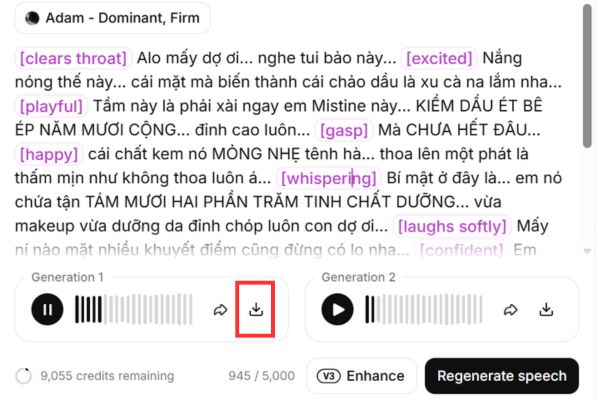
Step 6: Wait a few minutes and the system will give you 2 results, please listen and download and combine into your video. If you are not satisfied, you can click Regenerate speech to recreate.
Conclusion
Own one prompt to write Adam’s voice script Quality will make your content creation path much less thorny. Instead of struggling for hours, now everything is intelligently automated. I hope you apply it successfully and create many million-view videos.
Frequently Asked Questions (Q&A)
1. Which application do you use to compose command content before giving it to AI?
You can paste it into any application with text editing function on your computer, such as Notes, MS Word, or Google Docs.
2. How to add emotion to the reading voice on ElevenLabs?
Simply type the English emotion words and put them in square brackets (e.g.: [laughs], [playful], [confident]) inserted before the text that needs emphasis.
3. Why is the prompt required to convert all numbers into Vietnamese words?
According to the instructions in the video, changing all numbers to words (for example, writing “one” instead of “1”) will help the AI voice recognize more accurately. Thanks to that, the sound emitted will be smooth, natural and without stuttering or pronunciation errors.