In this article, I will guide you to add the upper index as the exponent and the lower index in Excel.
| Join the channel Telegram of the AnonyViet 👉 Link 👈 |
How to add superscript and subscript in Excel
first. For example, double-click cell A1.
2. Select value 2.

3. Right-click, and then select Format Cells (or press Ctrl + 1).
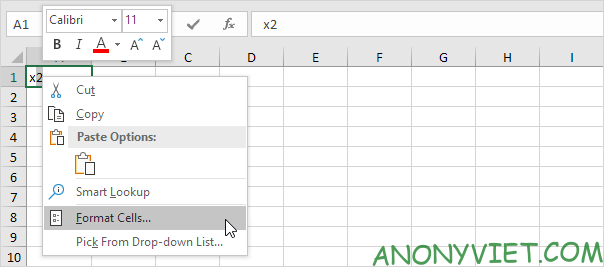
4. On the tab Fontunder Effectspress Superscript.
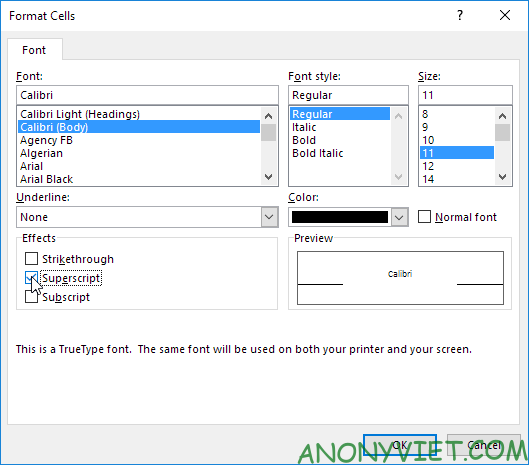
5. Press OK.
Result:

6. The above index cannot return results. To square a number, use the following formula:

Note: to insert the caret symbol ^, press SHIFT + 6.
7. To format a character as subscript, repeat steps 1-5 but in step 4 click Subscript.
Result:

8. Did you know you can also insert equations in Excel? On the Insert tab, in the Symbols group, click Equation.
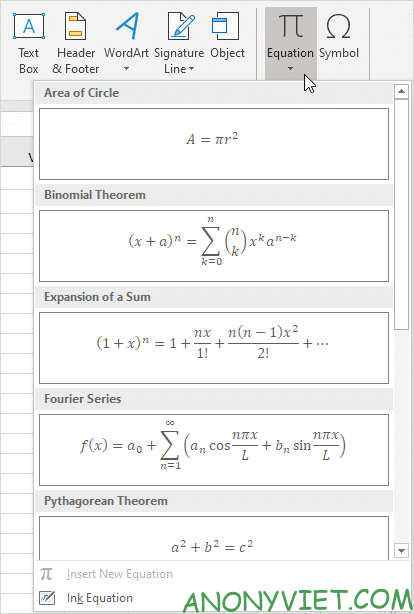
Note: Equations in Excel are image objects and do not return results.
In addition, you can also view many other excel articles here.