Tool for adjusting the format of administrative documents This was born from the author’s pain of having his resume returned n times. It integrates directly into Word to help you work leisurely without fear of breaking the rules. Let’s find out in detail how to install and use it with AnonyViet.
📢 Join the channel Telegram belong to AnonyViet
Update new articles, cool tools and IT tips fastest
Why do we often get the format of administrative documents wrong?
As an office worker, surely everyone has experienced the feeling of fear every time they bring documents to be signed. Especially those of you who are working in state agencies or enterprises. You hurriedly finished typing a long dispatch and then confidently submitted it. But just a few minutes later, the clerk called back and promptly returned the file. The reasons are oh enough. The left margin is not wide enough, the right margin is a bit narrow, then the font here is wrong, the font size there is not standard. The feeling at that time was really very helpless and extremely tired!
Actually, it’s not because we’re lazy or bad. The problem lies in state regulations such as Decree 30 or the Party’s like Instructions 05 it’s too detailed and rigorous. How can I remember every millimeter of paper margin or every line space? Every time I draft it, I have to pull out the regulations bit by bit, which is incredibly time-consuming. So the question is why don’t we find a way to automate it? Is there any way for the computer to understand and do these time-consuming chores for itself?

Outstanding features help you escape rejection from the office
The most valuable point of this add-in set is its adherence to current standards. You will no longer need to reopen dry guidance documents for comparison, because the administrative document formatting tool is already built in:
- Support standards according to state regulations (Decree 30) and the Party (Guideline 05).
- Automatically set the page size and align the paper margins according to standard specifications.
- Automatically adjust font, font size, side alignment, indent text and automatically number pages correctly.
- Put frequently used features outside the ribbon bar for quick manipulation: Shrink and stretch text, keep with next, page break (next page) and then rotate the page horizontally without damaging the overall layout.
- Create and insert directly QR code Accessing documents is extremely convenient.
Thanks to that, the entire formatting step that once took an hour can now be reduced to just a few gentle clicks.
Instructions for installing tools to adjust the format of administrative documents
Step 1: Open your browser and access the official file download link HERE.

Step 2: After successfully downloading the compressed file to your computer, unzip the file and click on the installation file.
At this point, you just need to start Microsoft Word software and you will see another one appear add-in named Standardize the format on the toolbar.
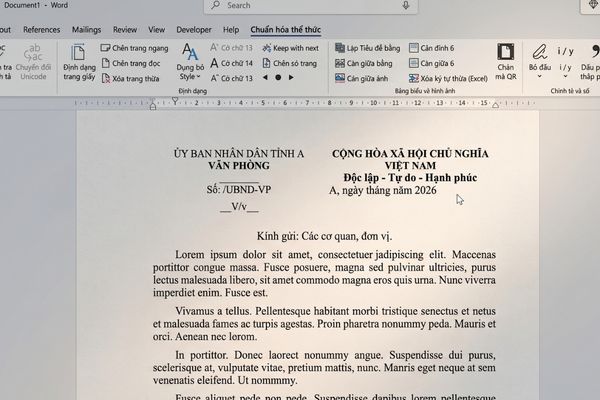
Inside will be full of function buttons for you to freely use. If you want to understand in more detail how to use each button, just go back to the author’s link and scroll down to see the instructions.
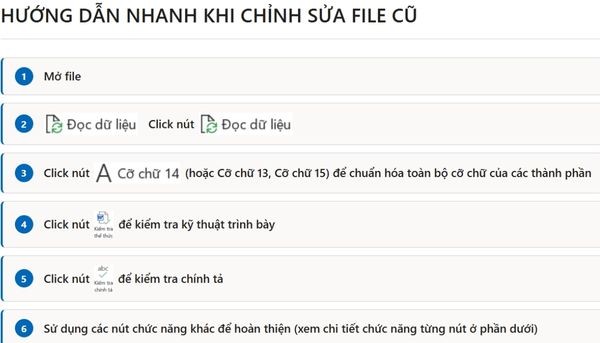
How to handle errors when Windows blocks download files
Sometimes the Windows operating system mistakenly recognizes the installation file and blocks it from downloading. Don’t worry, you can set the folder to be included in your computer’s exclusion list to install the normal administrative document formatting tool by following these steps:
Step 1: Press the key Windowstype the phrase Windows Security and open this application.
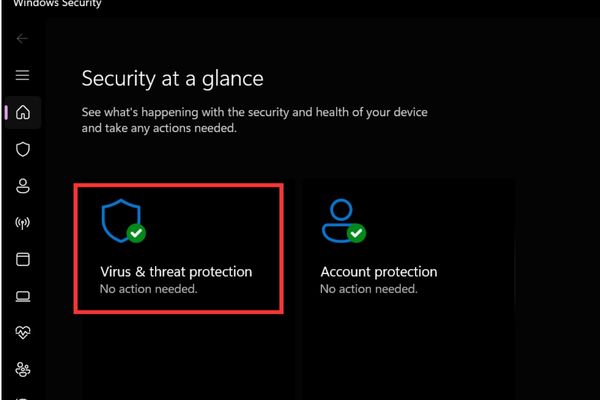
Step 2: You find and select the item Virus & threat protection.
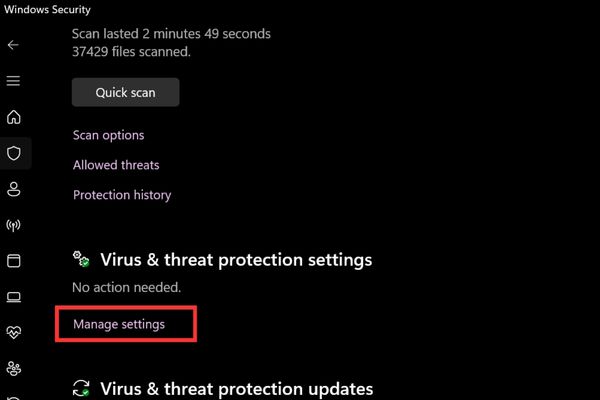
Step 3: In the Virus & threat protection settings section, click on the text Manage settings.
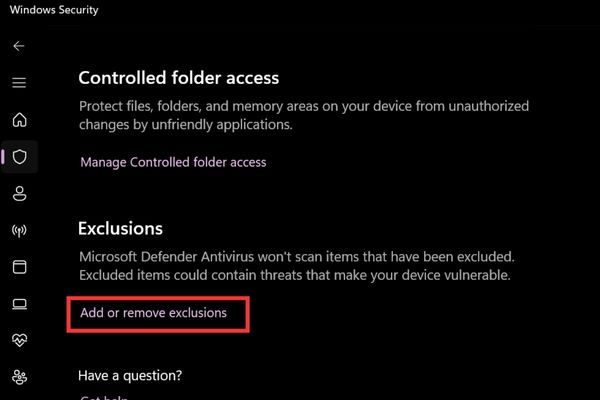
Step 4: Scroll down to the bottom and find the item Exclusions and click on the text Add or remove exclusions. If your computer displays a notice asking to confirm permissions, just click Yes okay.
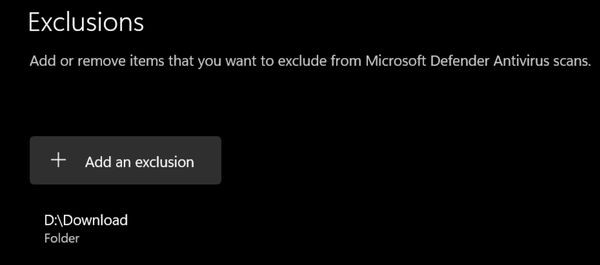
Step 5: Click the button with the plus sign + Add an exclusiona small menu will appear and you click to select Folder.
Step 6: When the file browser window appears, you just need to find and select the correct folder Download on your computer.
After completing the above steps, return to the browser and click download file one more time to see the download process succeed smoothly.
Conclusion
Drafting documents will no longer be an obsession when submitting them to superiors thanks to you tool for adjusting the format of administrative documents. All strict standards regarding style, font or page rotation are handled in just a few seconds. Please share this utility with your colleagues in the same room to make work easier.
Frequently Asked Questions (Q&A)
1. What formats does this utility support?
Tool to support drafting standards according to state regulations (Decree 30) and Party regulations (Guideline 05).
2. What should I do if the installation file download process is blocked by Windows?
You just need to open Windows Security, go to the Settings Management section of the Antivirus section and add the Download folder to the Exclusions list to download normally.
3. How to find out the detailed meaning of each feature button on the ribbon?
After installation is complete, you just need to access the author’s download link again and scroll down to the bottom of the website, there will be a clear explanation for each function button.