IObit Protected Folder is software that protects your data with a password. When you enter the correct password, you can access the folder or file to view the content. If you have sensitive files on your computer, you should use this software to protect your privacy and avoid illegal access to your data.
| Join the channel Telegram of the AnonyViet 👉 Link 👈 |
If you share a PC with colleagues at work or at home, you run the risk of your privacy being invaded. Some files and folders must be hidden from others, whether we are talking about photos, videos, work documents, password lists or anything else.
Fortunately, you can use software that specializes in protecting your files and folders with a password. And one of the best tools for that is IObit Protected Folder.
It is an easy to use program that can hide any files and folders on your PC. The only way to unlock them is to use the master password protected IObit Protected Folder software.
My review
Advantage
- Hide and protect files and folders with a password
- Keep files visible but with user rights management
- Exclude any files and folders
Defect
- Not regularly updated
However, hiding your files and folders is optional. IObit Protected Folder gives you the ability to manage user permissions, such as blocking write permission but allowing read. That way, other users can still view your files, but not edit them. And this tool is only available for Windows computers.
Versions of IObit Protected Folder
Security apps should not be used for free. However, you can still evaluate the app through the trial version and have no feature limitations.
When the free trial expires, you can uninstall IObit Protected Folder from your PC or purchase a license to continue using it.
The good news is that you can pay only once to use IObit Protected Folder forever. You’ll also get a 60-day money-back guarantee so you can request a refund if you’re not satisfied with the product within the first 2 months of use.
System configuration requirements
IObit Protected Folder is very modest in system configuration requirements, even older machines can be used. And here are the minimum things that the software needs:
- Processor: Intel Pentium 300 MHz or higher
- Memory: at least 256 Mb of RAM
- Storage capacity: about 10 Mb to install the program
- Operating system: Windows 10, 8.1, 8, 7, Vista, XP or even earlier (32-bit or 64-bit)
- Is different: admin rights
How to use IObit Proteted Folder

During the setup process, you can review and accept the terms of use, modify the default installation directory, and create desktop shortcuts. You can launch the tool as soon as the installation is finished.
When you launch IObit Protected Folder for the first time, you need to set and confirm master password consists of at least 6 characters, this password will be asked every time you start the program. You also need the passcode to uninstall it. Also, you can leave a hint in case you forget your password.
IObit Protected Folder interface
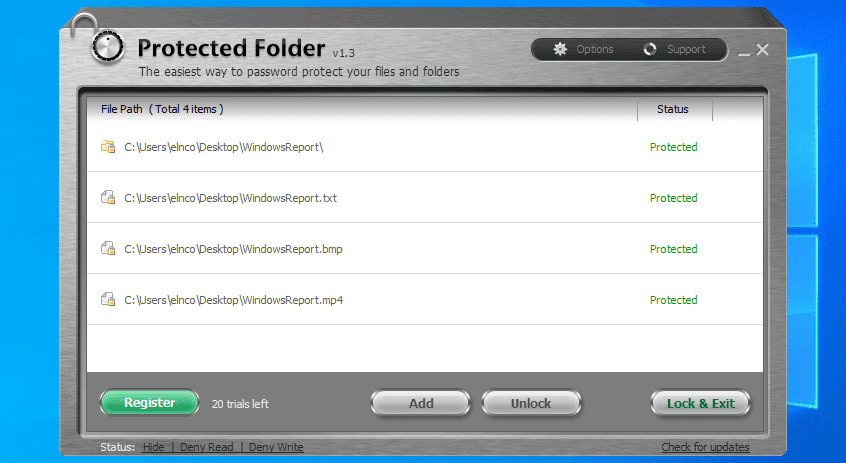
In terms of user interface, IObit Protected Folder has a sleek and unique window with a gray metallic theme. It is extremely intuitive, even for first-time users who have never tried locking files.
The user interface also has slow and fade scrolling effects, but you can turn them off from the Options panel. It is also possible to switch to another language as up to 33 languages are supported by IObit Protected Folder.
How to use IObit Protected Folder
- To lock and hide files/folders, simply drag them into the software.
- To unlock and delete files/folders, click the items and press Unlock.
- Once unlocked, all files/folders immediately reappear in their original locations.
- To quickly unlock multiple items at once, press and hold the Shift key, then press Unlock.
- Open protected files and folders by double-clicking the items.
Safe and secure safes
IObit Protected Folder is a simple and straightforward Windows application that can help you prevent unauthorized user access to confidential files and folders.
Hide files/folders is optional but highly recommended. However, if you want to keep files and folders visible, then you can manage user permissions, like denying write permission and allowing read permission.
IObit Protected Folder requires a password when uninstalling software and automatically unlocks all protected items once the software is removed from your PC. Therefore, you won’t risk losing your data when your free trial expires, as long as you remember the password.
The program has very little impact on the performance of the computer and it locks files/folders very quickly. The drive is not supported. Unfortunately, it is not possible to temporarily unlock files and folders without deleting them from IObit Protected Folder.
Download IObit Protected Folder
License Key IObit Protected Folder: FEDE9-04B76-FD1B2-705B9
Overview of IObit Protected Folder features
- Lock your files and folders with a password
- Hide files and folders without password
- Prevent other PC users from invading your privacy
- Unlimited number of protected files or folders
- Double click on any protected item to open
- User rights management: run, copy, read, move, delete, modify
- Change master password at any time and set password hint
- Exclude any files, folders or drives from IObit Protected Folder
- Disable UI effects and support up to 33 different languages
You can also use other IObit software here.