• Home
  • News
  • Software
  • Knowledge
  • MMO
  • Tips
  • Security
  • Network
  • Office
AnonyViet - English Version
  • Home
  • News
  • Software
  • Knowledge
  • MMO
  • Tips
  • Security
  • Network
  • Office
No Result
View All Result
  • Home
  • News
  • Software
  • Knowledge
  • MMO
  • Tips
  • Security
  • Network
  • Office
No Result
View All Result
AnonyViet - English Version
No Result
View All Result

How to use Suno AI to create a complete song from A to Z in just 5 minutes

AnonyViet by AnonyViet
May 15, 2024
in Software
0

How to create songs using AI Suno is an attractive and new topic in the modern music world. From writing lyrics, creating a melody, to combining it into a complete song, Suno will do it all for you, in less than 5 minutes. Do you believe? Let's find out with AnonyViet through the article below!

Join the channel Telegram belong to AnonyViet 👉 Link 👈

A few words about Suno AI

This is a website that allows you to create music with your own lyrics and vocals. You can choose from a variety of genres, moods and themes, or let artificial intelligence (AI) suggest it for you.

Suno has been integrated into Microsoft's AI software platform Copilot. Different from many music applications WHO On the other hand, Suno (pronounced soon-oh and meaning “listen” in Hindi) focuses on creating original melodies with original vocals – not copying or emulating someone else's vocals.

A few words about Suno AI

How to create a complete song using Suno

Step 1: Access to Suno homepage > Click 'Sign Up' to proceed with account registration.
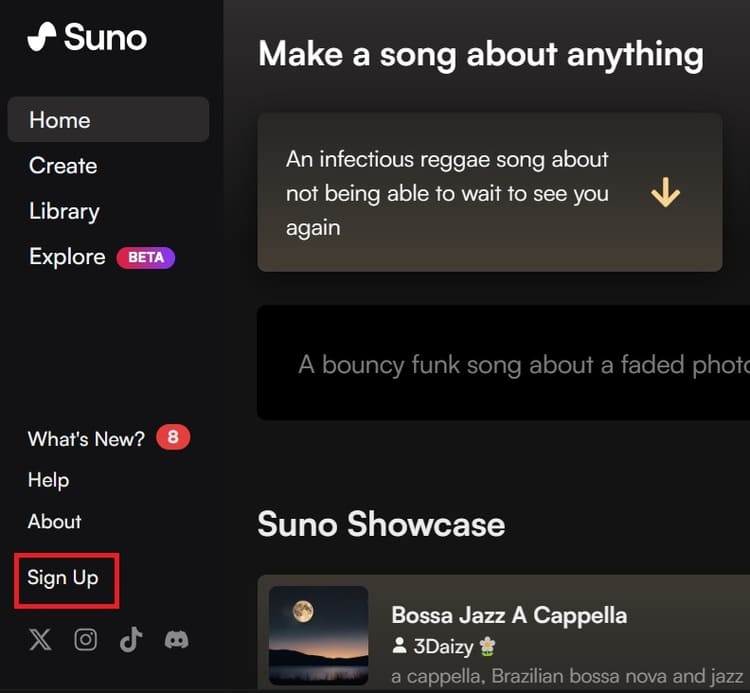
Click 'Sign Up' to register for a Suno account
Click 'Sign Up' to register an account.

You will have 50 free credits to try out. Each time you create a song, it costs 10 credits.

Step 2: Then click the Create button > Turn on 'Custom Mode'
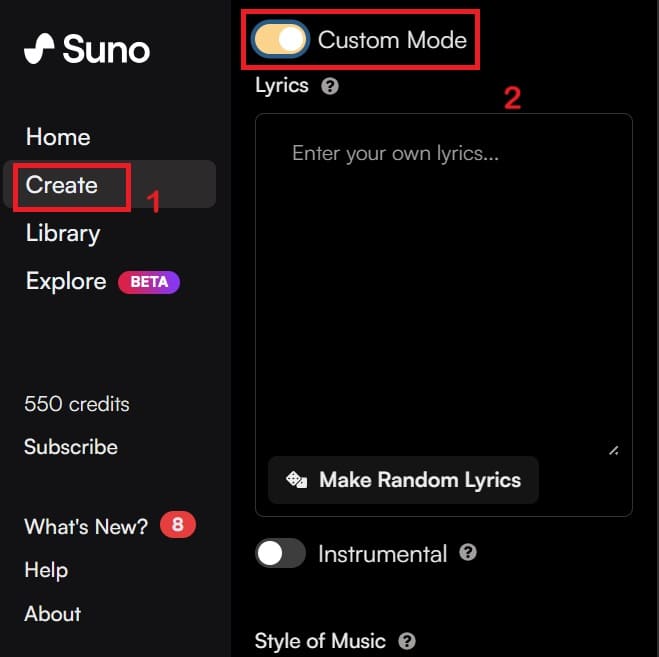
Click on Create button > Turn on 'Custom Mode'” width=”659″ height=”657″ srcset=”https://anonyviet.com/wp-content/uploads/2024/05/suno-3.jpg 659w, https://anonyviet.com/wp-content/uploads/2024/05/suno-3-300×300.jpg 300w, https://anonyviet.com/wp-content/uploads/2024/05/suno-3-150×150.jpg 150w, https://anonyviet.com/wp-content/uploads/2024/05/suno-3-75×75.jpg 75w, https://anonyviet.com/wp-content/uploads/2024/05/suno-3-350×350.jpg 350w” sizes=”(max-width: 659px) 100vw, 659px”/><figcaption id=Click the Create button > Turn on 'Custom Mode'

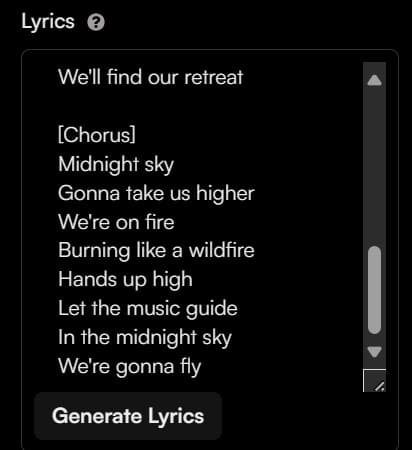
In the Lyrics box, type the lyrics according to the following structure:

  • [intro] – To create prelude music
  • [verse] – The main lyrics of the song
  • [chorus] – The chorus of the song will often have a different rhythm and melody than the verse
  • [rap] – If you want to hear AI rapping, add this section.
  • [outro] – The ending music
Type the lyrics into the Lyrics box

Step 3: Once you've finished entering the lyrics, select the desired music genre in the Style of Music section, such as pop, hard rock, country, latin, etc. You can also mix between genres.
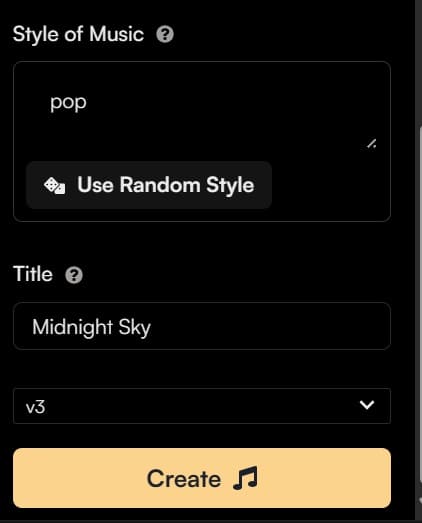
Select the desired music genre in Style of Music

Step 4: Next, click the Create button to let AI compose music. Within about 30 seconds, the AI ​​will complete and you can click the Play button to listen. Each song composed by AI has a maximum length of 2 minutes.

To create a longer song, you can click the Extend button next to the music, then continue to enter more lyrics in the Lyrics step.
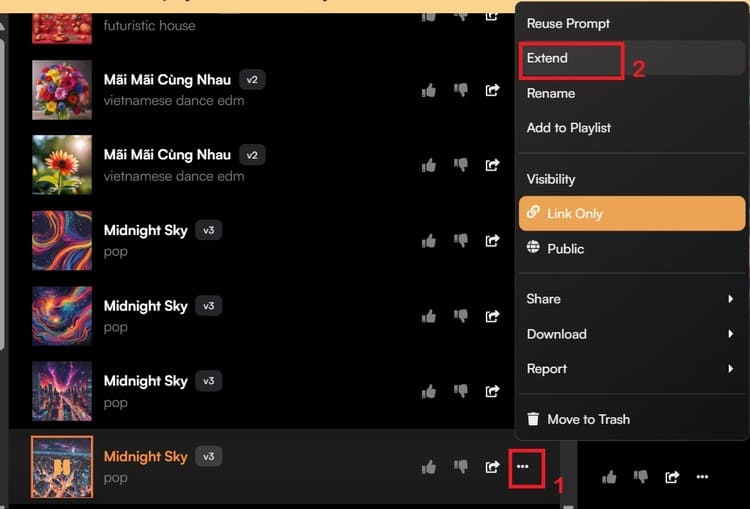
Click the Extend button to create a longer song

Click Extend under Style of Music, AI will create a new piece of music, called Part 2.
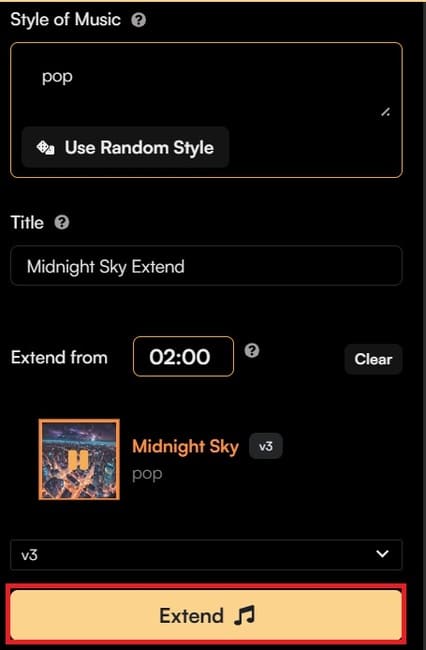
Click Extend under Style of Music

Next, click on the “three dots” button next to the Part 2 file, select 'Get Whole Song' from the menu that appears to combine Part 1 and Part 2 into a complete song.
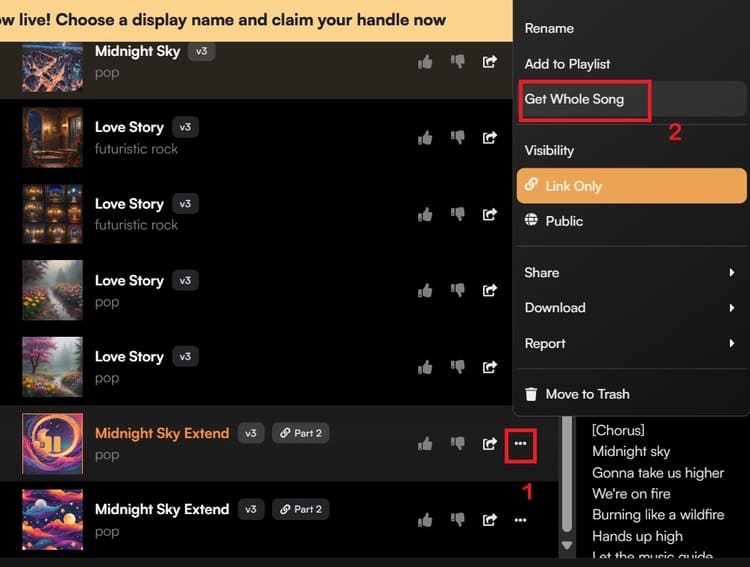
Click on the three-dot button > Select 'Get Whole Song'” width=”750″ height=”567″ srcset=”https://anonyviet.com/wp-content/uploads/2024/05/suno-8.jpg 750w, https://anonyviet.com/wp-content/uploads/2024/05/suno-8-300×227.jpg 300w” sizes=”(max-width: 750px) 100vw, 750px”/><figcaption id=Click on the three-dot button > Select 'Get Whole Song'

The AI ​​will then create a full file called Full Song. Click the three-dot button next to the Full Song file and select Download from the menu to download the Audio or Video of the song.
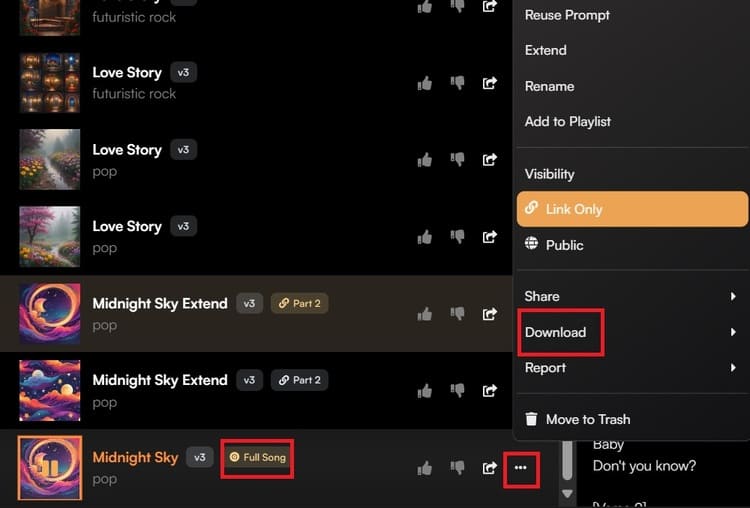
Click the three-dot button and select Download

Below is a complete track created by AI, you can click on the link below to listen:

Cat in the Window

Agency Ca

OH AI

Epilogue

How to create songs with AI is a fun and useful trick for anyone who loves music. Using Suno, you can create songs that are unique, creative, and suitable to your preferences. You can also explore and experiment with many different styles and genres of music. Good luck!


Tags: CompletecreateminutesSONGSuno
Previous Post

How to receive 10,000 free Viettel++ points to exchange data, sms,…

Next Post

BOT creates Google Drive Unlimited using Mail Edu Orange Coast College

AnonyViet

AnonyViet

Related Posts

Compare Poco X8 Pro and Poco X7 Pro: A new step for the “king” of mid-range performance
Software

Compare Poco X8 Pro and Poco X7 Pro: A new step for the “king” of mid-range performance

April 24, 2026
Top 5 apps to view good days 2026 for free on iOS and Android
Software

Top 5 apps to view good days 2026 for free on iOS and Android

April 23, 2026
Top 5+ utilities to install for Gmail to speed up work processing
Software

Top 5+ utilities to install for Gmail to speed up work processing

April 22, 2026
Decoding the problem of 4GB RAM and processing performance
Software

Decoding the problem of 4GB RAM and processing performance

April 21, 2026
4K Video Downloader Plus – Tool to download YouTube videos on macOS
Software

4K Video Downloader Plus – Tool to download YouTube videos on macOS

April 20, 2026
How to authenticate the owner’s SIM on VNeID from April 15
Software

How to authenticate the owner’s SIM on VNeID from April 15

April 15, 2026
Next Post
BOT creates Google Drive Unlimited using Mail Edu Orange Coast College

BOT creates Google Drive Unlimited using Mail Edu Orange Coast College

0 0 votes
Article Rating
Subscribe
Login
Notify of
guest

guest

0 Comments
Oldest
Newest Most Voted
Inline Feedbacks
View all comments

Recent News

Compare Poco X8 Pro and Poco X7 Pro: A new step for the “king” of mid-range performance

Compare Poco X8 Pro and Poco X7 Pro: A new step for the “king” of mid-range performance

April 24, 2026
How to compress online videos for free without losing quality

How to compress online videos for free without losing quality

April 24, 2026
Top 5 apps to view good days 2026 for free on iOS and Android

Top 5 apps to view good days 2026 for free on iOS and Android

April 23, 2026
Common errors when using Bosch products and how to fix them

Common errors when using Bosch products and how to fix them

April 22, 2026
Compare Poco X8 Pro and Poco X7 Pro: A new step for the “king” of mid-range performance

Compare Poco X8 Pro and Poco X7 Pro: A new step for the “king” of mid-range performance

April 24, 2026
How to compress online videos for free without losing quality

How to compress online videos for free without losing quality

April 24, 2026
Top 5 apps to view good days 2026 for free on iOS and Android

Top 5 apps to view good days 2026 for free on iOS and Android

April 23, 2026
AnonyViet - English Version

AnonyViet

AnonyViet is a website share knowledge that you have never learned in school!

We are ready to welcome your comments, as well as your articles sent to AnonyViet.

Follow Us

Contact:

Email: anonyviet.com[@]gmail.com

Main Website: https://anonyviet.com

Recent News

Compare Poco X8 Pro and Poco X7 Pro: A new step for the “king” of mid-range performance

Compare Poco X8 Pro and Poco X7 Pro: A new step for the “king” of mid-range performance

April 24, 2026
How to compress online videos for free without losing quality

How to compress online videos for free without losing quality

April 24, 2026
No Result
View All Result
  • Home
  • News
  • Software
  • Knowledge
  • MMO
  • Tips
  • Security
  • Network
  • Office

wpDiscuz
0
0
Would love your thoughts, please comment.x
()
x
| Reply