Snapchat is a fairly popular platform known for its short-lived video sharing service. Millions of people have been using Snapchat due to its huge features and security.
| Join the channel Telegram of the AnonyViet 👉 Link 👈 |
Snapchat has a very nice feature that you won’t have access to a specific video after 24 hours until your friends share it with you. This is really an attractive feature that can protect everyone’s privacy.

On the other hand, some people also want to save Snapchat videos before they disappear.
But Snapchat doesn’t officially allow you to download videos from its platforms, but you can still download videos if the sender allows.
There are many methods to download Snapchat videos to your iPhone or Android but I will list the most common and easy to use methods.
How to save snapchat videos on iPhone
Since Snapchat is now a popularly used social media platform around the world, everyone wants to explore all its features. In Snapchat, a lot of people share photos and videos. Fortunately, you can Download Snapchat Videos sent by your friends.
Step 1: Launch Snapchat
Step 2: Click the small circle under the shutter button.

Step 3: Select video. After selecting the video you want to save, tap the three dots in the top right corner.

Step 4: Export Video. You’ll see several options appear after you tap the ellipsis. Click Export Snap to continue.
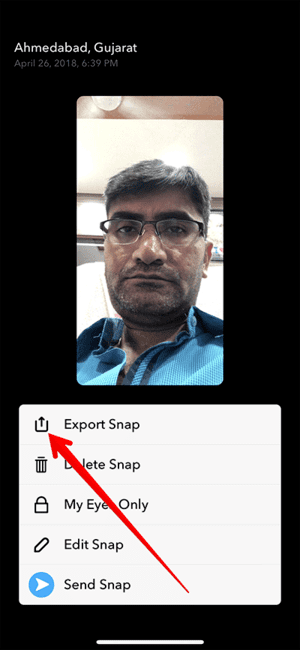
Step 5: Save video. After exporting your video, you can now save the video by clicking on the “Save Video” option.
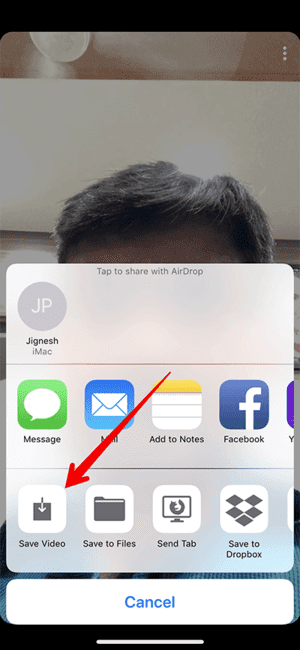
So that’s it then. The video is now saved in your library.
How to save Snapchat videos on Android
If you are looking for a way to download Snapchat videos on Android, then AZ Screen Recorder can be a great choice for you. It does not require any root access to Android phones; that’s why many experts recommend AZ Screen Recorder.
Step 1: Download AZ Screen Recorder. Install Snapchat AZ Recorder App and open it. Now, you will need to set up your account on your Android device with the required information.
Step 2: Press the button Record. After opening AZ Screen Recorder, tap the . button Record and open Snapchat Inbox. Select a video that you want to save. The app will record that video from Snapchat.
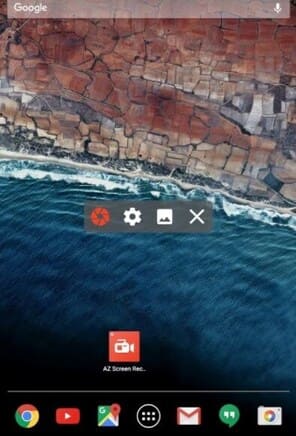
Step 3: Stop recording
After recording the video, you can now press the “Record” button again to stop recording.
Note: Snapchat won’t care if you save the video using this method. So your friends won’t know about what you’re doing.
The best video editor to edit Snapchat videos iMyFone Filme
If you want to make your video engaging, you need to make it perfect. Therefore, you need to edit your videos professionally.
Step 1: Download IMyFone Filme. Install iMyFone Filme after downloading from iMyFone website.
Step 2: Launch iMyFone Filme. Once installed, launch the software on your Mac or Windows.
Step 3: Import videos. Now, you’ll need to import the Snapchat video you want to edit before uploading it. You can click Import Folder to import videos.
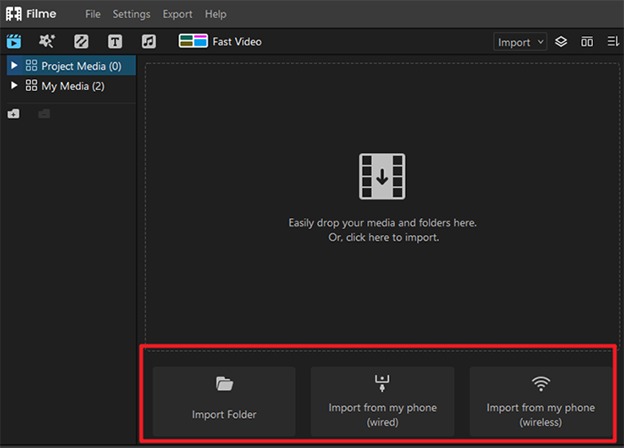
Step 4: Drag the video to the timeline.
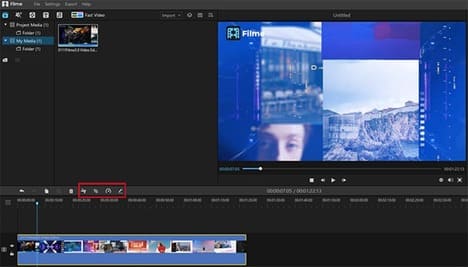
Step 5: Edit your video.
You can now make the necessary changes to your video. You can add effects, transitions, adjust speed and add text or maybe anything you want.
iMyFone Filme is a versatile tool for macOS and Windows. It offers some pretty impressive features. Despite being a professional video editor, Filme’s interface is very simple.
You will not see any redundant information in this tool. Using iMyFone Filme, you can make your YouTube, Snapchat and Facebook videos even better.
In addition to advanced features and simple features, it can also extract audio from your Videos. So iMyFone Filme is a multi-dimensional software.
Feature
You will get the ultimate features in iMyFone Filme.
1. Basic Tools
Using IMyFone Filme, you can trim, trim, split and adjust the speed of a particular video. All you need to do is choose a tool to edit your video.
2. Effects
There are loads of enchanting effects in Filme that can definitely make your videos more engaging. After selecting the video you want to edit, you can choose the effect you like and easily apply it to your video.
3. Emojis and stickers
Filme also gives you more emojis and stickers to add to your videos. You will find awesome GIFs, emojis and stickers in this tool.
4. Text
You will get rich text styles in iMyFone Filme. With the ability to add subtitles and end titles, you can also choose font size, color in iMyFone Filme.
5. Audio Editing
IMyFone Filme users will get great audio editing features in iMyFone Filme. Besides adding music, you can also adjust its duration. You can record your voice, add sound effects and change the pitch of your voice with iMyFone Filme.
Conclusion
I have introduced you to many suitable ways to download Snapchat Videos for iPhone and Android users in this article. In addition, I also emphasize the importance of iMyFone Filme in video editing.