You can create small scripts in Windows 10 that open multiple websites at the same time. This trick uses Windows 10’s scripting capabilities, but there’s also a pretty easy way for you to do the above in any web browser. You can also take advantage of the Bookmark feature on your browser to open multiple websites with one click.
📢 Join the channel Telegram belong to AnonyViet
Update new articles, cool tools and IT tips fastest

How to create a script to open multiple websites at the same time
To open multiple websites at the same time in the browser, you need to create a script file for these websites on your PC. Basically, you create a file, add all your websites to this script, and run the script file when you want to open multiple of them at the same time.
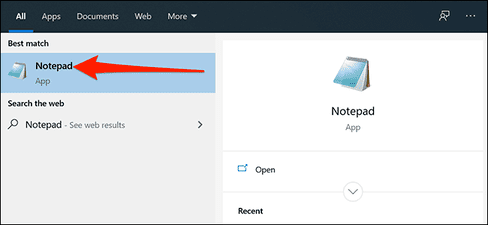
If you don’t know what a script is, you can read it here okay. You can create this command file using the built-in Notepad software on your PC. To open Notepad, just go in “Start menu”keyword search “Notepad” and select the top result.
Copy the following code and paste it into Notepad:
@echo off
start https://www.howtogeek.com
start https://www.reviewgeek.com
start https://www.cloudsavvyit.com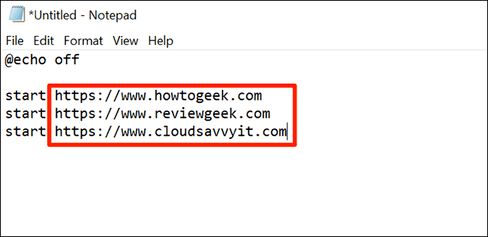
The above code will open the three websites you entered. Windows 10 will use the default web browser to open those websites. How many websites do you want to open at the same time? Just add the website link to the notepad file above. Just put each web address on its own line and add the “start” command and a space before each web address.
Once completed, you enter File -> Save As to save the file.
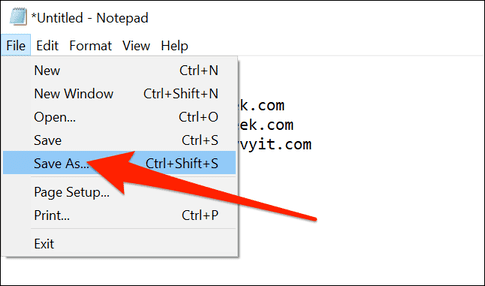
Choose a folder to save your file. You should keep it off the Desktop because it will help you open the script faster than other places.
Then, name your script in the “File name” field and add “.bat” to the end of the name. If you want to name your file “LaunchAllSites”, you must enter “LaunchAllSites.bat”. Then choose “All Files” in section “Save as type” and click “Save”.
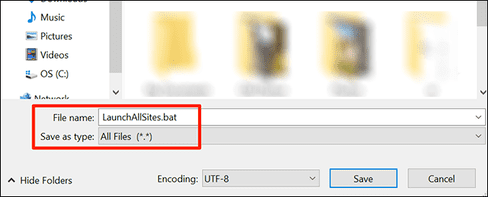
So the script to open the website has been created. To use, double click on the file LaunchAllSites.bat just created, and all your specified websites will launch in the default web browser. You will see a Command Prompt window appear momentarily, but it will disappear immediately.
You can create multiple short scripts like this to open different types of websites on your Windows 10 PC.
How to edit website list in script file
Your newly created script file is editable and you can add or remove web pages whenever you want. Use text editors such as Notepad to change the content of the script file.
To add or remove web pages from your script, right-click on the script and select “Edit”.
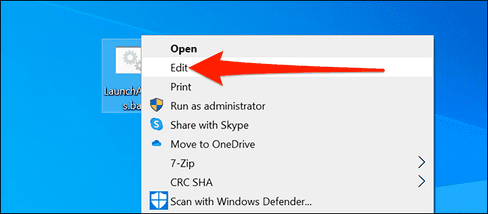
Your script will be opened in Notepad and you can now add or remove URLs. When you’re done, remember to click File -> Save to save changes.
How to change default web browser
All website addresses in the script file will open in the default browser on your PC. If you want to open your links in another browser, you can simply set that browser as your Windows default browser.
Enter “Start menu”keyword search “Settings” and click on the first result. You can also press Windows + i to open Settings.
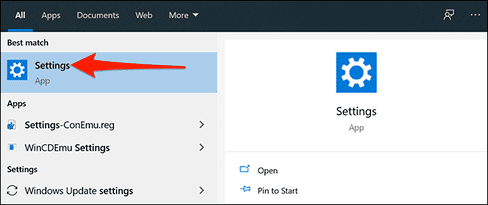
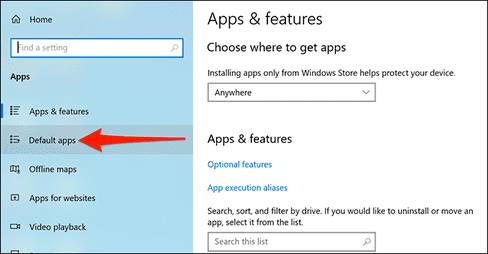
In Settingspress “Apps“, then select “Default app” left.
Click your current browser under “Web browser,” then select your new browser to make it your default.
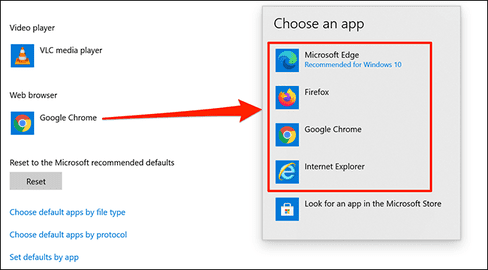
Your web pages will now open in the new default browser.
How to open multiple websites at the same time in the browser
If you want, you can open multiple websites at once from your browser. To do this, you need to add all your websites to the bookmarks folder.
Open the browser, press Ctrl + Shift + B to open the Bookmarks bar.
Open all the websites you want later and will open all the websites in 1 click, then press Ctrl + Shift + D to save those websites to the Bookmark folder.
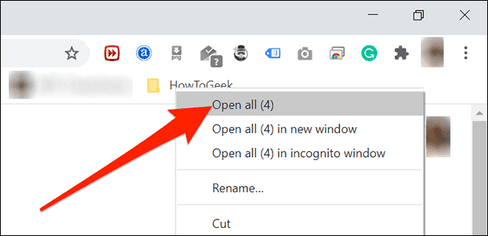
After this, you just need to right-click on your bookmarks folder and click “Open all”.
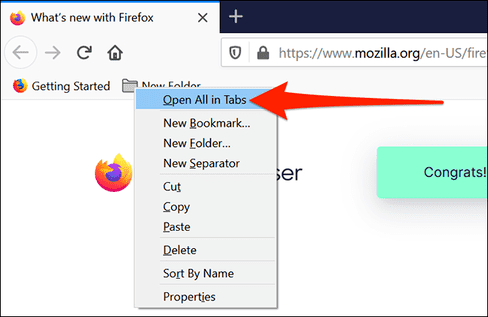
If you use Firefox, you can do this by right-clicking on your bookmarks folder and selecting “Open All in Tabs”. This will open all your websites in the bookmarks folder.
So that’s it.
Frequently asked questions
How many websites can I open at the same time using this method?
You can open as many websites as you like by adding their links to the .bat file. Each website needs a separate line with the syntax “start [đường dẫn website]”.
If I want to edit the website list, what should I do?
Right click on the .bat file, select “Edit”. Modify the website list in Notepad, then save the changes.
How to change the default browser to open websites?
Go to Settings > Apps > Default apps and select the desired browser as the system default browser.