If you use a Google or Microsoft VPS, you will see on the Desktop that hardware information such as RAM, CPU, Computer Name, IP … Some stores display Laptop, Desktop, they also display hardware information. , Windows on the Desktop so that users can quickly see the computer configuration. Or if you want to show off your computer configuration to your friends, you can display hardware configuration parameters on the Desktop for a beautiful look. In this article, I will guide you to display computer information on the Desktop screen easily.
| Join the channel Telegram of the AnonyViet 👉 Link 👈 |
Windows 10 and 11 have apps System Information will display detailed information about the hardware on the computer. However, to open this application you have to perform many steps and clicks. To quickly display hardware configuration on Desktop from System Information you can use 3rd party software. Those apps add more system stats and details to the top right of the Windows 10 or 11 screen so you can instantly check the specs of any PC when need.
How to display hardware information on the Desktop with O&O DeskInfo
O&O DeskInfo is a freeware application that adds both usage information and system specifications to the Windows desktop. This software provides complete information about operating system, RAM, CPU, computer name, GPU and system architecture. To add those details to the desktop, download and launch O&O DeskInfo as follows.
- Access O&O DeskInfo website
- Click Download to download software to your computer.
- Open the O&O DeskInfo EXE folder and click on it to run the software (no installation required).
- When you run O&O DeskInfo for the first time, a notification window opens. If you want to always display hardware information on the Desktop, turn on the . button Start automatically with Windows below.
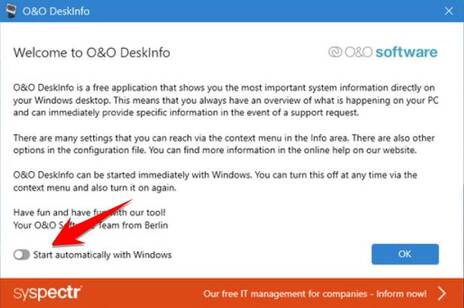
- Click the OK button to add hardware information to the Desktop, the result will be as shown below:
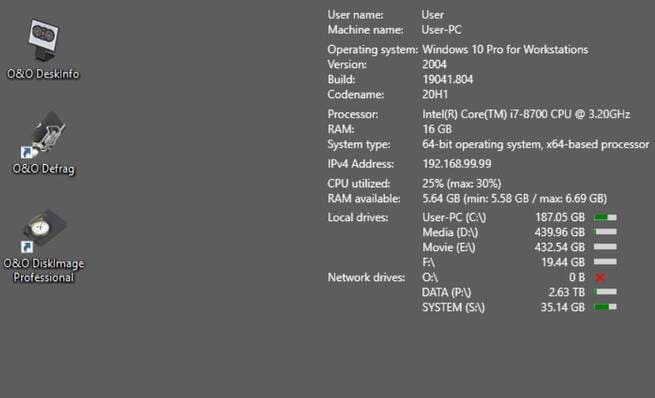

O&O DeskInfo has Minimum, Default, and Full display options. If you want to see more of all the computer information, select the Full option. Just right click on your system tray icon O&O DeskInfo and select Display > Full . Selecting that option displays 20 PC specifications on your desktop along with 6 system resource usage details to make it easier for you to manage your Windows.

If the font is too small, you can enlarge it a bit. Right click on the O&O DeskInfo system tray icon and select Font Size . Then choose the size Large(12pt) .
Besides, O&O DeskInfo allows you to copy all information of Windows as well as computer hardware with the feature. Copy to clipboard. You just need to right click on O&O DeskInfo and select Copy to clipboardthen open Notepad and press Ctrl + V to paste it and you will see all the information of the computer.

How to add hardware information to the Desktop with BGInfo
BGInfo is a lightweight and free program that displays Windows system and hardware information to the Desktop. However, BGInfo provides more network insights than O&O DeskInfo. BGInfo is also more flexible because you can change all the system parameter fields it displays.
Follow the steps below to add hardware and system information of BGInfo to the screen.
- Open Softpedia pageincubatea BGInfo .
- Click Download Now
- Unzip the downloaded folder.
- Open BGInfo64 to configure the content you want to display on the Desktop.

- Finally, click Apply or OK on that BGInfo64 to add the system information fields to the Desktop
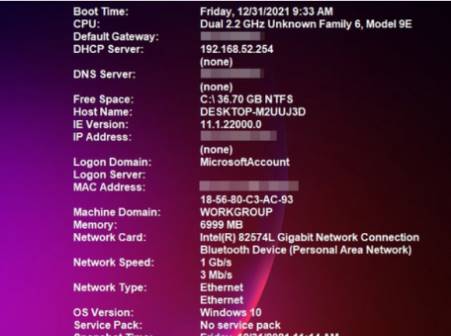


BGInfo also has better text formatting features than O&O DeskInfo. You can select the text then adjust the Bold, Italic, Bullet and Underline modes to add some formatting effects. Select another Font on the drop-down menu. You can expand or shrink the text by choosing a different value on the Font Size drop-down menu. Click the three alignment buttons to align the text left, center, or right.

You can also save BGInfo system information configurations. To do so, click the menu File and choose Save As.
So with 2 small, compact, resource-free software, you can display detailed hardware and Windows information on the Desktop screen easily. Here you can manage how much hard drive, RAM, CPU is working to use the computer more optimally.