

How to automatically earn points Microsoft Rewards is a topic that many people are interested in to accumulate bonus points without spending much effort. If you find manual searching every day boring and time-consuming, a smart automation tool will be the perfect “savior”. Let’s learn about Rewards Helper – a groundbreaking extension that makes your journey to collecting reward points easier than ever.
| Join the channel Telegram belong to AnonyViet 👉 Link 👈 |
Introducing Rewards Helper
Rewards Helper is an extension specifically designed for browsers Chromewith the goal of automating Bing search tasks. The special thing about this tool is that it is built on the latest Manifest V3 platform, ensuring not only smooth operation and high performance but also compliance with the most stringent security and privacy standards today.

Discover smart and outstanding features
This tool is equipped with a series of powerful features, helping to simulate user behavior in the most natural way.
- You can set up a running schedule automatically every day at a fixed time, helping you never miss reward points even when busy.
- The tool automatically performs sequential searches within the same tab, accurately simulating the behavior of a real user.
- The utility allows you to deeply customize the number of searches and the waiting time between each search, from instant, fixed to random to avoid detection.
- You can absolutely use the rich keyword list available or create your own list your own by uploading a .txt file to enrich your searches.
- The interface is designed to be user-friendly, including a quick control popup (Start/Stop) and a detailed, easy-to-manage settings page.
- The utility is committed to privacy as it only interacts with Bing domains and does not collect any of your personal data.
Instructions on how to automatically earn Microsoft Rewards points
Because it is not yet available on the Chrome Web Store, you need to install Rewards Helper by following these manual steps:
Step 1: Visit project’s GitHub pageselect Code > Download ZIP to download the source code to your device.
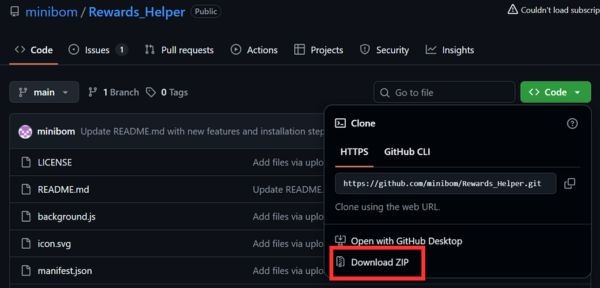
Step 2: Unzip the downloaded .zip file into a separate and easy-to-remember folder.
Step 3: Open Chrome browser, type chrome://extensions/ go to the address bar and press Enter.
Step 4: In the upper right corner, flip the button Developer mode (Developer mode) to the On position.
Step 5: Click the button Download the unpacked utility (Load unpacked) and point to the folder you unpacked in step 2.

Once completed, the Rewards Helper icon will appear on the toolbar. You can pin it for faster access and start using it immediately.
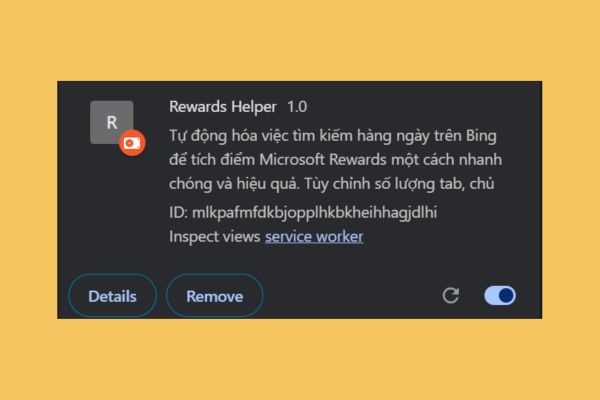
After installation, to know how to automatically earn Microsoft Rewards points, just click on the utility icon on the toolbar. A small window (popup) will appear with basic function buttons such as Start (to start searching) and Stop (to stop).

Button Setting will take you to a more detailed customization page. Here, you can set up the tool according to your needs:
- General settings: You can adjust the number of searches and the delay between each search to simulate natural behavior.
- Custom themes: This is the most important item. You can add your own keyword list.
- Schedule: The utility allows you to choose a fixed time frame to automatically run every day, helping you not miss any related trends.
- Introduce: This area provides information about the current version of the add-on and change updates.

Important notes
With automating searches on PC and mobile, combined with daily tasks like reading the newspaper and checking in, you can achieve more on average. 215 points per day. Including chain rewards and weekend events, this works out to nearly 7,500 points per month – an impressive number to redeem for valuable gift cards.
However, please note:
- Use of automated tools may violate the Microsoft Rewards terms of service.
- There is always a risk that your account may be suspended if Microsoft systems detect unusual behavior. Use random settings to minimize this risk.
Conclusion
In short, Rewards Helper is an attractive solution for those looking How to automatically earn Microsoft Rewards points in a smart and effective way. This tool helps you save valuable time and not miss out on any bonus points.










