• Home
  • News
  • Software
  • Knowledge
  • MMO
  • Tips
  • Security
  • Network
  • Office
AnonyViet - English Version
  • Home
  • News
  • Software
  • Knowledge
  • MMO
  • Tips
  • Security
  • Network
  • Office
No Result
View All Result
  • Home
  • News
  • Software
  • Knowledge
  • MMO
  • Tips
  • Security
  • Network
  • Office
No Result
View All Result
AnonyViet - English Version
No Result
View All Result

Guide to see the new address on VNEID after the merger

AnonyViet by AnonyViet
July 3, 2025
in Software
0

See new addresses on vneid After the merger is the necessary job right now for all citizens. With a major administrative reform, your hometown and permanent information has been updated by the system. Anonyviet will guide you how to check exactly with just a few simple steps.

Join the channel Telegram belong to Anonyviet 👉 Link 👈

Why should check the new address?

According to Resolution 202/2025/QH15 of the National Assembly, a large -scale arrangement of provincial administrative units has been started. The whole country will be restructured, many provinces are merged to expand the development space, creating more dynamic economic areas. A mountainous province can now reach the sea, and a coastal province can own more majestic mountains.

At the same time, from July 1, the local government model is also streamlined to only 2 levels (provincial/city and commune), eliminating intermediaries is the district and district. This “revolutionary” change is not only a macro story, it directly affects the personal information of millions of citizens.
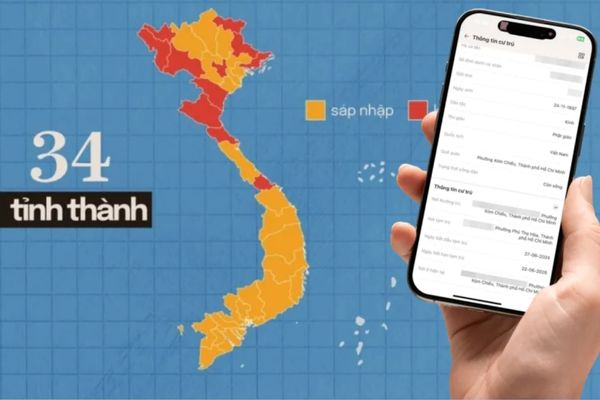
The streamlined government model is only 2 levels

Permanent residence address, hometown on citizenship, household registration book and other identification documents will be automatically updated according to the new administrative structure. The initiative to see the new address above Vneid is the responsibility to ensure:

  • All administrative and civil transactions, from banks, land to schools and health care need accurate address information.
  • Avoid unnecessary troubles and troubles when your papers do not match the data on the national system.
  • Update information helps you not miss important policies and notifications from the new local government.

Guide to see new addresses on vneid

Instructions on how to see new addresses on vneid

The national database system for population has worked non -stop to synchronize information. Since June 30, the data about the homeland and the permanent address have been updated on the VNEID application. You can check immediately with just a few simple steps:

Step 1: First, open VNEID application On the phone. Proceed to log in to the electronic identification account level 2 By password or using biometric method (fingerprint/face ID) installed.

Step 2: At the main interface of the application, find and click on the item Paperwork. This is the place to store the electronic version of your most important papers.

The interface will display the basic information on the front of the electronic CCCD card. To see more details, click on the item “View detailed information“.
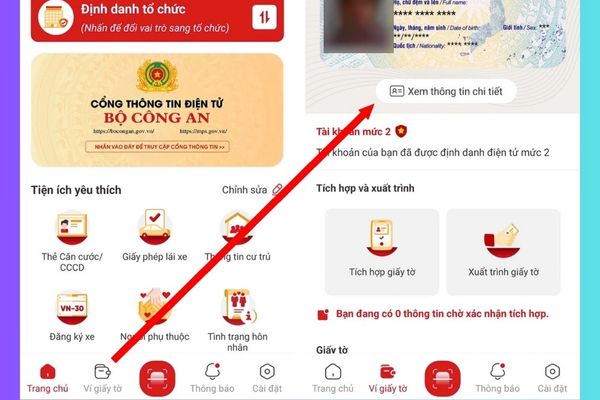
Click on the item "View detailed information"
Click on “See detailed information”

Step 3: The system will display all the information fields extracted from the national database about the population.

Pay attention to the items “Permanent residence” and “Hometown“
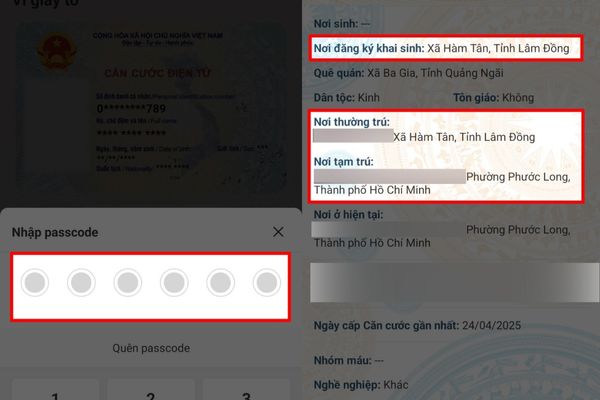
The system will display all the information fields

Conclusion

The change in administrative boundaries is a big step, requiring adaptation from each individual. By proactive See new addresses on vneidyou are not only fulfilling citizenship but also equipping yourself with the most powerful tool to live, work and trade smoothly in the digital era.


Tags: addressGuidemergerVNeID
Previous Post

5 steps to create a free AI assistant with Gemini Gems

Next Post

Top 5 white -hat hacker programming languages ​​should learn

AnonyViet

AnonyViet

Related Posts

How to create luxurious portrait photos using the Dola app
Software

How to create luxurious portrait photos using the Dola app

June 24, 2026
Cách hạ cấp iOS 27 xuống iOS 26 an toàn, không lo mất dữ liệu
Software

Cách hạ cấp iOS 27 xuống iOS 26 an toàn, không lo mất dữ liệu

June 20, 2026
Hướng dẫn cài đặt iOS 27 Developer Beta
Software

Hướng dẫn cài đặt iOS 27 Developer Beta

June 17, 2026
Instructions on how to activate the new Siri on iOS 27
Software

Instructions on how to activate the new Siri on iOS 27

June 15, 2026
PDF editing application on Android worth 199k is free
Software

PDF editing application on Android worth 199k is free

June 10, 2026
How to buy in-game items for free on iPhone
Software

How to buy in-game items for free on iPhone

June 8, 2026
Next Post
Top 5 white -hat hacker programming languages ​​should learn

Top 5 white -hat hacker programming languages ​​should learn

0 0 votes
Article Rating
Subscribe
Login
Notify of
guest

guest

0 Comments
Oldest
Newest Most Voted
Inline Feedbacks
View all comments

Recent News

How to create luxurious portrait photos using the Dola app

How to create luxurious portrait photos using the Dola app

June 24, 2026
How to quickly compare the content of 2 Excel files

How to quickly compare the content of 2 Excel files

June 24, 2026
How to get a free domain for 1 year from Gravatar

How to get a free domain for 1 year from Gravatar

June 23, 2026
Instructions on how to use Gemini Omni to create realistic videos

Instructions on how to use Gemini Omni to create realistic videos

June 23, 2026
How to create luxurious portrait photos using the Dola app

How to create luxurious portrait photos using the Dola app

June 24, 2026
How to quickly compare the content of 2 Excel files

How to quickly compare the content of 2 Excel files

June 24, 2026
How to get a free domain for 1 year from Gravatar

How to get a free domain for 1 year from Gravatar

June 23, 2026
AnonyViet - English Version

AnonyViet

AnonyViet is a website share knowledge that you have never learned in school!

We are ready to welcome your comments, as well as your articles sent to AnonyViet.

Follow Us

Contact:

Email: anonyviet.com[@]gmail.com

Main Website: https://anonyviet.com

Recent News

How to create luxurious portrait photos using the Dola app

How to create luxurious portrait photos using the Dola app

June 24, 2026
How to quickly compare the content of 2 Excel files

How to quickly compare the content of 2 Excel files

June 24, 2026
  • Home
  • Home 2
  • Home 3
  • Home 4
  • Home 5
  • Home 6
  • Next Dest Page
  • Sample Page

6789 kv999

No Result
View All Result
  • Home
  • News
  • Software
  • Knowledge
  • MMO
  • Tips
  • Security
  • Network
  • Office

6789 kv999

wpDiscuz
0
0
Would love your thoughts, please comment.x
()
x
| Reply