• Home
  • News
  • Software
  • Knowledge
  • MMO
  • Tips
  • Security
  • Network
  • Office
AnonyViet - English Version
  • Home
  • News
  • Software
  • Knowledge
  • MMO
  • Tips
  • Security
  • Network
  • Office
No Result
View All Result
  • Home
  • News
  • Software
  • Knowledge
  • MMO
  • Tips
  • Security
  • Network
  • Office
No Result
View All Result
AnonyViet - English Version
No Result
View All Result

How to Get Grok AI for Free 7 Days

AnonyViet by AnonyViet
February 3, 2026
in Tips
0

Do you want to experience the power of Elon Musk’s Grok artificial intelligence but are afraid of the cost of subscribing to X Premium? Currently, users in Nepal are enjoying the privilege of trying Grok for free for 7 days. This article will show you how to use a VPN to connect to Nepal To activate the Grok trial package quickly and simply.

Join the channel Telegram belong to AnonyViet 👉 Link 👈

Why choose Elon Musk’s Grok AI?

Grok is not just an ordinary chatbot. With the ability to access real-time data from the X (Twitter) platform, Grok outperforms other AI competitors thanks to:

  • Updated information: Catch trends and hot news as soon as they appear globally.
  • Distinctive personality: “Fun Mode” brings funny, sharp and personality-filled answers.
  • X ecosystem integration: Supports post data analysis, live interactions, and deep understanding of social media context.

Instructions on how to get 7 days of free Grok via VPN Nepal

To successfully perform this trick, you need to prepare a software VPN has Nepal server and an account X.com or Grok.com.

Step 1: Roaming (VPN) to Nepal

Currently, the 7-day free trial program is being prioritized for display in the region Nepal. This is the location with the highest successful activation rate.

  1. Open your VPN app (Prefer apps like NordVPN, Surfshark, or free VPN apps with servers in Nepal).
  2. Search and select server at Nepalthen press connect.
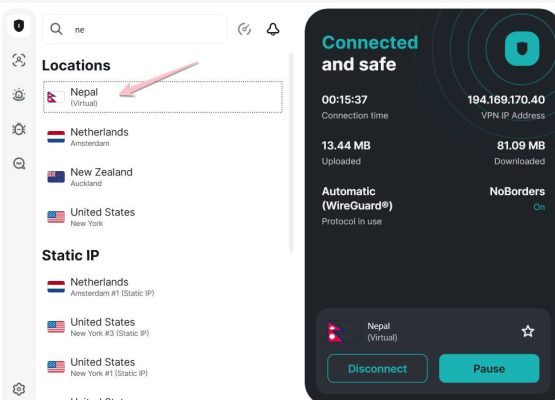
Instructions for connecting to VPN Nepal to receive Grok for free

Step 2: Visit Grok.com and select the Upgrade package

Once the system has recorded your IP in Nepal, perform the next steps in the browser:

  1. Go directly to the homepage https://grok.com/ and log in to your account.
  2. Find and select the button Upgrade (Upgrade).
  3. At this time, the system will automatically display the message: “Start your 7-day free trial” (Interface can display in Nepali). Click this button to get started.
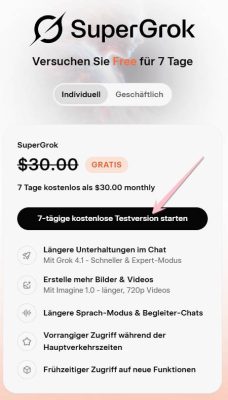
Grok 7-day free trial registration interface

Step 3: Confirm payment information (Credit card)

To pass the authentication step, you can use the virtual VISA card creation method according to the instructions below:

  • Visit website: Namso Gen to create tags.
  • Enter BIN code: 5598880398xxxxxx and press the button Generate.
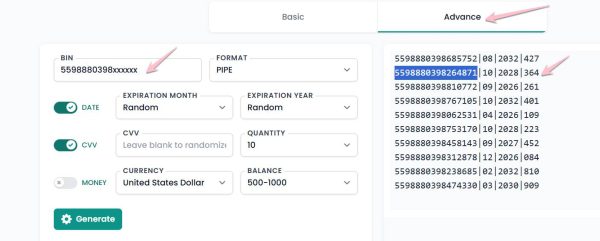
How to create a virtual card BIN for Grok AI registration

Copy the information including: Card number, expiration date and security code (CCV), then paste it into the payment box on the Grok site.
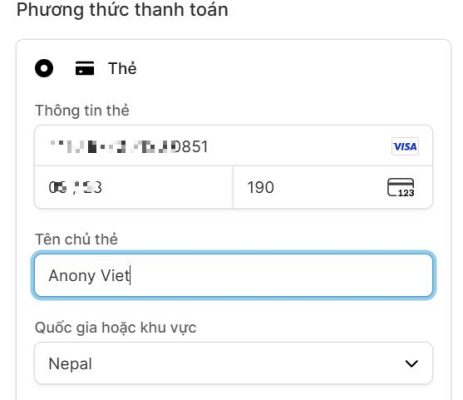
Enter Grok Nepal payment card information

Press Pay to complete. If successful, you will be redirected to the interface Grok Premium as shown below.
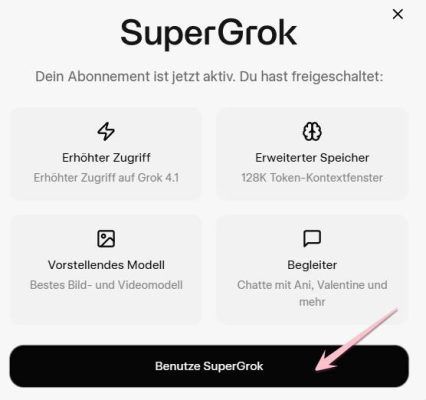
Successfully activated Grok Premium for free

How to change language to Vietnamese on Grok

Since we are using VPN Nepal, the interface can display the local language. To change to Vietnamese, do the following:

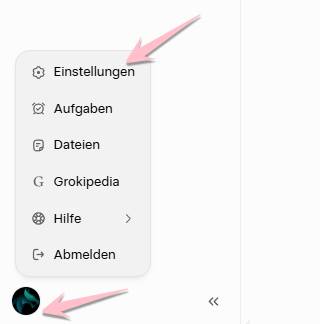
  1. Go to section Profile (in the lower left corner of the screen).
  2. Select line Einstellungen (Setting).

Language settings for Grok AI

Continue choosing the route: Sprache -> Ändern -> Find and select Vietnamese.
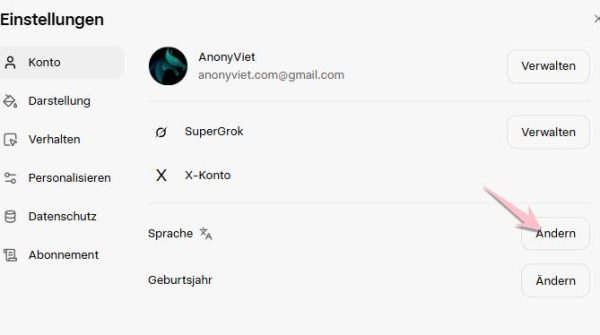
Instructions to change Grok language to Vietnamese

Congratulation! So you have successfully activated your account Grok 7 days free extremely simple. Experience the smartest features of this AI chatbot now!


Tags: daysfreeGrok
Previous Post

Instructions for connecting OpenClaw with Whatsapp

Next Post

Instructions for viewing lyrics without internet on Apple Music

AnonyViet

AnonyViet

Related Posts

How to change the default font on Windows 10
Tips

How to change the default font on Windows 10

April 13, 2026
5 tips for using a Browser to replace an App (helps save RAM, time and money)
Tips

5 tips for using a Browser to replace an App (helps save RAM, time and money)

April 13, 2026
How to make funny MeMe photos without Photoshop within 10 seconds
Tips

How to make funny MeMe photos without Photoshop within 10 seconds

April 11, 2026
How to quickly design your own Logo without Photoshop
Tips

How to quickly design your own Logo without Photoshop

April 10, 2026
How to convert Website into App on Windows
Tips

How to convert Website into App on Windows

April 9, 2026
Instructions for getting 3 months of Adobe Express Pro for free
Tips

Instructions for getting 3 months of Adobe Express Pro for free

April 9, 2026
Next Post
Instructions for viewing lyrics without internet on Apple Music

Instructions for viewing lyrics without internet on Apple Music

0 0 votes
Article Rating
Subscribe
Login
Notify of
guest

guest

0 Comments
Oldest
Newest Most Voted
Inline Feedbacks
View all comments

Recent News

How to add Watermark to Google Docs to protect copyright

How to add Watermark to Google Docs to protect copyright

April 19, 2026
How to intercept traffic using Burp Suite to analyze HTTP/HTTPS

How to intercept traffic using Burp Suite to analyze HTTP/HTTPS

April 18, 2026
How to avoid Adblock detection on Youtube with 4 good tips

How to avoid Adblock detection on Youtube with 4 good tips

April 17, 2026
How to transfer ChatGPT data to Claude is extremely simple

How to transfer ChatGPT data to Claude is extremely simple

April 16, 2026
How to add Watermark to Google Docs to protect copyright

How to add Watermark to Google Docs to protect copyright

April 19, 2026
How to intercept traffic using Burp Suite to analyze HTTP/HTTPS

How to intercept traffic using Burp Suite to analyze HTTP/HTTPS

April 18, 2026
How to avoid Adblock detection on Youtube with 4 good tips

How to avoid Adblock detection on Youtube with 4 good tips

April 17, 2026
AnonyViet - English Version

AnonyViet

AnonyViet is a website share knowledge that you have never learned in school!

We are ready to welcome your comments, as well as your articles sent to AnonyViet.

Follow Us

Contact:

Email: anonyviet.com[@]gmail.com

Main Website: https://anonyviet.com

Recent News

How to add Watermark to Google Docs to protect copyright

How to add Watermark to Google Docs to protect copyright

April 19, 2026
How to intercept traffic using Burp Suite to analyze HTTP/HTTPS

How to intercept traffic using Burp Suite to analyze HTTP/HTTPS

April 18, 2026
No Result
View All Result
  • Home
  • News
  • Software
  • Knowledge
  • MMO
  • Tips
  • Security
  • Network
  • Office

wpDiscuz
0
0
Would love your thoughts, please comment.x
()
x
| Reply