If you feel your Lien Quan account is too monotonous or lacks highlights, creating a Lien Quan signature is the fastest way to refresh your ingame appearance. A beautiful signature not only makes your profile stand out but also helps express your emotions and personality. And with just a few steps on your phone, you can choose an available signature template or design your own according to your personal style. Discover how to do it below.
1. How to create a Lien Quan signature for yourself
Personal signature in Lien Quan Mobile is a feature that helps you express your personal style, make your personal page more unique and impress your friends. Players can choose from available signature templates or set their own favorite signature to display on their personal page.
The steps to create Lien Quan signature are as follows:
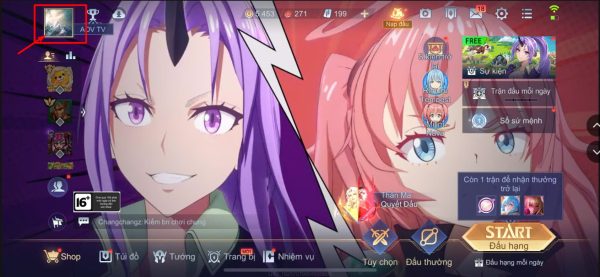
Step 1: Open Lien Quan Mobile application on your phone (Android or iPhone), at the home page interface, select the avatar icon in the top left corner to access your personal page.
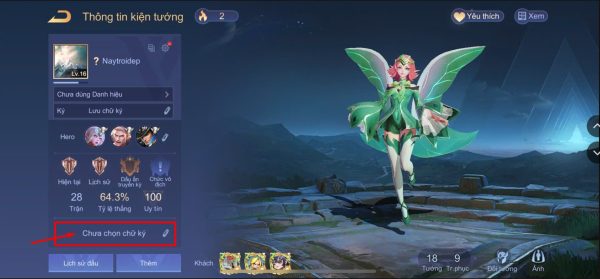
Step 2: On your personal page, select the pen icon at the bottom to set or edit your signature.
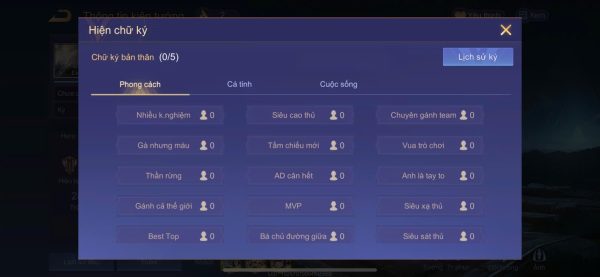
Step 3: Signature samples will be displayed, including 3 categories: Style, Personality and Life. You choose the signature model that suits you personally.
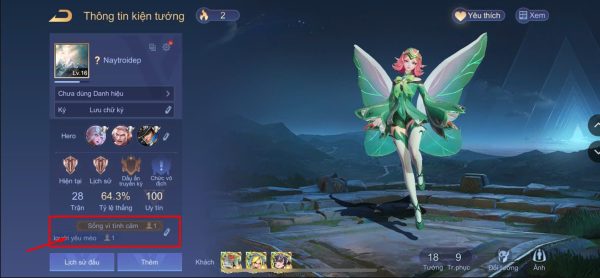
After selecting, the signature will appear in the signature section below the avatar on the personal page. Players can change their signature whenever they want, up to a maximum of 5 signatures.
With the above steps, you can create an impressive personal signature and make your profile stand out in the game.
2. Instructions for creating Lien Quan signature for introduction
In addition to the available templates, Lien Quan Mobile also allows you to create your own signature in the introduction to express your unique and individual personality.
The steps are as follows:
Step 1: Open Lien Quan Mobile > select the avatar icon in the upper left corner to go to your personal page.
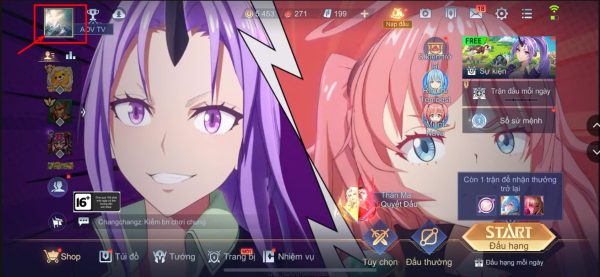
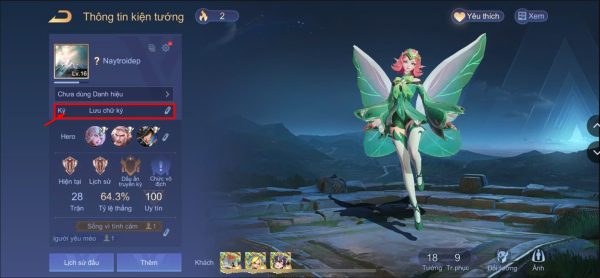
Step 2: Select the pen icon in the Sign section (right below the avatar) to start entering your own signature.
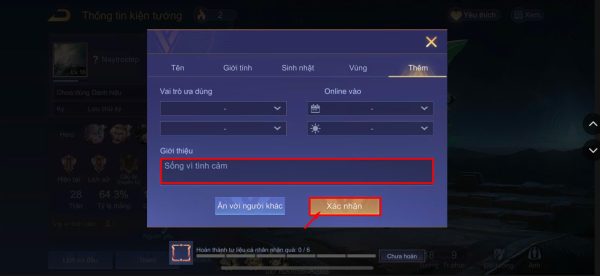
Step 3: Enter your signature in the About box. Then select Confirm to save.
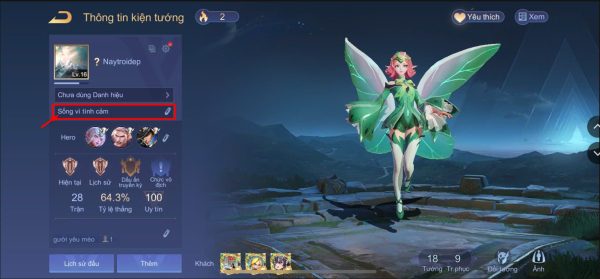
As a result, the newly entered signature will be displayed under the avatar on the personal page.
3. Syntax for creating a colored Lien Quan signature
Previously, gamers could use HTML syntax to create signatures, names or messages in color, combining bold and italics. However, Garena currently does not allow players to use colored names in Lien Quan. This is a trick you should consider before using it on Lien Quan or other games.
Basic syntax:
- Write letters in 1 color:
name - Write letters in 2 colors:
name name - Colored, bold text:
name name - Color text, italicized:
name name - Color text, bold + italic:
name name
The 6-character color code can be shortened to 3 characters by keeping a representative character for each pair (e.g., 00FF00 → 0F0).
Example of code 1 bold color:
Example code with 2 bold colors:
4. How to create special character signature Lien Quan
Set special character 2026 helps character names or signatures become unique, “cool” and much more prominent. This is a particularly popular way to create signatures recently. You can use online tools to create your own unique character signature.
The specific process is as follows:
Step 1: Visit Lien Quan character website
Step 2: Enter your desired signature in the “Enter your name” box. Customize the left, space, and right characters to your liking (can add space characters, hot characters) > Click CREATE CONTACT CHARACTER NAMES > Choose a desired template and press Copy.
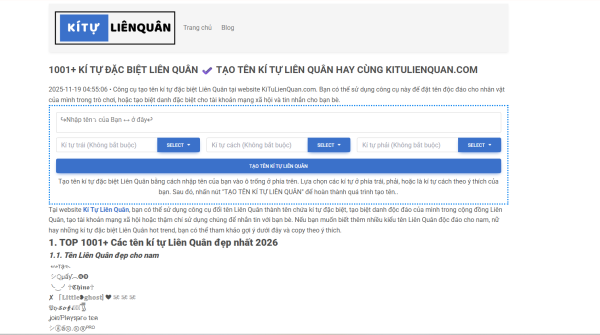
Step 3: Enter the game, go to your personal page > Click on the pen icon, Sign section (under avatar), paste the copied character signature into the About box and click Confirm to save.
With this method, you can own an extremely unique Lien Quan character signature that stands out among the gaming community.
Creating a beautiful Lien Quan signature is not difficult, especially when you have mastered the basic steps above. Feel free to experiment with many signature styles to express your own style every time you enter a match.
To create a quick, beautiful, trendy signature, you can use Lien Quan Characterthe leading special character name and signature creation tool today. The website has a simple interface, with just a few clicks you will have a satisfactory signature template. In addition, the character inventory is constantly updated according to the trends of the gaming community. Contact Ki Tu Lien Quan right here:
- E-mail: [email protected]
- Phone: 0916420565
- Working hours: 8:00 – 21:00
- Address: 245 D. Van Cao, Lieu Giai, Ba Dinh, Hanoi.