It is an undeniable fact that Facebook is collecting user data from its own as well as third-party applications. Giving other applications permission to use your Facebook and vice versa will help Facebook collect more data from you. So how to stop Facebook from tracking you?
| Join the channel Telegram belong to AnonyViet 👉 Link 👈 |
Have you ever been discussing with friends about a trip, and after 30 minutes your Facebook page is filled with ads about travel, resorts…? Facebook is listening and analyzing your needs to provide the most appropriate advertising.
This article will discuss how Facebook collect your data and prevent Facebook from tracking you, what data Facebook collects, and what Facebook does with the same data. Furthermore, I will also guide you through the steps to prevent Facebook from tracking your activities, collecting data, and limiting the “Off-Facebook Activity” feature.

What data is Facebook collecting and how?
Data collected by Facebook includes users’ screen time, features they use, number of times the app is opened, etc. On e-commerce apps, Facebook knows the user’s purchase history, products added to cart, contacts and more, because almost all of these apps have a “Facebook Pixel” code on the web and on the mobile app.
Facebook Pixel is an analytics tool that tracks your browsing behavior by collecting your data across the web. The data collected will be shared with Facebook, allowing it to show you “targeted ads”.
When you visit websites or use apps, these businesses may share information about your activity with Facebook through business tools. Based on this activity, Facebook will personalize your experience, such as showing more relevant ads. So don’t ask why when you are searching for something on shopee or tiki, Facebook immediately displays similar ads.
Off-Facebook Activity feature
Introduced this year, “Off-Facebook Activity (activity outside Facebook)” summarizes every move made by a user on an app or website outside of Facebook. Apps and websites that use Facebook tools (login with Facebook, share, FB pixel,…) will have to share this data with Facebook.
Not to mention Facebook loves to “find out” all your data and don’t think that banking apps won’t share your data with Facebook.
Screenshots were confirmed by banking applications to be data shared with Facebook through the Off-Facebook Activity feature, which is alarming.
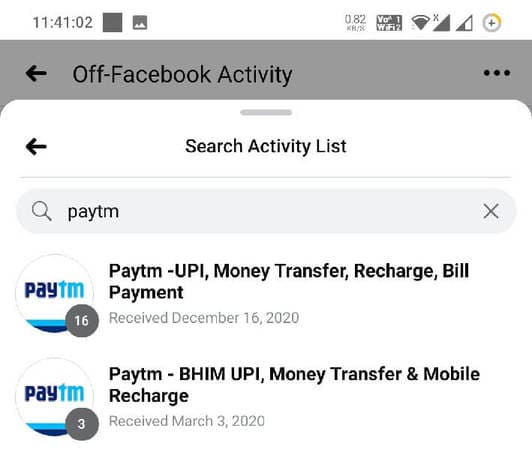
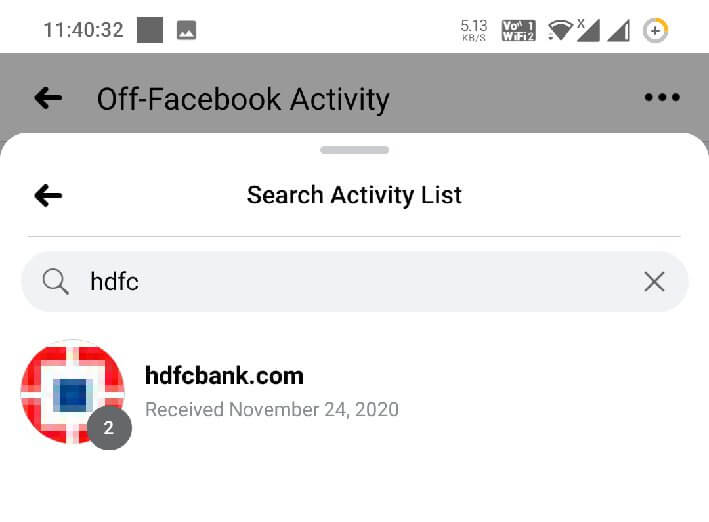
Tech giant Facebook claims that data collected from users’ web activities helps them sell more accurate ads and better deliver them to users. In other words, the number of applications you have signed up for through your Facebook account in exchange for time and convenience will have to be “charged” with your data.
What is even more interesting is that Facebook creates these virtual profile (shadow profiles), collects data from users who don’t even use Facebook.
If you want to protect yourself, you can take the steps in this article to limit the amount of data Facebook can collect from your account by turning off the Off-Facebook Activity feature.
How to stop Facebook from tracking you
There are two ways you can limit data sharing:
1. Stop Facebook tracking on the Facebook app
Take these steps to limit data shared by Facebook with third-party apps:
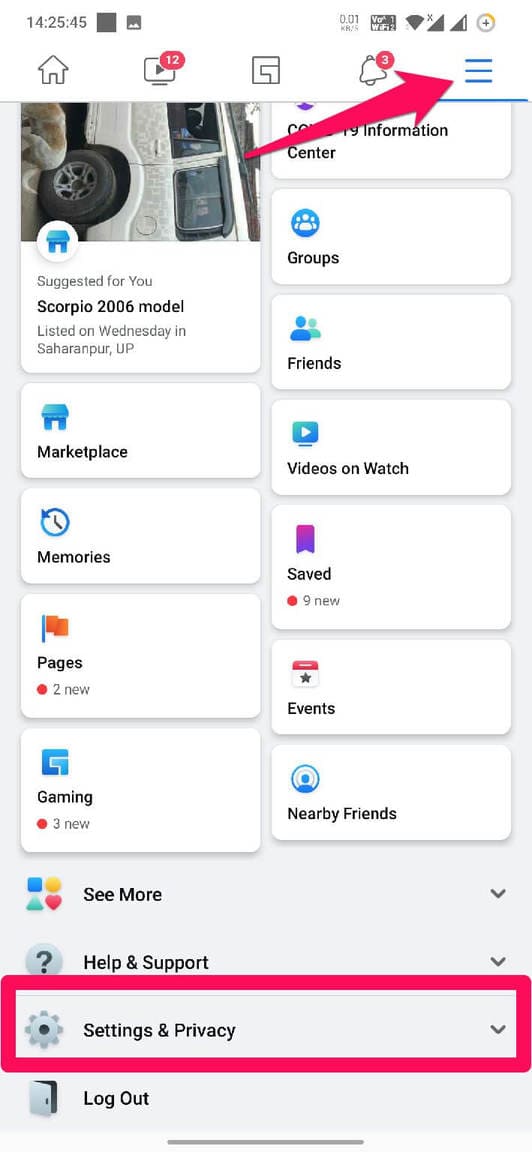
- Launch the Facebook app, click the hamburger icon in the top right corner and click “Settings & Privacy”.
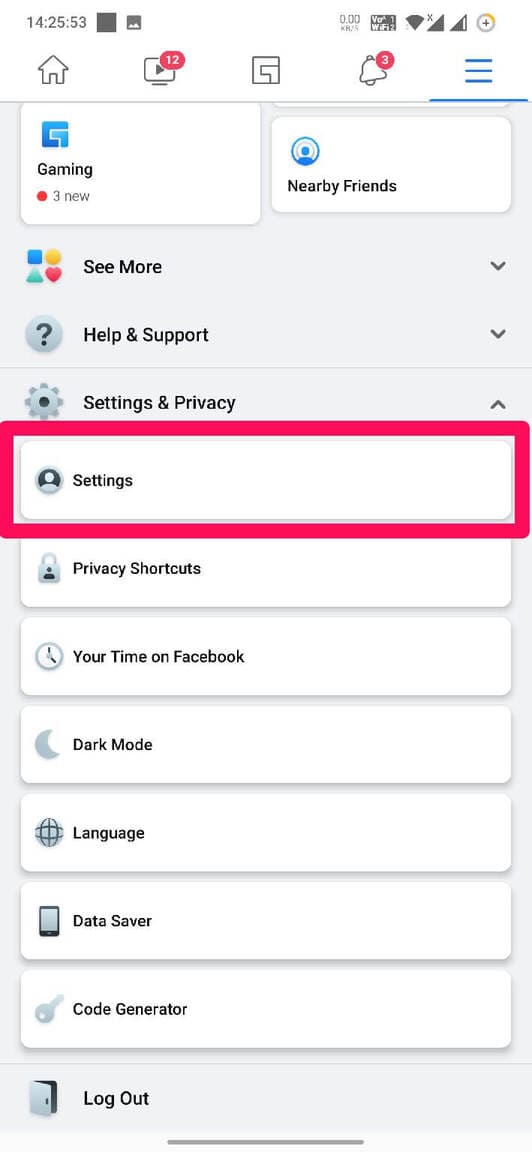
- Click “Settings”.
- Scroll down and select “Off-Facebook Activity”.
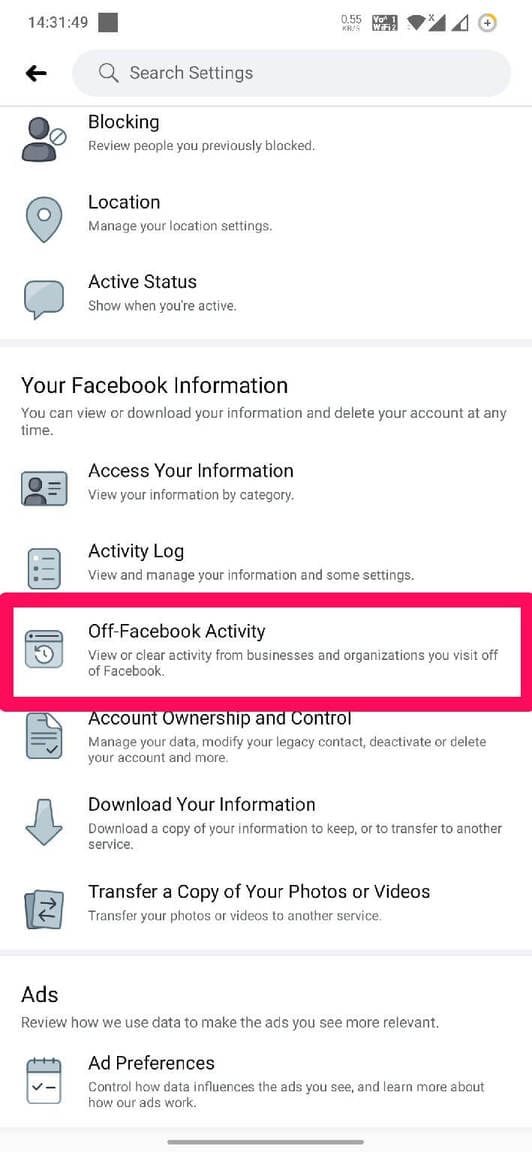
- Click on the three-dot icon in the top right corner of the screen and select “Manage Future Activity”.
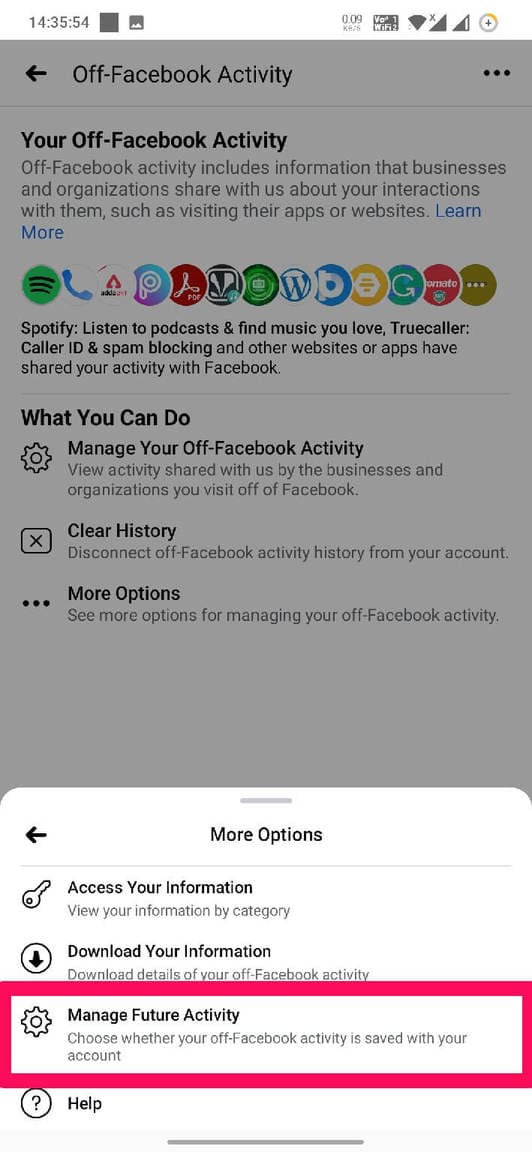
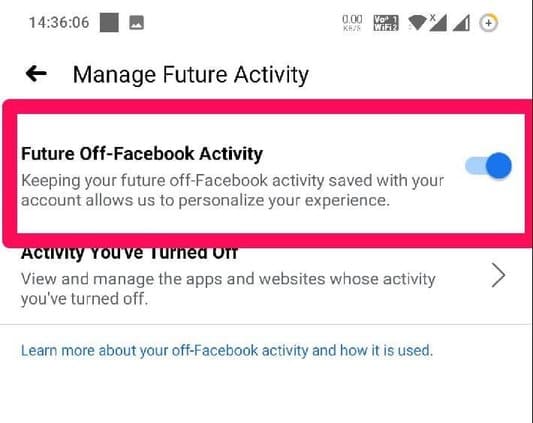
- Turn off the “Future Off-Facebook Activity button off” feature.
2. Block Facebook from tracking you on your browser
Follow these steps in your web browser to turn off the Off-Facebook Activity feature:
- Open Facebook and click “Settings & Privacy” from the top right corner of the screen.
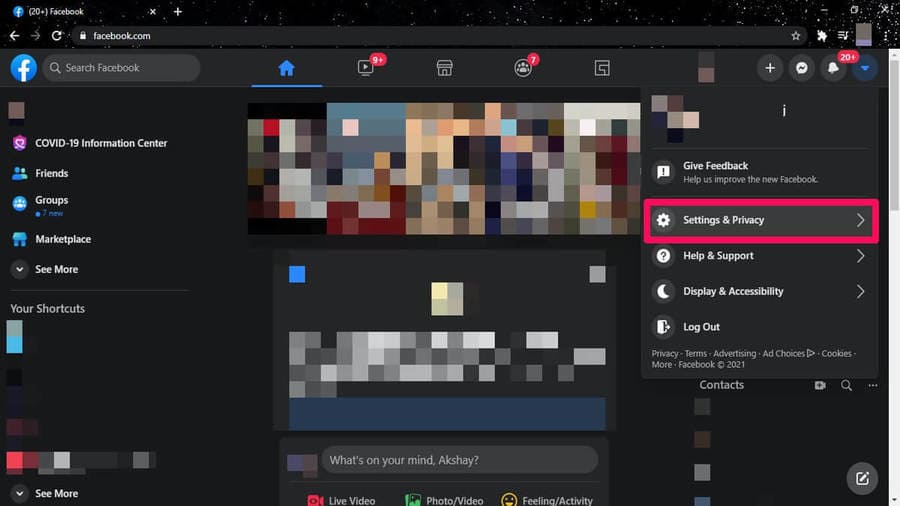
- Select “Settings”.
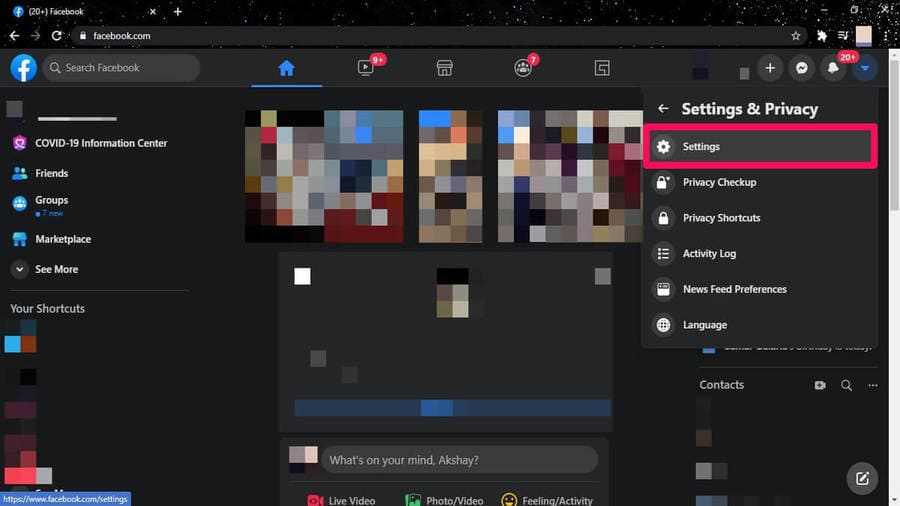
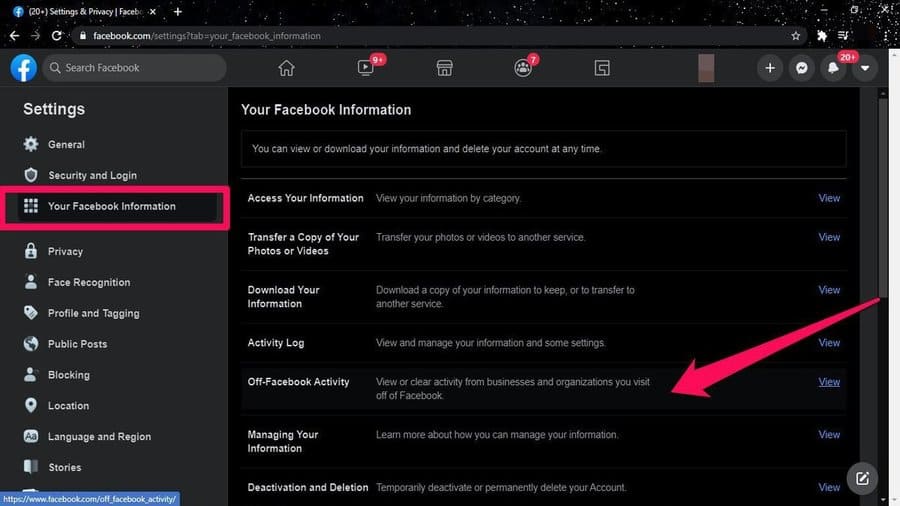
- Click “Your Facebook Information” and then select “Off-Facebook Activity”.
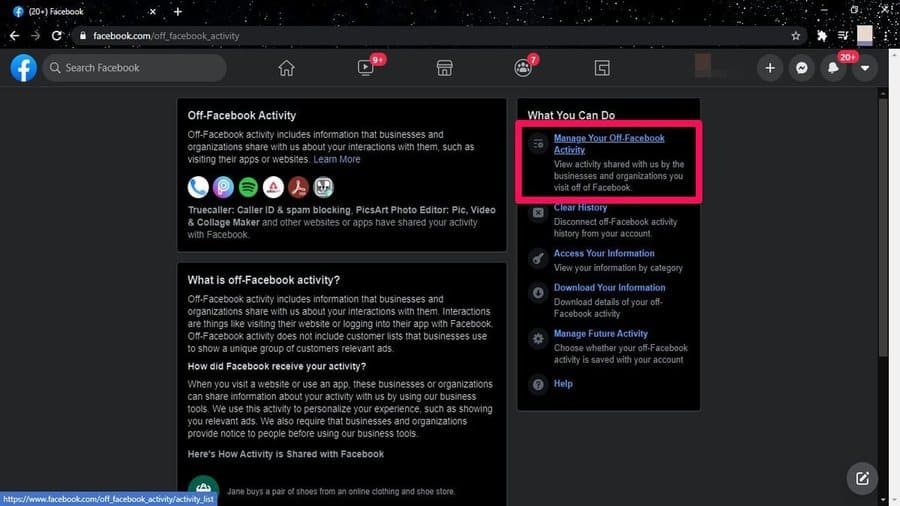
- Select “Manage your Off-Facebook Activity”.
- Select “Manage Future Activity”.
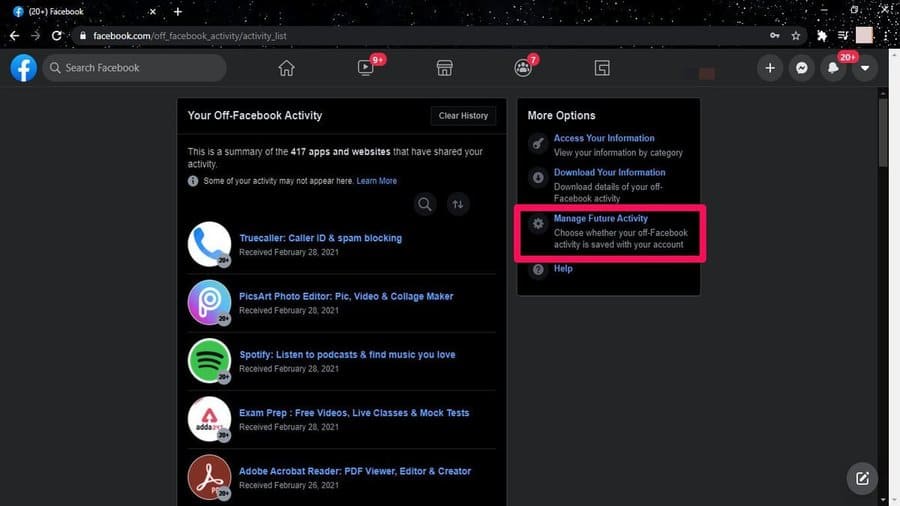
- Turn off the “Future Facebook Activity button” feature.
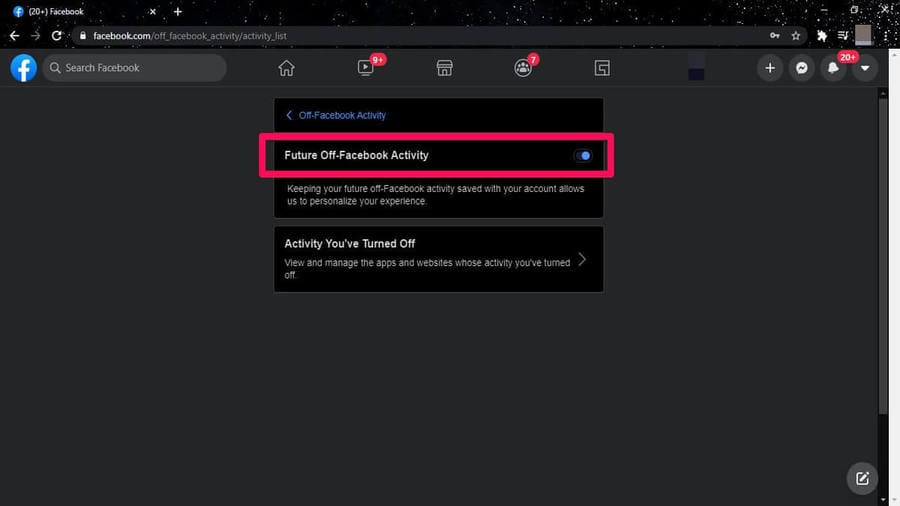
Confirmation from Facebook
As Facebook confirms, it is using data for advertisements by collecting user behavior. Meanwhile, Facebook does not publicly disclose its data security track record and how it shares user data with third parties.
Furthermore, since Facebook owns WhatsApp and Instagram, it will be easier for the tech giant to create personal profiles. However, if you want to completely stop Facebook from tracking you, a quick way is to delete these 3 apps.
Frequently asked questions
What kind of data does Facebook collect from me?
Facebook collects a variety of data, including screen time, the features you use, purchase history (from e-commerce apps), and other web and app activity if they use Facebook tools.
How do I turn off Off-Facebook Activity?
You can turn off this feature by going to Settings & Privacy on the Facebook app or browser, finding “Off-Facebook Activity”, then selecting “Manage future activity” and turning this feature off.
How will blocking Facebook tracking affect my experience using Facebook?
Turning off tracking will reduce the accuracy of the ads you display, but will better protect your privacy by limiting the amount of data Facebook collects.